

"Every company coming to us for chatbot work arrives with the same question: which platform, which model, which vendor. It’s usually the first sign the business is heading in the wrong direction.
The ones who see returns from conversational AI work it out early: deployment is an operations problem. Think about who owns your chatbot product, what data feeds it, how it connects to the systems driving the business, and who reviews it every quarter.
Chatbot digital transformation is a program with prerequisites. Get those wrong, and you end up with a very expensive FAQ page."
{{Kirill Lazarev}}
The gap between companies running production-grade chatbot digital transformation and those still in eternal pilot mode is widening. In 2026, the key question is whether your organization has the operational foundation to make adoption stick.
Unlike generic chatbot guides, this article is built around what production deployments require: clean data, integration depth, named ownership, and a governance cadence from day one. Read on to explore our actionable chatbot design framework, the readiness checklist, the ROI math, and proven tips to strengthen your business with AI technology.
Key takeaways
- Chatbot digital transformation is an enterprise-wide program. Readiness — including the accessibility of clean data, defined use cases, named ownership, and governance frameworks — determines outcomes.
- The 2026 market inflection is real and quantified. Conversational AI is expected to reduce global contact center labor costs by $80 billion this year. Companies that treat this as a future consideration are already behind.
- ROI is calculable before you build. A straightforward formula combining ticket volume, cost per interaction, and containment rate produces a defensible business case within an hour.
What is chatbot digital transformation, and how does it differ from simple bot deployment?
Chatbot digital transformation is the systematic integration of AI-powered conversational interfaces into core business processes.
In practice, this means interactions handled automatically, large data volumes processed in real time, relevant insights surfaced on demand, and decisions informed by conversation patterns.
The word "transformation" is doing real work in the phrase. A bot answering FAQs is a deployment. A bot capable of qualifying leads, processing refunds, onboarding employees, and feeding insights back into the product roadmap is a transformation.
Most organizations conflate the two, and the confusion is where projects go sideways — the same clarity gap that decides whether users understand what an AI product is doing in the first place.
Data insight: According to Salesforce's 2025 State of Service report, companies unifying their customer service channel data are 1.4x more likely to achieve a successful AI implementation. The depth of integration is the deciding variable here. It determines whether a bot is functional or transformational, and everything else in the comparison above follows from it.
💻 Product example: Bank of America's Erica launched in 2018 as a voice-activated assistant for basic balance queries and transaction lookups. By 2024, it had processed over 2 billion interactions by proactively surfacing spending insights, flagging fraud patterns, and guiding customers through mortgage applications, all integrated across the bank's full product suite.
The gap between what Erica was at launch and what it became is the gap between chatbot deployment and chatbot digital transformation.
The cleaner your understanding of this distinction at the start, the less time you will spend explaining to a CFO why a bot cannot solve problems it was never trained to handle.
Why 2026 marks the shift from experiment to infrastructure
For most enterprises, the past three years of chatbot investment followed the same pattern: an enthusiastic pilot, a middling dashboard, a quiet deprioritization.
McKinsey's research on agentic AI in customer care found half of AI customer care deployments remain stuck in pilot mode, 35% of organizations lack a clear AI product roadmap, and 4 in 5 businesses allocate less than 10% of their customer care budget to AI.
What changed in 2026 is the cost of staying stuck. Chatbots are the most visible piece of a far larger AI and digital transformation agenda, where the same pilot-to-production gap shows up in dashboards, agents, and internal tooling.
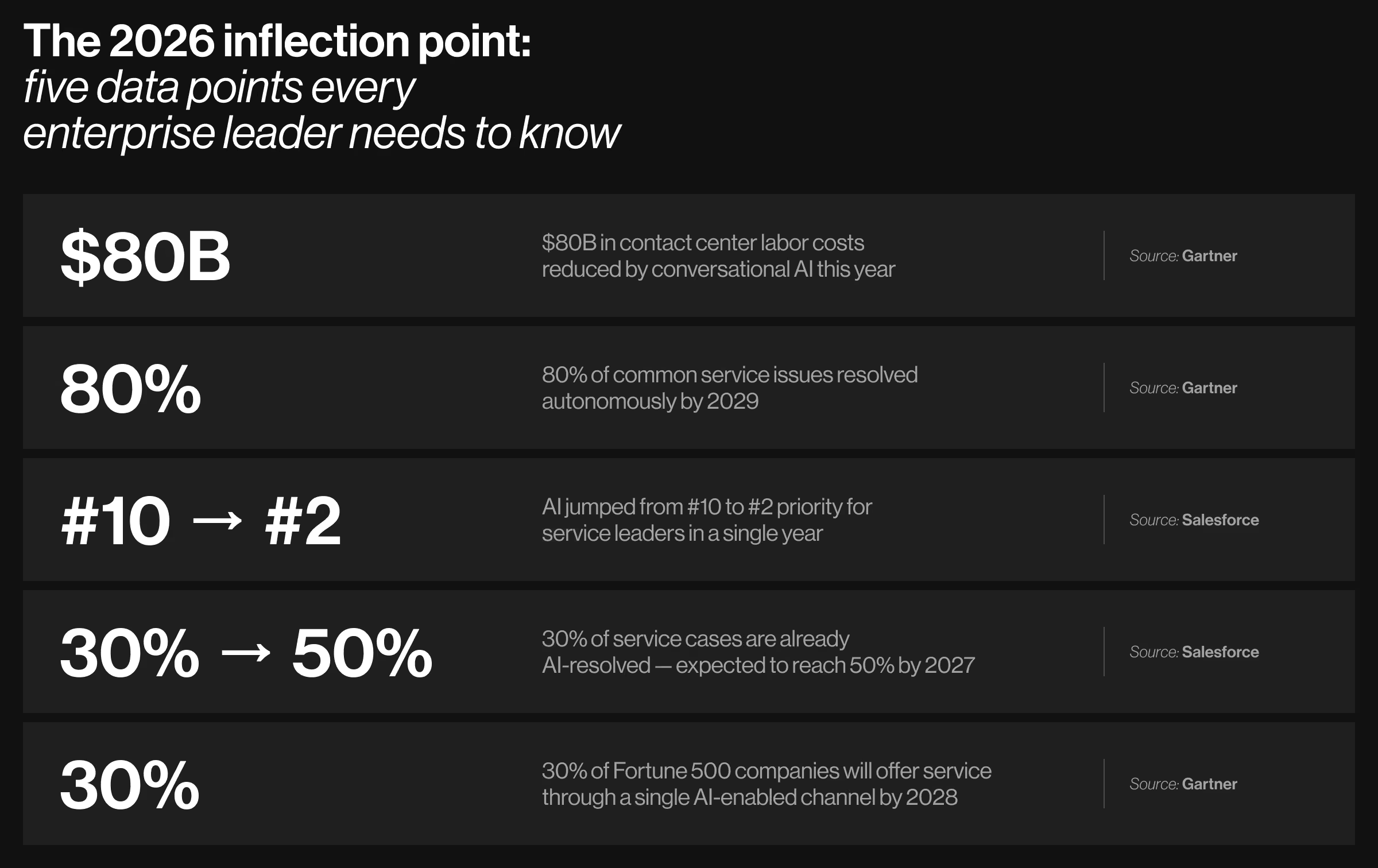
The data from Gartner and Salesforce points to the same inflection:
- Cost pressure is current. Gartner projects conversational AI will reduce contact center labor costs by $80 billion globally in 2026 — a figure now landing on every service P&L.
- Automation is scaling fast. According to another of Gartner's estimates, by 2029, agentic AI will autonomously resolve 80% of common customer service issues without human intervention.
- Organizational priority has already shifted. AI jumped from the #10 to the #2 priority for service leaders in a single year, Salesforce reports.
- Adoption is accelerating mid-cycle. 30% of service cases are already AI-resolved. Salesforce expects the figure to reach 50% by 2027.
- Channel consolidation is underway. Gartner estimates 30% of Fortune 500 companies will offer service through a single AI-enabled channel by 2028.
Generative AI made chatbots reliable enough to trust with consequential interactions. The organizations capturing the savings moved past pilots two years ago.
Three generations of chatbots
Before selecting a platform or scoping a deployment, it helps to understand the architectural lineage behind modern chatbots. Each generation represents a distinct trade-off between predictability, capability, and risk. Knowing where your use case sits on this spectrum shapes every downstream decision.
Expert tip: Hybrid architectures, i.e., LLM reasoning layered over rule-based guardrails, are the fastest-growing deployment pattern in healthcare and financial services. They give you conversational flexibility without surrendering compliance controls. If your industry has audit requirements, design for a hybrid from the start.
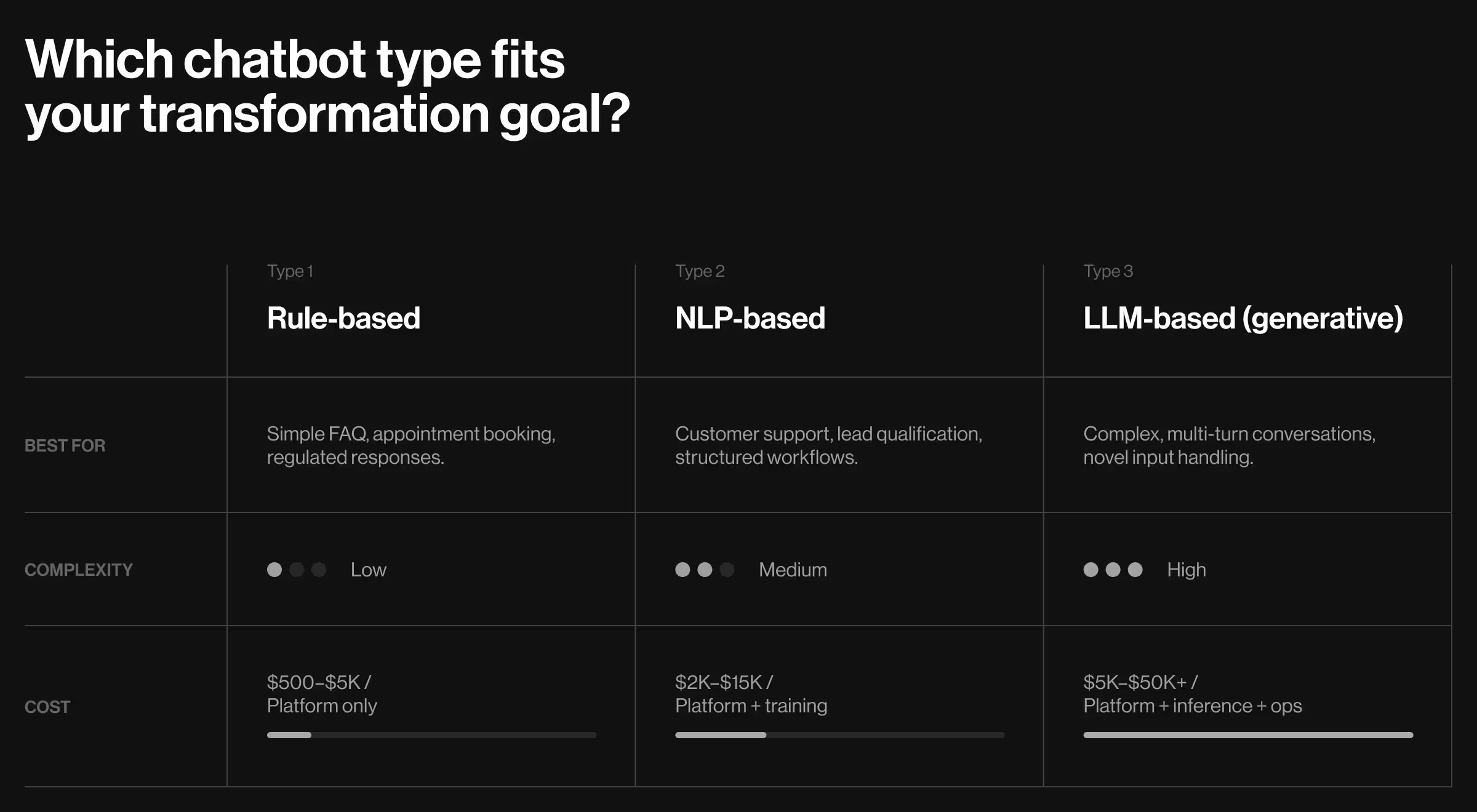
Which chatbot type fits your transformation goal?
Picking the wrong architecture is the fastest way to build something impressive in the demo and broken in production, so pair the choice with chatbot design best practices proven to keep flows usable at scale.
The table below maps each type to use case, complexity, and realistic monthly cost, drawn from what mid-market organizations actually pay.
💻 Product example: Klarna's AI assistant is the most documented case of architecture iteration at enterprise scale. It began as a structured NLP deployment and evolved to an LLM-based model as query complexity outgrew what the original architecture could handle. In its first month, it handled two-thirds of all customer service chats, thus cutting resolution time from 11 minutes to under two minutes.
The takeaway: architecture choice is a decision you revisit in the process, and building for iterative upgrades from the outset is cheaper than retrofitting later.
Is your organization ready for chatbot technology?
Most chatbot projects clear launch without incident. Month 3 is where they come undone. It’s when the bot starts confidently answering questions with outdated information, escalating 60% of conversations to agents operating without context, and generating complaints about the complaints channel.
Readiness is less about technical infrastructure and more about organizational discipline. Run through this checklist before starting the build.
Pre-launch readiness checklist:
- Prepare clean, accessible chatbot training data — structured logs from support tickets, chat history, and CRM. If your knowledge base is a shared folder with 400 documents nobody has updated in two years, start there.
- Define your enterprise chatbot use case with measurable success criteria — "Resolve 60% of billing inquiries without human escalation" is a use case. "Improve customer experience" is a goal. Present goals as specific, measurable targets before building begins.
- Confirm chatbot integration feasibility in the design phase — verify the bot can connect to your CRM, helpdesk, and relevant data sources in the design phase.
- Agree on your channel strategy — web chat, mobile app, WhatsApp, Slack, or voice? Voicebot and chatbot design share the same intent backbone but diverge on UX constraints, so pick one for the pilot.
- Map the escalation path to a human agent before launch — every bot flow needs an exit. Define when handoff happens, and how to prevent users from looping back.
- Assign a named internal owner — one specific person owns the bot's performance. Bots without a named owner plateau at pilot-phase performance and stay there.
- Draft bot persona and tone guidelines before conversation design begins — name, voice, and limits defined before writing a single flow.
- Audit your chatbot knowledge base before AI training starts — remove outdated content, fill gaps in high-frequency topics, establish a process for ongoing maintenance.
- Agree on chatbot KPIs before launch — containment rate, CSAT, first-response time, escalation rate. Define them with stakeholders now; the metrics you track shape the behavior you optimize for.
Self-scoring:
- 8–10 confirmed → ready to launch a conversational AI pilot.
- 5–7 → 60-day preparation chatbot implementation sprint first.
- Fewer than 5 → foundational work (chatbot training data, governance, use case definition) comes before any build conversation.
💻 Product example: In 2024, Air Canada's chatbot told a passenger he was eligible for a bereavement travel discount, The Guardian reports. The airline's actual policy did not offer it. A British Columbia Civil Resolution Tribunal ruled Air Canada was bound by its chatbot's promise. The root cause was a knowledge base never audited against current policy before deployment.
The takeaway: This case shows that when a bot provides confident answers drawn from stale content, the liability lands on the business. Skipping the readiness phase leads to 3–6 months of reactive firefighting.
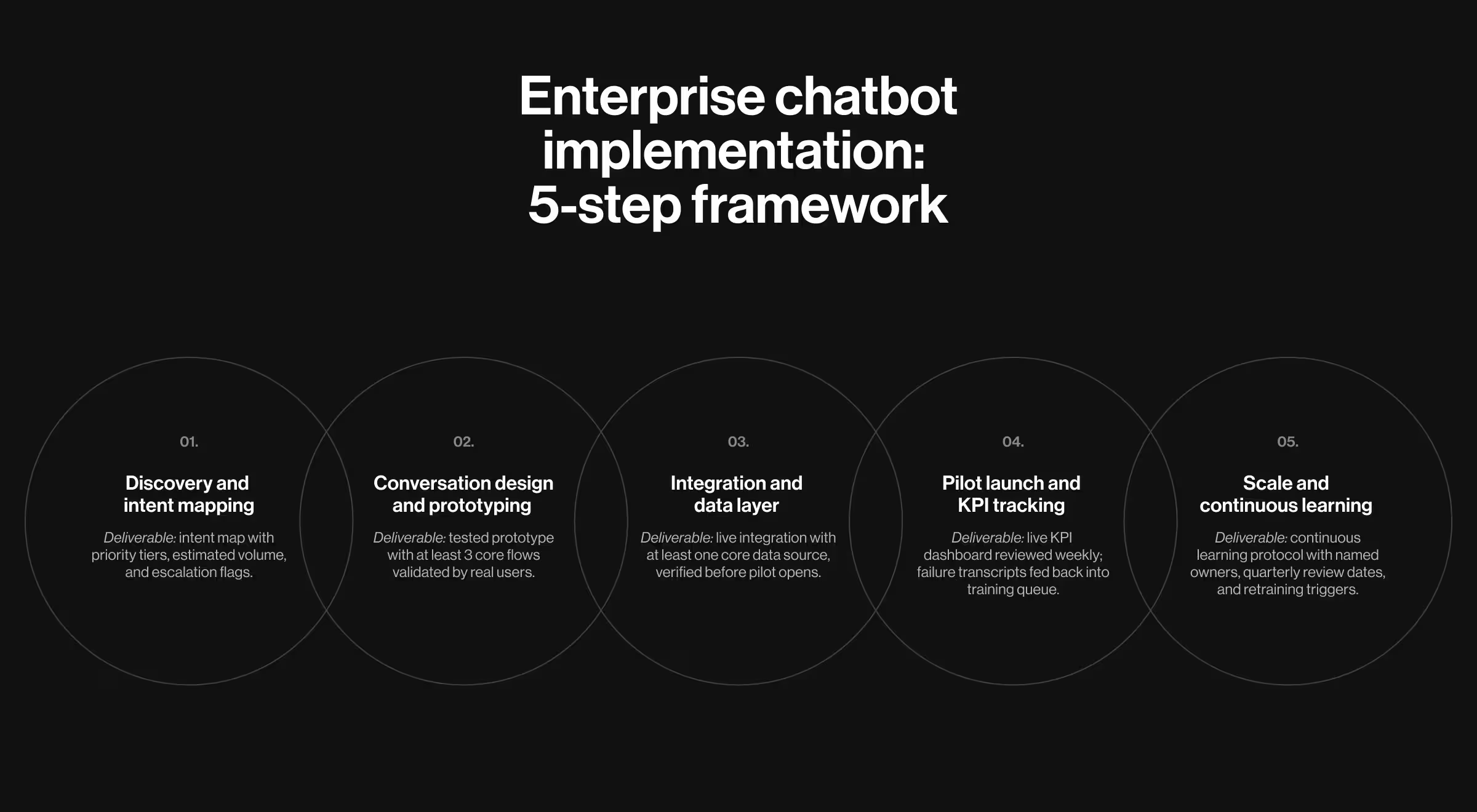
Enterprise chatbot implementation: the 5-step framework
Clearing the readiness checklist means the foundational work is in place.
The five steps below take the project from the first discovery session to a production bot with a working governance cadence. Each step produces a tangible deliverable, and each deliverable is the input for the following step.
Step 1: Discovery and intent mapping
Ditch any floating assumptions and start with your data:
- Pull the last six months of support tickets, chat transcripts, and CRM interaction logs.
- Identify the top 20–30 user intents by volume.
- Then score each one on two dimensions: how often it comes up, and how complex it is to resolve.
Why it matters: Start with the requests users submit most often and agents can resolve easily. Your first candidates are billing inquiries, order status checks, password resets, and appointment scheduling. Taking the opposite approach — automating a low-volume, high-complexity flow — is how you spend months building something that handles a fraction of tickets.
✅ Make it actionable:
- Mine the last 6 months of support tickets. Tag each by intent type.
- Score each intent: volume (high/ medium/ low) × resolution complexity (simple/ moderate/ complex).
- Produce a priority matrix: automate/ assist/ escalate.
What happens if this is omitted? Teams build flows for the intents they assume are common. As a result, your bot falls apart on the high-value interactions.
Deliverable: An intent map with a priority tier for each intent, estimated monthly volume, and an escalation flag.
Step 2: Conversation design and prototyping
Engineers design for how a system should work. Conversation designers design for how people talk. This is where clear chatbot design guidelines — voice, tone, and fallback rules agreed up front — keep the two disciplines aligned.
Most chatbot flows are built by the first group without input from the second, and users feel the difference the moment something they say doesn't match what the bot expects.
Why it matters: A poorly designed flow creates what support teams call "bot rage" — the spiral of repeated misunderstood inputs that ends with a frustrated user and a ticket anyway. Good conversation design prevents this loop.
✅ Make it actionable:
- Use progressive disclosure: lead with the most common path, branch from there and never front-load all options.
- Build graceful fallbacks into every flow: if the bot does not understand, it says so clearly and offers a forward path.
- Eliminate dead ends: every flow terminates in a resolution or a clean human handoff.
- Validate with real users.
At this step, consider using Voiceflow for visual flow mapping, Botpress for open-source prototyping, and Figma conversation kits for stakeholder review sessions.
What happens if this is omitted? Bots built without conversation design testing consistently underperform on containment rate in the first 90 days. The failure paths were never mapped, so users hit dead ends your team never knew existed.
Deliverable: A tested prototype with at least three core flows validated by real users.
Step 3: Integration and the data layer
A chatbot without access to your systems is a fancy FAQ page. Integration is what turns it into an operational asset.
Why it matters: Personalization, context, and accuracy all depend on the bot having live access to meaningful data like account records, order history, policy documents, and inventory status. Without integration, every interaction starts from zero.
✅ Make it actionable:
- Prioritize integrations by value unlocked: CRM first (personalization + account data), helpdesk second (ticket creation + agent handoff), transactional systems third (order, billing, inventory).
- Scope authentication, webhook setup, and data sync in the design phase. Test before the pilot opens.
- Document every data source the bot touches and include it in the compliance review.
What happens if this is omitted? Bots launched without CRM integration deliver generic responses regardless of account history. Users notice immediately, and the customer satisfaction scores reflect it within the first two weeks.
Deliverable: A live integration with at least one core data source, verified through real test conversations before the pilot opens to users.
Step 4: Pilot launch and KPI tracking
Launch in one channel. Not the highest-traffic one. Focus on the one where you have the most historical data and the lowest stakes for early failure.
Why it matters: Single-channel pilots produce clean learning loops. Multi-channel launches spread QA capacity thin and make it nearly impossible to isolate why performance is below target.
✅ Make it actionable:
- Containment rate: percentage of conversations resolved without human escalation. The benchmark for a well-trained bot is 60–80%.
- CSAT: collect at the end of resolved conversations. Target 4/5 or higher within 90 days.
- First-response time: should be near-instant. Latency above three seconds is a UX problem.
- Escalation rate by intent: track per flow. An 80% escalation rate on billing inquiries is a flow-specific training signal.
Set alert thresholds for each metric before the pilot opens. A 10% week-over-week containment drop without a corresponding traffic spike warrants immediate investigation.
What happens if this is omitted? Pilots without pre-defined KPIs and alert thresholds tend to run for 60–90 days before anyone formally reviews performance, by which time the bot has been giving users inconsistent answers for months.
Deliverable: A live KPI dashboard reviewed weekly, with failure transcripts fed back into the training queue on the same cadence.
Step 5: Scale and continuous learning
The pilot tells you what the bot cannot do yet. Scale is how you fix these gaps systematically.
Why it matters: A bot trained once and never reviewed degrades. Products change, policies update, prices shift. A bot from January, left unreviewed through July, gives customers misleading information about things since discontinued.
✅ Make it actionable:
- Analyze failure transcripts weekly. Look for patterns in misunderstood inputs and use them as training data.
- Add channels only when the existing ones hit the target containment rate. A bot at 45% on the web is not ready for mobile.
- Assign a named owner for quarterly reviews: who reviews outputs, what triggers retraining, and what changes require legal sign-off.
- Treat conversation logs as a product intelligence asset: what users ask and where they get stuck.
What happens if this is omitted? Without a governance cadence, bots plateau at pilot-phase performance, and the organization loses confidence in conversational AI as a program before it has had a fair chance to mature.
Deliverable: A continuous learning protocol with named owners, quarterly review dates, and defined retraining triggers.
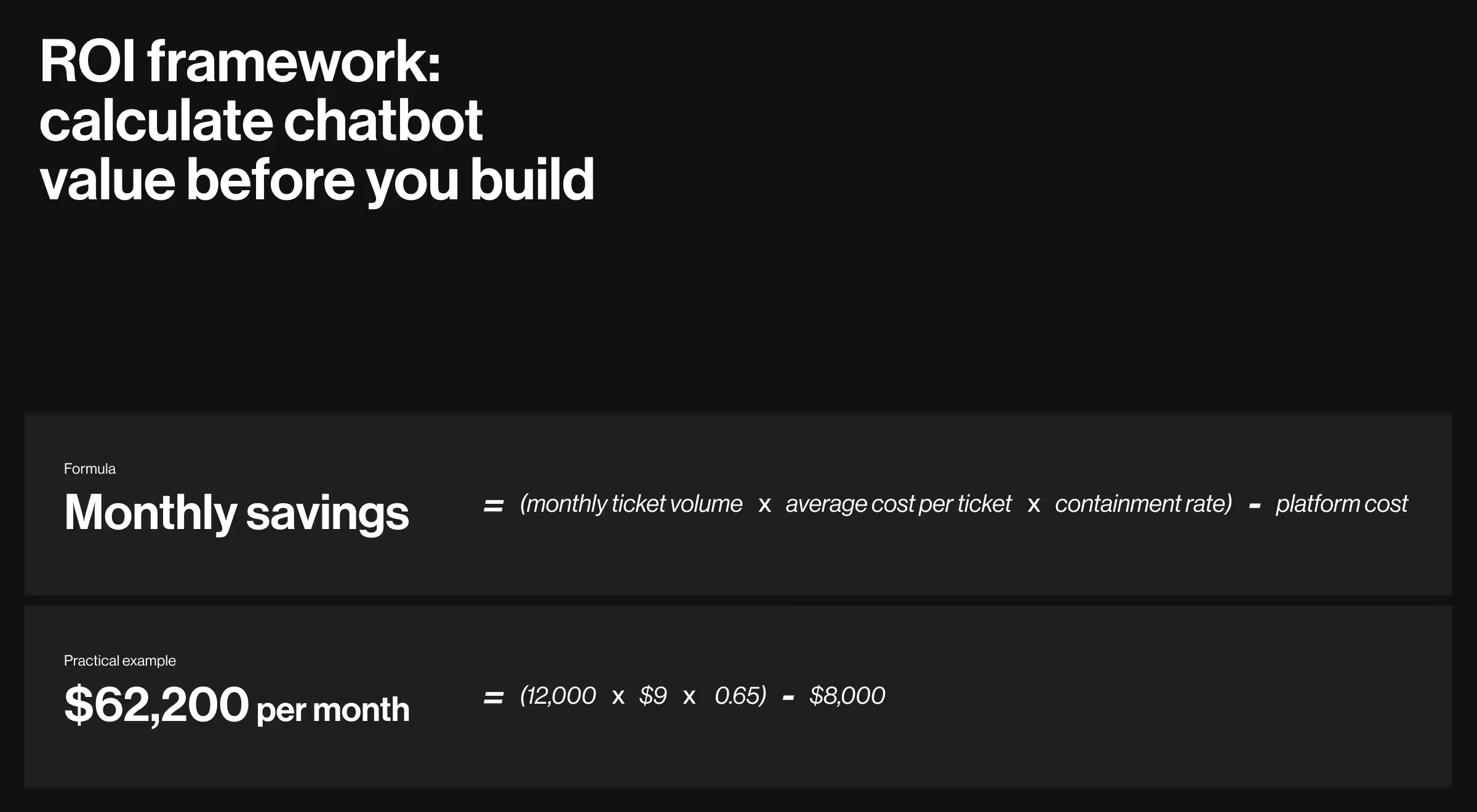
ROI framework: calculate chatbot value before you build
Vague claims about "significant cost savings" do not survive the first CFO review. This model does.
ROI formula:
Monthly savings = (monthly ticket volume × average cost per ticket × containment rate) − platform cost
Practical example: A company handles 12,000 support tickets per month. Average cost per ticket — agent time, tooling, overhead — is $9. A well-trained bot achieves 65% containment. Platform cost is $8,000 per month.
Monthly savings = (12,000 × $9 × 0.65) − $8,000 = $62,200 per month
On a $180,000 implementation investment, the payback period is roughly 3 months.
Revenue upside should not be excluded from the model. Cart recovery bots typically recover 10–25% of abandoned sessions when engaged within ten minutes of exit. Lead qualification bots shorten sales cycles by routing high-intent prospects to reps faster than any web form can.
Data insight: According to Salesforce, service teams using AI agents project a 15% boost in upsell revenue — a figure that rarely appears in cost-reduction models but consistently materializes in practice.
Build this model before you pitch the project. It also sets realistic expectations with vendors who promise 30-day ROI.
Industry use cases with real benchmarks
Industry context shapes every meaningful chatbot decision — use case, architecture, integration priority, and governance model. A fintech deployment and a hospital deployment share almost nothing beyond the underlying technology.
The examples below cover what strong performance looks like across sectors and deployment types, with benchmarks you can use as planning references.
💻 Product example #1 — B2B and professional AI workflows.
Rhea is Accern's NLP platform for financial analysts, VC investors, and ESG professionals. When Accern rebuilt it, the challenge was delivering AI workflows without the interface gimmicks eroding credibility with technical buyers.
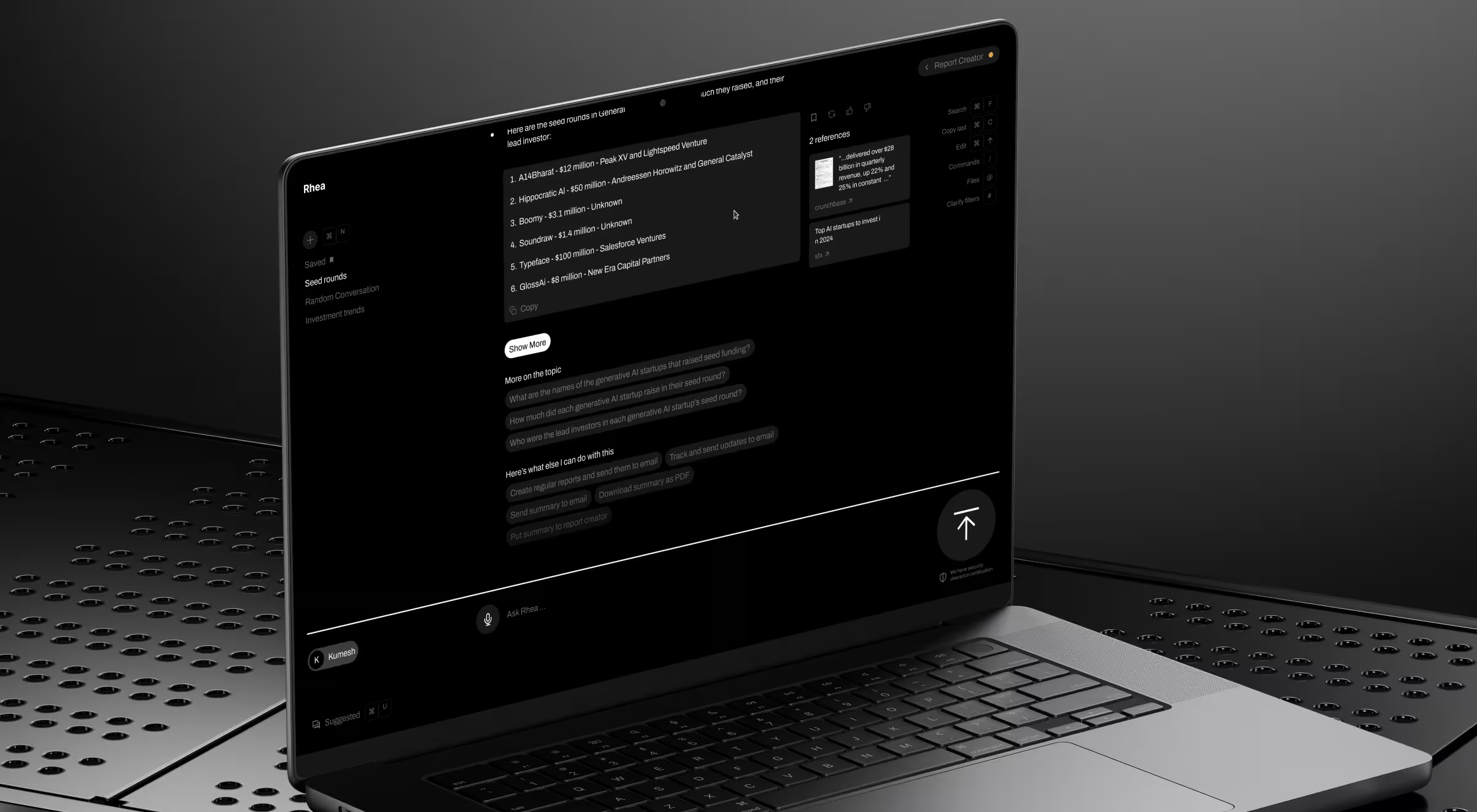
Lazarev.agency designed a hybrid GUI/prompt system to let users query financial data via natural language while preserving the precision professionals require. Rhea raised $40M+ following the relaunch and was subsequently acquired.
The takeaway: in high-stakes professional contexts, conversational AI earns trust through precision and workflow fit.
💻 Product example #2 — retail and e-commerce.
Sephora's Messenger bot drove an 11% higher booking rate for in-store appointments than the web form it replaced. The timing principle behind it holds across retail broadly: bots engaging users within ten minutes of exit consistently outperform delayed follow-up, regardless of channel.
The takeaway: in retail, deployment timing and channel fit drive results as much as bot capability.
💻 Product example #3 — enterprise operations and AI incident management.
Bacca AI is an agentic incident management platform built for enterprise SRE teams. It automates detection, triage, and response workflows previously consumed hours of manual coordination. The product serves two audiences simultaneously: engineers who need technical depth and executive buyers who need a clear business case. Lazarev.agency designed both registers into the product experience, turning a genuinely complex AI platform into a buyer journey that converts.
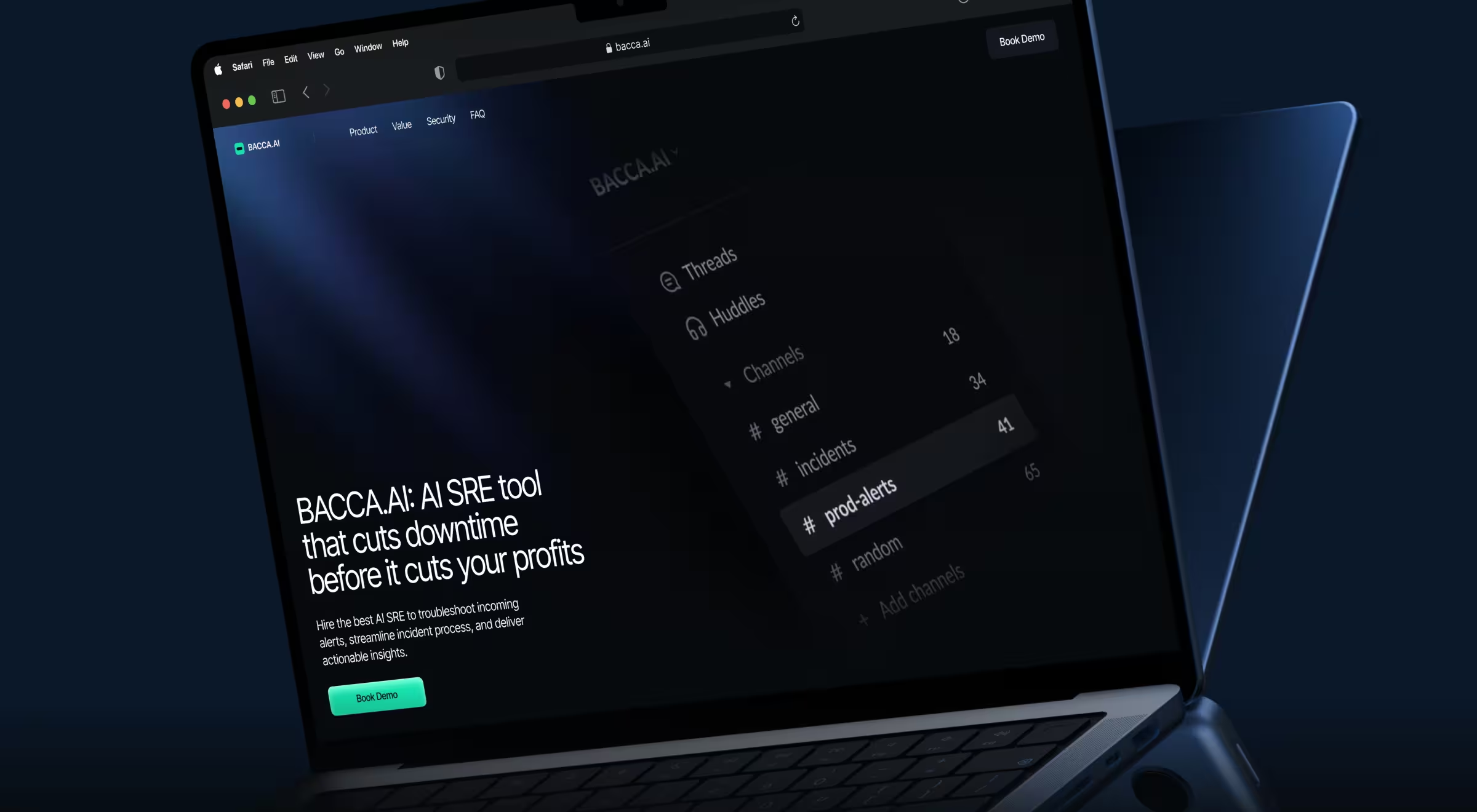
The takeaway: internal AI tools serving mixed audiences need two distinct design registers — functional precision for practitioners, narrative clarity for approvers.
💻 Product example #4 — edtech and AI-powered learning.
HiTA is an AI-powered learning platform built around subject-aware assistance — offering hints rather than direct answers to protect independent problem-solving. Despite strong pedagogical foundations, growth stalled because the product's value was invisible to first-time visitors.
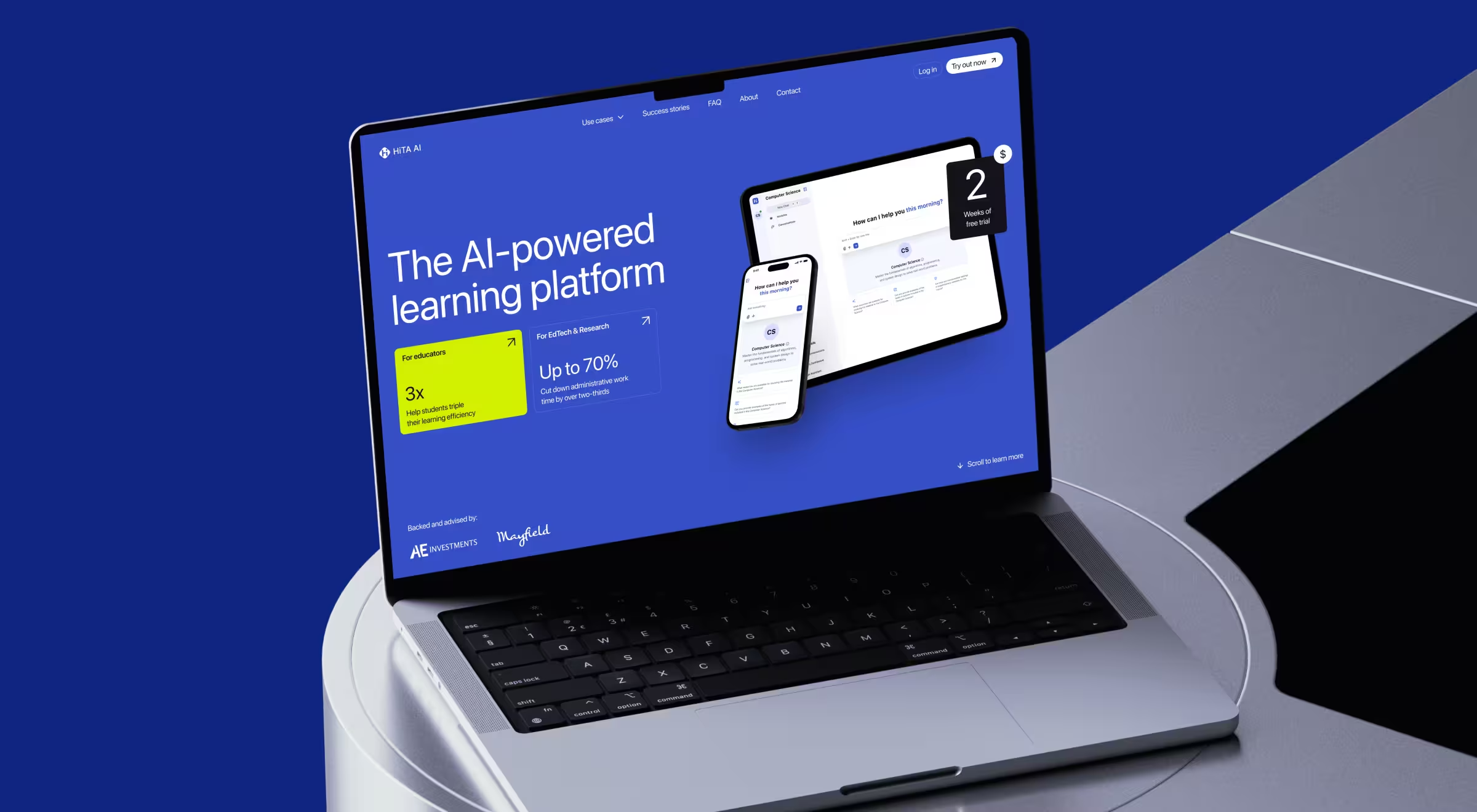
Lazarev.agency tackled this on two levels. First, we restructured the landing page around two distinct audience segments — students and educators. We also embedded HiTA's AI assistant directly on the page, so visitors could experience the product while exploring it. Second, we designed a research strategy built around market and UX research. Through workshops and user scenario mapping, we identified audience segments, their goals, and pain points. This gave the HiTA team a focused product roadmap for both immediate growth and long-term development.
The takeaway: when an AI product's value only becomes clear through use, the sales surface needs to deliver the experience directly. A page letting visitors interact with the AI before signing up converts faster than one describing it.
The pattern across every case: bots perform best when trained on proprietary interaction data, integrated with real business systems, and governed by someone who reviews what the bot is saying.
💻 Product example #5 — consumer mobile and voice-first agentic AI.
Elva is an agentic mobile video director. Users speak a request like "make a travel reel from last weekend," and the AI selects the scenes, cuts to rhythm, and scores it with zero manual editing. The challenge was making a "zero taps" experience feel trustworthy enough that first-time users hand over creative control.

Lazarev.agency designed the product end-to-end: brand, onboarding, the AI's persona, the voice-first interaction model, and a context-aware storefront. The interaction model uses the same conversation-design patterns as enterprise deployments. Elva asks clarifying questions when intent is ambiguous, presents drafts for approval before committing, and surfaces premium features only when their value is visible.
The takeaway: in consumer AI, adoption depends on a visible persona and graceful fallbacks that lower the articulation barrier between what a user wants and what they can say.
Common mistakes that end chatbot programs early
None of the mistakes below is a technology problem. They are organizational ones. Programs collapse when process discipline is deferred until after launch.
The table maps each mistake to its consequences and the corrective action. Most corrective actions require a day of structured work, whereas the cost of skipping them is measured in months.
Each of these felt like a reasonable call at the time. The cost shows up weeks or months after launch when the fix means redoing work already shipped. Knowledge bases get rebuilt, and governance built from scratch.
Programs with strong organizational backing absorb the remediation and recover. Most do not get a second chance.
Ready to map your chatbot transformation?
Scaling a chatbot from prototype to revenue driver takes more than good technology. It takes clear ownership, a tested information architecture, and a proven digital transformation strategy, and deliberate integration with the syste. The organizations moving fastest aren't treating these prerequisites as the work itself, before a single flow gets built.
At Lazarev.agency, we help product and operations teams identify where customer interactions break down and turn those findings into a prioritized roadmap for automation, usually as part of a broader enterprise AI transformation.
Our starting point is always the interaction gaps — understanding where friction lives, and building the case for change from there.
Ready to find yours? Talk to our team.





.webp)





