

Reviewed by: Lazarev.agency Product & UX Strategy Team
Last updated: November 2026
Relevant case studies: Grand Founders website redesign, SaaS & fintech engagement optimization, Web3 and crypto product UX
You increase user engagement by designing around how people think and behave: how they decide, hesitate, explore, and return. That means combining psychology-backed UX, business-type-specific tactics, real-time personalization, and clear engagement metrics (scroll depth, return visits, time on task) into a continuous test-and-iterate loop instead of guessing with isolated UI tweaks.
Key takeaways
- Start with psychology. Use principles like the Zeigarnik Effect, Hick’s Law, and social proof to create intuitive, memorable experiences.
- Match tactics to business types. SaaS, e-commerce, content, fintech, and Web3 each require different engagement patterns.
- Personalize in real time. Adapt layout, CTAs, and content to behavior, device, and context.
- Invest in micro-engagements. Hover states, reactions, smart popups, and responsive search deepen engagement.
- Track the right signals. Focus on scroll depth, return visits, time on task, and engagement segmentation instead of raw bounce rate.
- Evolve your voice and story. Test tone of voice and build emotional narratives like in the Grand Founders case study.
1. Why psychology is the missing piece in website engagement
Most websites optimize for logic: clear navigation, clean layouts, standard CTAs. Necessary, but insufficient. People make decisions emotionally first, then rationalize them.
Three core principles to build into your UX:
Zeigarnik Effect: use “unfinished business” to bring users back
We remember incomplete tasks better than completed ones. That’s why streaks, partial progress bars, and “4 of 5 steps done” are so sticky.
How to use it:
- Show visible progress in flows (account setup, onboarding, checkouts).
- Make “almost done” states obvious: “Complete 1 step to finish your profile,” “Write 2 more lines to publish.”
- Use dashboards and checklists that clearly show what’s left.
Duolingo is a classic example: streaks + lesson progress create a constant pull to “finish the set.”
🔍 Read more about the Zeigarnik Effect here.
Hick’s Law: fewer choices, faster decisions
The more options you show, the longer it takes to decide, and the higher the chance users bail out.
How to use it:
- Reduce main navigation to the 3–5 journeys that matter most.
- Offer fewer main CTA choices above the fold (e.g., “Book a demo” and “Try it free,” not seven competing buttons).
- Use progressive disclosure: show advanced options only after a user signals intent.
Apple’s homepage is a masterclass: minimal, focused, and curated, not a catalog thrown on screen.
🔍 Read more about the Hick’s Law here.
2. How engagement tactics should differ by business type
“What increases engagement?” is the wrong question. Start with “For whom? In which context?”
For SaaS websites
Users are there to understand capability and fit.
Tactics:
- Interactive product tours and guided onboarding instead of static feature walls.
- Micro-interactions on key UI areas: hover states, inline tooltips, subtle state changes.
- Session recordings and friction analysis via tools like FullStory or LogRocket.
Example: Notion guides new users with checklists and gradually reveals complexity as they progress.
🔍 If you want the UX work to translate into predictable revenue, pair these product-side improvements with a scalable go-to-market engine — our guide on how to build a SaaS sales strategy teams can actually scale breaks it down step-by-step.
For e-commerce
Users are weighing risk vs. reward and want confidence before they commit.
Tactics:
- Real-time purchase or stock notifications (used sparingly).
- Shoppable videos and real-time demos to show products in context.
- Wishlists, favorites, and compare features to keep decisions “in play.”
- Short quizzes for personalized recommendations.
Example: Glossier uses quizzes plus UGC on product pages to blend personalization with trust.
For content-heavy sites
Users want clarity, credibility, and tools that help them think.
Tactics:
- Calculators, quizzes, short polls integrated into articles.
- Jump links, sticky TOCs, and collapsible sections to tame long-form content.
- Click-to-copy, save-to-notes, and “email this summary” options.
Example: NerdWallet’s comparison tools keep users engaged while they evaluate options, not after.
🔍 For a real example in action, explore our VTnews.ai case study — a content-dense platform redesigned to help users think faster and navigate information bias with clarity.
For fintech products
Users are managing money and risk, so trust and comprehension are non-negotiable.
Tactics:
- Gamified savings or investment progress (badges, levels, milestones).
- Progressive disclosure in onboarding: show only what’s needed at each step.
- In-product micro-education: small explainer snippets, not PDF manuals.
Example: Revolut pairs spending insights with visualizations and just-in-time education in its crypto and investments flows.
🔍 If you want to see how these principles translate into real product outcomes, explore our practical fintech UX case study examples — a breakdown of how we design clarity, trust, and risk-aware flows for modern financial products.
For Web3 projects
Users operate in a high-friction, high-risk environment where transparency and community matter.
Tactics:
- Real-time data from smart contracts surfaced directly in the interface.
- Wallet-based personalization: NFTs, tokens, or activity shaping UI states.
- Community-facing surfaces like DAO voting dashboards or protocol health feeds.
Example: Mirror.xyz and Lens Protocol adjust experiences based on wallet identity and social context, not generic logins.
🔍 Check out Lazarev.agency’s article on crypto product design for more patterns you can steal for Web3 engagement.
3. Personalization that goes beyond “Hey [First Name]”
Personalization is no longer a novelty; it’s table stakes. What matters in 2026 is behavior-based and context-aware personalization.
Add behavioral personalization
Segment users by how they behave:
- Browsers vs. buyers
- New vs. returning
- Speed-clickers vs. careful readers
- Rage-clickers vs. methodical users
And by trigger:
- different CTAs
- content blocks
- popups or in-line prompts
All to be based on real-time behavior.
Use predictive, context-aware personalization
Adapt layout, content, and CTAs dynamically based on:
- scroll behavior
- time on page
- referral source or campaign tag
- device type and connection quality
AI-powered tools like Dynamic Yield and similar platforms can help orchestrate these adaptive experiences.
Respect privacy while still learning
Engagement dies when users feel spied on.
- Use first-party data and server-side tracking wherever possible.
- Provide clear data preference controls and plain-language consent.
- Make it easy to see and edit saved data.
Examples of personalization in action
🔍 To see how these personalization tactics evolve into fully predictive experiences, check out our article on anticipatory design.
4. Turn micro-engagements into macro results
The engagements that really matter often start small.
Micro-engagement examples
- Emoji reactions on articles or comments
- Hover-based microinteractions on product cards (quick specs, previews)
- Scroll-triggered animations and progress bars
- Dynamic search suggestions that refine with every keystroke
- Smart popups based on scroll depth or idle time
- Visual rewards (confetti, subtle highlight states) after key actions like sign-ups, orders, or uploads
The rule: micro, not manic. These touches should guide and reward.
5. Measure what actually matters for engagement
Bounce rate on its own is a blunt instrument. Shift your focus to metrics that tie closer to real engagement and task success.
Core engagement metrics
- Scroll depth: Are users reaching the content that matters?
- Click heatmaps: Which elements draw attention and which get ignored?
- Time on task: How long does it take to complete key actions (sign-up, checkout, booking, publishing)?
- Return visits: Are users coming back within meaningful windows (D1, D7, D30)?
- Engagement segmentation: How behavior differs between new vs. returning, organic vs. paid, mobile vs. desktop.
Tools to consider:
- GA4 for event-based analytics
- Hotjar and Microsoft Clarity for visual behavior insight
- Mixpanel or Heap for cohorts and funnels
- Segment or RudderStack for server-side and privacy-conscious tracking
How to track and iterate in practice
Frequency
- Weekly: quick engagement review
- Monthly: deeper performance audit and pattern analysis
Ownership
- Assign a cross-functional growth pod or a dedicated UX researcher / product analyst.
Iteration loop
- Spot patterns and anomalies (e.g., drop-offs in mid-article, rage clicks on filters).
- Form a clear hypothesis (“Users abandon sign-up because the form feels too long”).
- Run small experiments (shorter forms, progress bars, fewer fields, clearer copy).
- Measure using A/B or multivariate tests.
- Scale the winning patterns to other journeys.
💡 Pro tip: Build an engagement dashboard that shows scroll depth, CTA interaction, hover-to-click ratios, return sessions, and time-to-task. Share it across product, marketing, and design so everyone speaks the same language.
6. Test your tone of voice
Design teams often test button colors and layouts while ignoring the variable that shapes behavior most: how you talk.
What to test
- Tone: casual vs. formal vs. expert-but-friendy.
- Timing: immediate CTAs vs. CTAs that appear after scroll or key interactions.
- Wording: “Try it free” vs. “Start now” vs. “See it in action”.
- Link and button styles: inline text links, ghost buttons, bold primary buttons.
Use tools like VWO or Convert to run structured communication tests. You may find that a single line of microcopy outperforms a complete layout rework.
7. Keep users engaged even after they leave
Engagement isn’t bound to one session. Treat it as a cross-channel journey.
Tactics to extend engagement
- Behavioral email sequences:
- “You started this…” prompts
- content recommendations based on past behavior
- milestone emails (e.g., 30 days using the product)
- Browser push notifications:
- new content drops
- critical account alerts
- time-sensitive offers
- Smart retargeting:
- retarget based on behavior and intent (e.g., cart abandoners vs. people who only visited the blog).
Keep tone, visuals, and experience consistent across channels so users feel like they’re continuing the same story.
8. Use emotion and storytelling to make your site unforgettable
Users don’t remember analytics dashboards; they remember how your site made them feel.
Practical ways to design for emotion
- Structure pages as stories: intro → tension → resolution → next step.
- Use motion sparingly but intentionally: micro-animations, hover reveals, transitions.
- Align fonts, colors, and spacing with your brand personality (calm, bold, playful, authoritative).
- Write for humans first, algorithms second.
Writing for humans vs. writing for algorithms
Case study: how we simplified Grand Founders’ website for deeper engagement
Grand Founders is a nonprofit investment fund driving economic development and national security initiatives. Their community unites investors, ambassadors, and emerging founders with a strong focus on Ukraine.
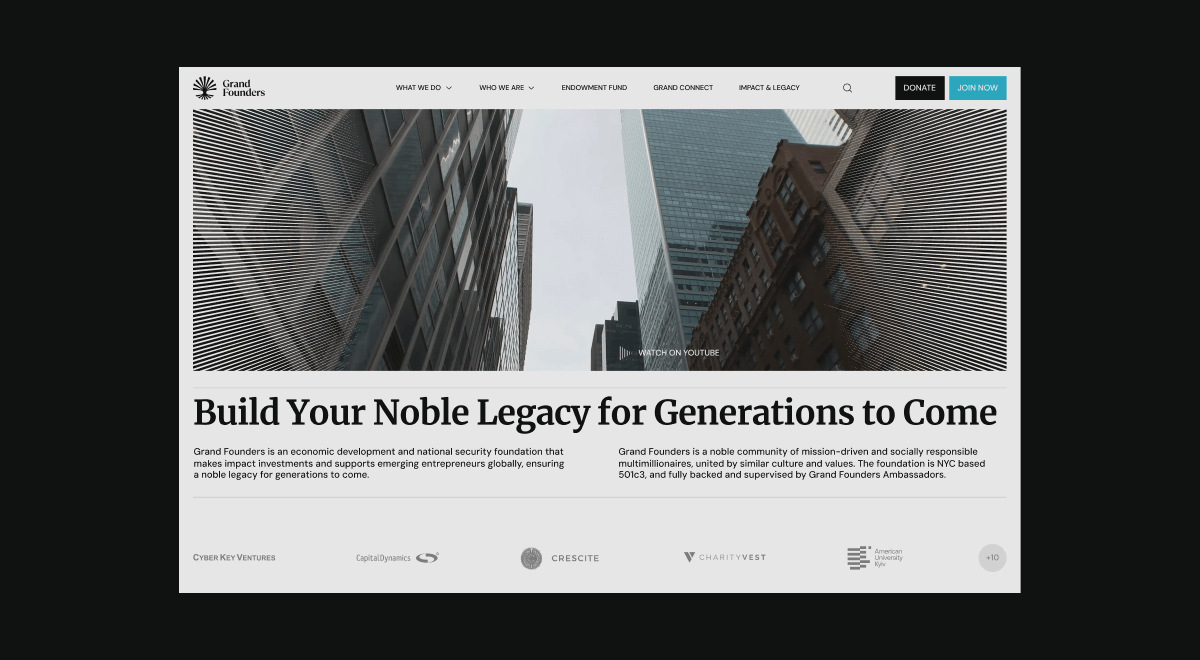
They needed:
- a modern, emotionally resonant website
- a structure that serves investors, entrepreneurs, and ambassadors
- an experience that converts visitors into donors, contributors, and long-term partners
Our challenge
Design a platform that:
- communicates legacy and trust to high-net-worth investors
- supports entrepreneurs seeking funding and resources
- energizes ambassadors growing the movement
All while keeping navigation simple, stories compelling, and actions effortless.
Our approach
00–1 Strategic alignment
We aligned with internal stakeholders and studied the nonprofit investment landscape. We uncovered:
- fragmented content
- weak emotional storytelling
- no clear, role-specific user journeys
00–2 Architecture with purpose
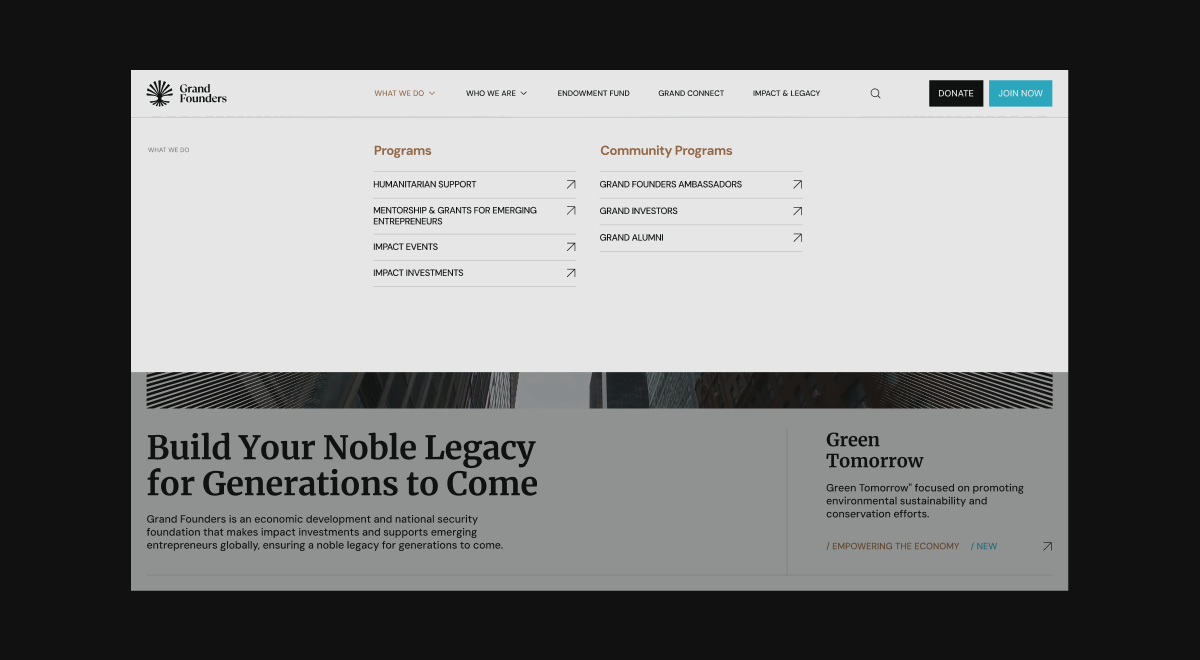
We restructured dense, administrative content into:
- clear, hierarchical information architecture
- role-specific pathways for investors, entrepreneurs, and ambassadors
- journeys that make it obvious how to explore programs, governance, and ways to get involved
00–3 Storytelling flows
We built narrative pathways around each audience:
- Investors: leading with human impact stories, then moving into structured investment logic.
- Entrepreneurs: starting with credibility, then simplifying application and engagement.
- Ambassadors: highlighting momentum, growth, and shareable stories.
Each group could see themselves in the story and understand how to join it.
00–4 Visual system rooted in legacy
We designed a hybrid visual language:
- serif typography and editorial layouts for credibility and gravitas
- minimalist structures for approachability and clarity
- rich imagery to underline global reach and emotional mission

00–5 Symbolism and emotion
We added subtle symbolic cues:
- moiré textures hinting at currency and value
- blue-green accents for trust and continuity
- iconography and interaction details that gently guide users toward action
The result is a platform where structure, storytelling, and visuals work together to increase engagement and drive meaningful action — donations, applications, and partnerships.
🔍 For more examples like this, visit our case studies page.
What to expect next: future trends in web engagement
To stay competitive, you need to anticipate how engagement itself is evolving.
Hyperpersonalization
Users expect sites to “know” them. Tools like Mutiny and Adobe Target help:
- Tailor headlines and layouts in real time
- Prioritize content by observed interest
- Align offers with intent signals
First-party data strategies
With third-party cookies fading, owning your data matters.
- Privacy-first analytics (e.g., Plausible)
- Server-side tagging in GA4
- Transparent consent flows and clear data usage explanations
Sustainable web design
Engagement also has an ethical layer.
- Leaner scripts and lighter pages
- Optimized media and fewer blocking resources
- Green hosting providers and lower energy footprints
Faster sites feel better and align with eco-conscious expectations.
Video as a growth driver
Video remains one of the most engaging formats online with reaching 80%+ of all internet traffic.
- Short, TikTok-style explainers
- Product walk-throughs and interactive demos
- Personalized video using tools like VideoAsk or VideoWise
Done right, video increases clarity and connection without bloating your site.
Stay relevant (and engaging) with Lazarev.agency
The more friction you remove and the more relevance you add, the more your visitors will interact, convert, and come back.
Use:
- psychology-informed UX
- smart, context-aware personalization
- cross-channel engagement flows
- clear, emotion-driven storytelling
Watch your users closely: their behavior will tell you exactly where to improve.
Whether you’re fine-tuning UX or planning a full website redesign, we can help map your engagement flow and turn visits into momentum.
👉 Want a personalized engagement scorecard or UX audit? Get in touch with Lazarev.agency and let’s design a website users remember.



.avif)








Social proof: let users see that “people like me” are acting
People lean on others’ behavior when they’re unsure.
How to use it:
Amazon, Trustpilot, and similar platforms make this feel natural: proof appears exactly where hesitation lives.
🔍 Read more about the social proof necessity here.