

Skip to content
Let's talk
Home
News & Articles
Industry UX/UI playbooks
How design for nonprofits to double donations looks like

Industry UX/UI playbooks

September 10, 2025

How design for nonprofits to double donations looks like

Ostap Oshurko
Ostap Oshurko

Lead Designer

5
min read
Donation interface showing 200 UAH contribution with military helmet and vest background.

Russia’s full-scale invasion of Ukraine in February 2022 triggered the largest humanitarian crisis in Europe since World War II. Prytula Foundation, launched in 2020 for local social projects, pivoted overnight to a dual mission:

  • Front-line support. Drones, radios, vehicles, medical kits — everything Ukrainian defenders need to stay effective and alive.
  • Civilian relief. Food, shelter, and rapid aid deliveries to de-occupied and front-line communities.

With coverage on CNN, BBC, and major Ukrainian outlets, traffic to the foundation’s site spiked 20-fold overnight. Yet a surge of donors ran into Cyrillic bank codes, multi-step SWIFT forms, and slow PayPal hand-offs. Every abandoned session meant fewer reconnaissance drones and slower relief convoys.

Prytula Foundation could have chased quick fixes like longer FAQs or extra payment buttons, but wartime giving leaves no room for guesswork. They asked Lazarev.agency to rebuild the entire donation journey around three non-negotiables:

  1. Zero-friction checkout — one screen, any currency, one tap to confirm.
  2. Live transparency — receipts, shipping photos, and budget trackers visible before donors even reach their inbox.
  3. Emotional clarity — imagery and micro-copy that move hearts without exploiting pain.

What followed doubled daily gifts and lifted average donations, proving that disciplined UX design for nonprofits can save both seconds and lives.

Key takeaways

  • A friction-free donation path trimmed drop-offs by 18% and pushed average gifts up 22%.
  • Geo-smart currency toggles and a copy-light UI removed confusion for international donors.
  • Transparent reporting screens turned trust into repeat support, proving that non profit UX design can drive retention.

Challenge → solution → outcome

The renewed site should accept funds in multiple currencies without manual bank look-ups, showcase verified impact fast, and scale under traffic spikes driven by global news cycles.

The next four mini-cases show how that workflow unfolded challenge by challenge, solution by solution, with measurable wins at every step.

1. Smooth donation widget

  • Challenge: Donors outside Ukraine bounced when IBAN fields appeared in Cyrillic, and multi-step SWIFT forms killed mobile conversion.
  • Solution: A location-aware toggle auto-filled USD/EUR details and surfaced payment options accordingly.
  • Outcome: Contributions doubled within weeks — proof that great non profit UI design converts empathy into action.

For any non profit website design the first click must feel effortless; that’s the heart of effective design for nonprofits. We re-built Prytula’s giving flow with brand-color buttons, generous tap-targets, and micro-copy tested on the foundation’s global target audience. The result looks like polished nonprofit graphic design, yet loads without heavy stock photos or extra scripts.
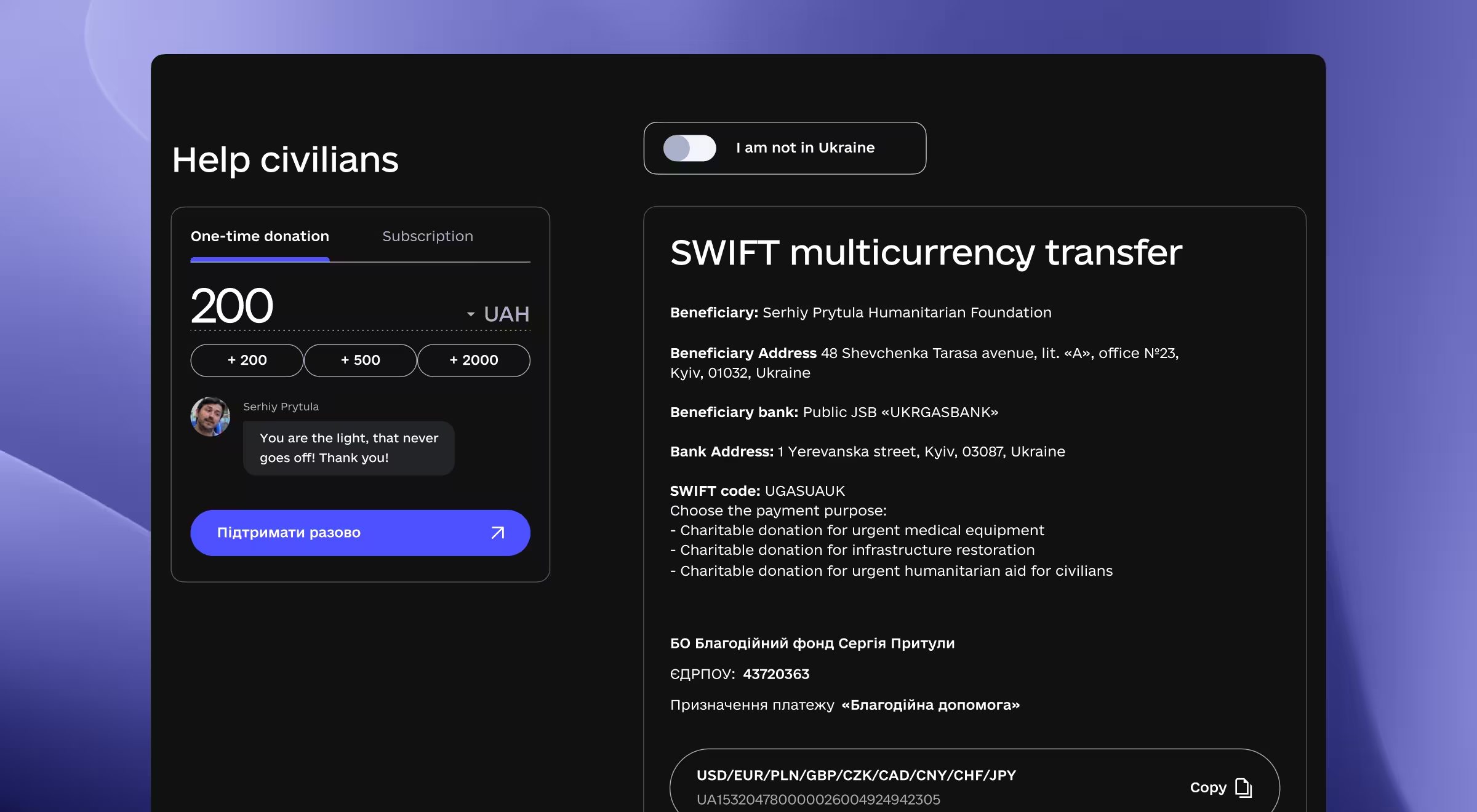
Donation page for helping civilians with one-time UAH amount and SWIFT multicurrency transfer details.

Donations widget is purpose-built for speed: donors pick a preset or custom amount, flip the “I am not in Ukraine” toggle, and the form instantly switches to USD with SWIFT, PayPal, and crypto options — no scrolling through Cyrillic bank codes. Clear brand-color buttons and large tap targets keep the experience mobile-ready, while the concise layout is easy for the comms team to screenshot for on-brand social media updates.

2. Radical transparency hub

  • Challenge: Large gifts stalled without evidence of where the money went.
  • Solution: A project library with filters for “Help Army” vs. “Help Civilians” aid plus downloadable receipts.
  • Outcome: Average gift size climbed 22% and returning-donor rate ticked up.

Donors today expect impact dashboards instead of PDFs buried in footers. Our live Achievements page packages budget numbers, route maps, and short video content into bite-sized cards. Clear graphic design rules: consistent grid, accessible color scheme, and toggles for “Help Army” vs. “Help Civilians" to let visitors parse complex information in seconds.

Because every report aligns with the organization’s mission, supporters feel their gift advances real frontline goals, raising trust and repeat giving. A dedicated Partnership section centralizes press kits and co-branded assets, making it easy for corporate allies to launch campaigns and raise awareness with on-brand marketing materials.

3. Split-focus first screen

  • Challenge: The Foundation juggled two distinct missions and audiences.
  • Solution: Dual CTAs — “Donate” / “Request Help”, anchored by a lightweight 3D drone model that loaded under 1s.
  • Outcome: Bounce dropped 18% across mobile and desktop.

The foundation juggles two audiences — civilians needing aid (the “Request help” option) and donors funding it (the “Donate” option). Instead of siloed microsites, we used a dual-CTA layout that reflects a strong brand identity: clean typography, restrained palette, and 3D drone hero rendered with lightweight design tools.
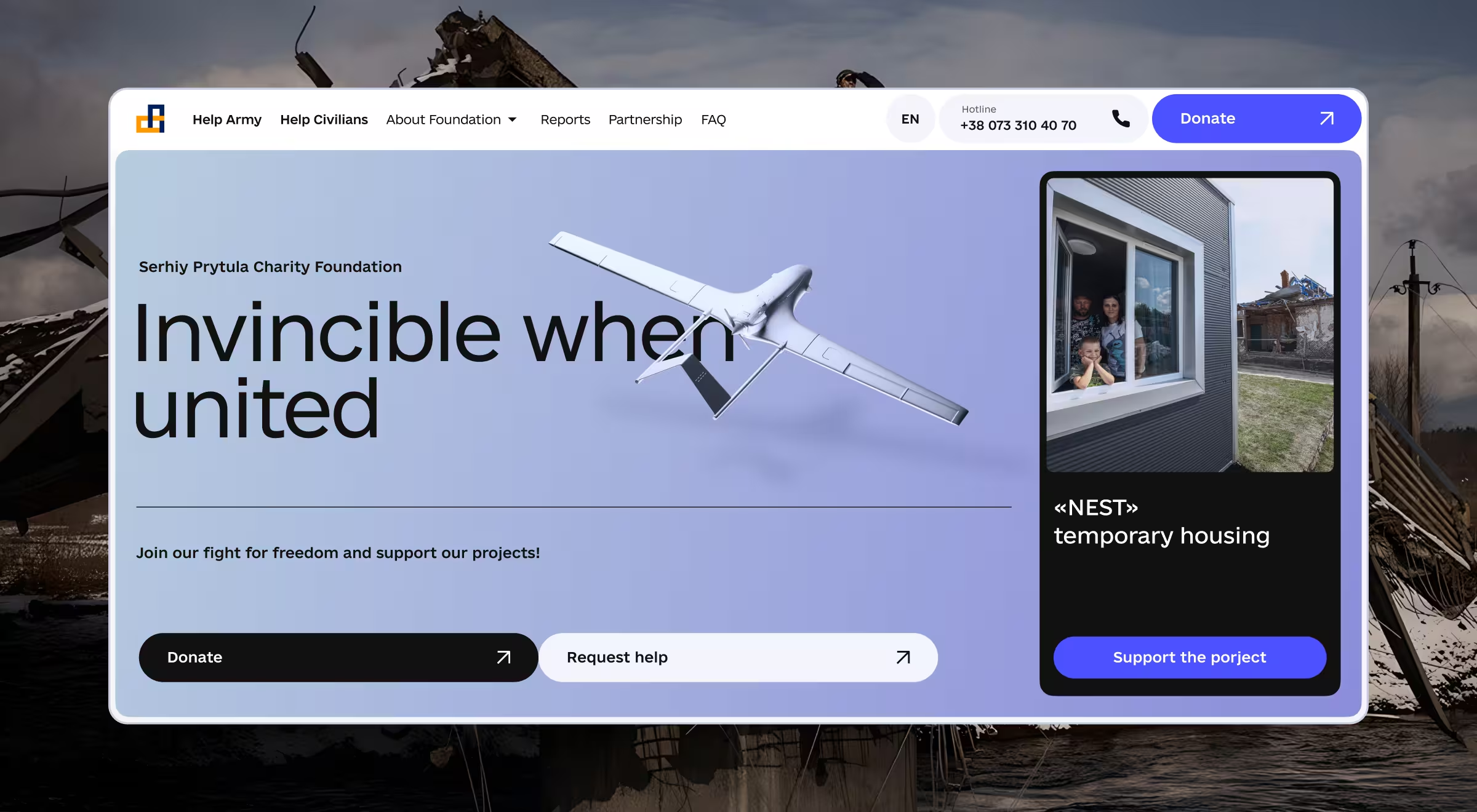
Serhiy Prytula Charity Foundation homepage with slogan 'Invincible when united' and donation options.

This visual identity speaks one language across web banners, merch, and social media graphics, so graphic designers inside the org can create new assets on a regular basis without diluting the look. Clear lanes mean fewer misrouted emails and more time focused on the organization’s work.

4. Payment method parity

  • Challenge: Bank transfers felt outdated to Gen-Z supporters who paid via digital wallets elsewhere.
  • Solution: One-tap wallets matched the trend that 53% of online transaction value will come from digital wallets by 2025.
  • Outcome: Mobile-first gifts eclipsed desktop for the first time during an August 2024 appeal.

We surfaced Apple Pay, Google Pay, and PayPal above the IBAN lines, matching the habits of prospective supporters who already shop with digital wallets. The gesture feels familiar thanks to unified brand colors and unobtrusive icons — tiny but compelling visuals that signal security.

Behind the scenes, the checkout template re-uses the same components across mobile ads and other digital materials, giving the fundraising team practically unlimited designs to A/B test without new code. Meeting donors in their preferred medium proved a great tool for lifting mobile revenue share.

What makes this design for nonprofits repeatable?

Below are 5 transferable tactics any charity can lift straight from the Prytula project. Each one maps to a common nonprofit obstacle and shows how thoughtful nonprofit UX design clears it.

Pain point Solution Why it scales to other charities
Too many clicks to give One-screen donation widget with preset sums and Apple Pay/PayPal buttons. High-intent visitors convert before attention drifts.
Currency friction Geo-detect toggle fills USD/EUR details and translates copy on the fly. Removes the “I’ll come back later” blocker for global donors.
Trust gap Always-visible trackers: live totals, recent logistics receipts, downloadable audit sheets. Transparency boosts repeat gifts; works for any mission.
Campaign fatigue 3D hero (drone model) plus fresh photo sets per appeal auto-rotate without dev help. Visual variety keeps returning visitors engaged year-round.
Corporate partnership chaos Dedicated B2B page: tiers, legal docs, CSR success stories. Gives companies a one-stop hub both for military and humanitarian aid, cutting back-and-forth email loops.

Design for nonprofits to cause impact

A clear path to donate, real-time proof of impact, and globally friendly payments transformed the Prytula Foundation’s surge of goodwill into a reliable stream of lifesaving contributions.
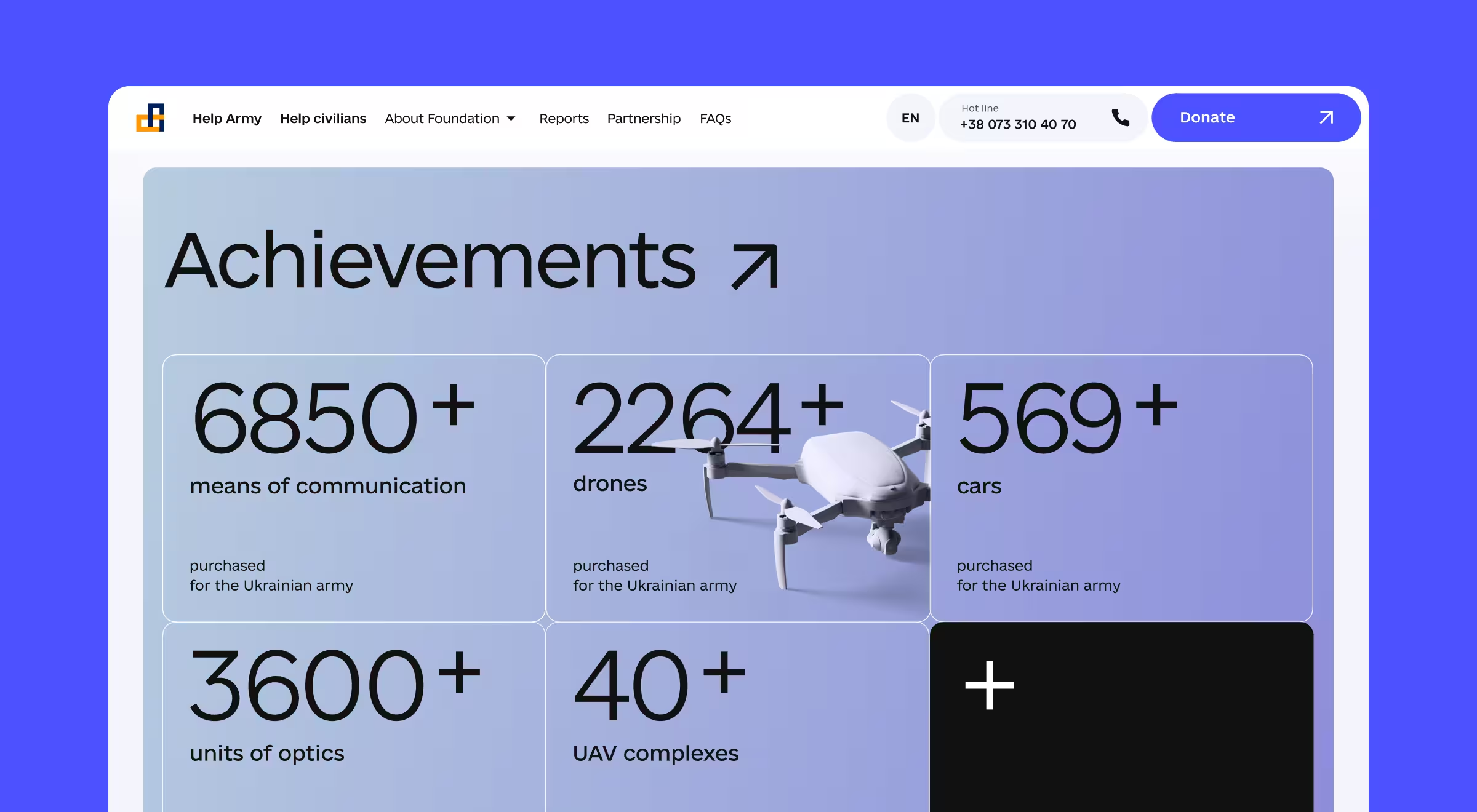
Achievements page showing over 6850 communication devices, 2264 drones, 569 cars, and 3600 optics for Ukrainian army.

Want to see how UX/UI design for nonprofits could lift your donations next quarter?

As one of the leading nonprofit design firms, Lazarev.agency works shoulder-to-shoulder with your team, aligning UX metrics to fundraising goals and iterating until every click fuels your mission.

Book a strategy call and let’s build a donation engine that grows month after month — together!

Table of Contents

Found this useful? Share it forward

Frequently asked questions

Common questions
about this topic

How does design impact donation performance for nonprofits?

Consider design as a strategy. For nonprofit organizations, clear, emotionally resonant graphic design boosts trust, enhances clarity, and moves donors to act. A compelling donation experience — whether through a website, presentation, or campaign landing page — can directly increase conversions and lifetime support.

What free or affordable design tools are best for nonprofit marketing?

Several powerful, budget-friendly tools offer professional-level capabilities:

  • Canva for Nonprofits gives eligible organizations free access to all Canva Pro features, including 75M+ images, templates, and brand kits.
  • Affinity provides its full design suite free for nonprofits.
  • Adobe Express, BeFunky, and VistaCreate offer free plans tailored for fast, on-brand social media posts and marketing materials.
  • For brand-building, DesignMantic enables nonprofits to create logos for free.

These tools allow lean teams to create visuals, tell stories, and scale awareness without external design support.

Can strong design really influence donor trust and conversion rates?

Absolutely. According to research, 94% of first impressions are driven by website design quality. Clean layouts, consistent branding, and clear calls-to-action reduce hesitation and build donor confidence. High-quality visuals, especially on mobile, can improve conversion rates by up to 40%.

What makes a nonprofit website or campaign visually effective?

Great nonprofit design presents information simply, leads with story, and reinforces the organization’s mission and credibility. Design elements like:

  • Trust signals (clear contact info, return policies, security badges)
  • User-generated content (testimonials, impact videos)
  • Mobile-first layouts with fast load times

…all contribute to a smoother donor journey. Visual clarity increases action, while design confusion costs donations.

How can nonprofits scale marketing design without a full-time creative team?

Use platforms like Canva or VistaCreate to create branded assets internally. These tools are designed for non-designers and let you maintain visual consistency across social posts, fundraising emails, and web campaigns. For larger initiatives, like end-of-year giving drives, partner with an agency or design freelancer experienced in the nonprofit sector.

How does storytelling factor into nonprofit design?

Design is your story’s delivery system. A well-crafted visual narrative helps you raise awareness, build emotional connection, and communicate urgency. Whether it’s a donation appeal or a program overview, smart design makes the story memorable and motivating, essential for increasing repeat engagement and donor loyalty.

What does successful collaboration between nonprofits and designers look like?

Designers, stakeholders, and community voices must align early, ideally during campaign planning or brand development. Successful partnerships result in assets that reflect real user needs and community impact. Clear communication, shared goals, and open feedback loops lead to better design outcomes and measurable fundraising lifts.

How do logos and brand identity affect donor perception?

A recognizable, mission-aligned brand builds credibility. Free tools like DesignMantic help create logos, but many nonprofits benefit from investing in custom branding when scaling. A strong visual identity across touchpoints, from website to donation forms, creates trust and helps your nonprofit stand out in a crowded digital landscape.

What types of design assets do nonprofits need most?

Foundational design needs include:

  • Donation pages
  • Impact reports
  • Social media content
  • Email templates
  • Event materials
  • Infographics for annual reports or pitches

Most of these can be built with free or discounted tools or created collaboratively with your design partner or agency.

How can nonprofits build internal design capacity without hiring full-time?

Many graphic design tools for nonprofits are built for non-designers. With tools like Canva, you can create a brand kit, train volunteers or interns, and manage design in-house. You can also bring in agency support on a per-project basis for branding, fundraising campaigns, or nonprofit website redesigns.

What’s the ROI of investing in better nonprofit design?

Great design builds trust faster, communicates clearer, and drives more action. The ROI includes:

  • Higher donation conversion rates
  • Greater organic reach through shareable visuals
  • Stronger community engagement
  • Increased brand recognition

Design is a multiplier for your mission and when done right, it becomes a force multiplier for fundraising.

Keep reading

Related articles you
might find useful

Industry UX/UI playbooks

July 29, 2026

Voice UI design in 2026 for products people talk to

Anna Demianenko
Anna Demianenko

Lead Designer

A hand holding a smartphone that displays a conversational voice interface responding "Great! Applying filter Sunflower Dreams!" with a live "Listening" indicator, illustrating an AI-native voice UI completing a task hands-free.

Industry UX/UI playbooks

July 24, 2026

AI UX designer: when to hire one in 2026

Kirill Lazarev
Kirill Lazarev

CEO and Founder

Abstract 3D illustration of glossy blue interconnected cubes and floating geometric blocks representing scalable digital systems and modern infrastructure.

Industry UX/UI playbooks

June 15, 2026

SaaS dashboard design: best practices behind industry-leading products

Oleksandr Holovko
Oleksandr Holovko

Product Lead at Lazarev.agency

3D illustration of an analytics dashboard featuring performance gauges, bar charts, line graphs, and donut charts, representing business intelligence, KPI monitoring, and data visualization.
Ostap Oshurko
Ostap Oshurko

Lead Designer

Oleksandr Koshytskyi

Lead Designer

Oleksandr Holovko
Oleksandr Holovko

Product Lead at Lazarev.agency

Kyle Casterline
Kyle Casterline

Co-Founder / CTO at Barricade AI

Kseniia Shyshkova
Kseniia Shyshkova

Head of PM

Kirill Lazarev
Kirill Lazarev

CEO and Founder

Danylo Dubrovsky
Danylo Dubrovsky

Senior UX/UI designer

Anna Demianenko
Anna Demianenko

Lead Designer

Andrey Gaday
Andrey Gaday

Head Of Design Department

Anastasiia Balakonenko

Lead Designer