

Do we have your attention?
Good, because apparently half of the internet has its attention on the same thing: AI tools for designers.
We dug into Google Trends data from November 2024 to November 2025 and a pattern jumps out immediately. In 2025, the U.S. officially tops the global chart for searches around AI design tools. Not by a little. By a landslide.
But here’s the fun part:
This isn’t a “curiosity spike.”
It’s a “we’re done pretending AI won’t change our jobs” spike.
Designers in the U.S. aren’t experimenting anymore. They’re absorbing AI into their workflow the way we all absorbed “Can you jump on a quick call?” — involuntarily at first, and then with alarming enthusiasm.
Because once you realize an AI can produce 40 layout explorations in the time it takes to finish your coffee, you don’t go back.
So yes, the U.S. is leading the world in searches for AI design tools.
But the more interesting question is why.
What exactly are designers looking for?
And what does this shift say about where our industry is headed next?
Let’s dig in.
Key takeaways
- The U.S. leads global interest in AI design tools, hitting a 100 Google Trends index while Canada, the U.K., and Germany sit near zero.
- Searches shifted from “tools” to “workflows,” with “best AI design tools” and “design workflow AI” also peaking at 100 in late 2025.
- “AI UX tools” surged 10× year-over-year, moving from near-zero interest to a full 100 index by September 2025.
- Designers are adopting AI to speed up research, flows, UI, and motion. Velocity is the new differentiator.
- Teams treating AI as core infrastructure outperform, using structured workflows instead of scattered tool experimentation.
Lazarev.agency's designer AI stack: a framework for modern teams
Most articles throw 40 tools at you and call it insight.
We’d rather show you what actually works, when we use it, and why certain tools outperform others in real workflows.
This is the AI stack we rely on internally — the tools that consistently pull their weight in real client projects.
Consider it the practical version of “AI tools for designers,” minus the overwhelm.
1. Ideation & visual exploration
The tools that kickstart imagination when the blank canvas feels too loud.
Midjourney
- Best for: artistic directions, atmospheric visuals, branding concepts
- Why we use it: still unmatched at “visual poetry”
- What it beats: DALL·E (cleaner), Stable Diffusion (more control but more effort)
GPT Image
- Best for: clean, product-ready imagery, UI-adjacent visuals
- Why we use it: strongest coherence, great typography, best for structured ideas
- What it beats: Midjourney when we need grids, interfaces, objects, clarity
Ideogram 2.0
- Best for: brand work with real text in images
- Why we use it: typography accuracy is scary good
- What it beats: everyone else at handling text on visuals
Stitch (for apps/web)
- Best for: turning ideas into instant UI concepts
- Why we use it: “show me 6 ways this onboarding could look” is a real superpower
- What it beats: Midjourney (no UI intelligence), Diagram (slower for UI generation)
When we use this category:
Kickoff workshops, brand exploration, concept sprints, visual direction testing.
2. UX workflows & research assistants
The tools that save us from 200-page Notion documents and 20-tab research tears.
Perplexity AI
- Best for: competitor research, quick synthesis, industry scans
- Why we use it: accuracy beats ChatGPT on factual stuff
- What it beats: Google (speed), ChatGPT (sources)
AskYourPDF / ChatPDF
- Best for: summarizing audits, whitepapers, studies
- Why we use it: turns dense research into digestible bullets
- What it beats: manually reading… everything
FigJam AI (Figma)
- Best for: early flow drafts, sticky clustering, brainstorming
- Why we use it: fast, integrated, good enough for rough UX
- What it beats: Miro’s slower AI experiments
Diagram (Genius)
- Best for: speed-running user flows from a single prompt
- Why we use it: helps us generate multiple variations on complex journeys
- What it beats: Figma alone (obviously)
When we use this category:
Audits, UX strategy, flow exploration, competitor teardown, research-intensive projects.
3. UI production & layout assistants
AI that turns prompts into real screens.
Figma AI
- Best for: turning user flows into draft screens
- Why we use it: integrates beautifully into existing design systems
- What it beats: Every standalone AI UI generator (because it plugs into our real files)
Relume AI
- Best for: fast wireframes + Webflow-friendly components
- Why we use it: best tool for quick MVP layout previews
- What it beats: Uizard (less flexible), Galileo (more visual, less structural)
v0.app (by Vercel)
- Best for: generating interface components in React/Tailwind
- Why we use it: dev-ready code + good visual translations
- What it beats: Anima (more code complexity)
Uizard
- Best for: rough sketches → screens
- Why we use it: genuinely useful for rapid validation
- What it beats: “manual wireframing at 11 PM”
When we use this category:
Early UI concepts, MVP speed builds, component exploration, Dev+Design collaboration.
4. Motion, video & 3D generation
Where ideas stop being static.
Runway Gen-3
- Best for: motion prototypes, ad-style sequences, UX motion concepts
- Why we use it: makes motion feel real before production
- What it beats: Pika (more cinematic), Kaiber (more control)
Pika
- Best for: quick product videos, camera movements
- Why we use it: great for showing “interaction mood”
- What it beats: Runway (more playful, less heavy)
Spline AI
- Best for: 3D interactions & product elements
- Why we use it: browser-native, fast, perfect for demo scenes
- What it beats: Blender (for early 3D exploration)
Blender + AI add-ons
- Best for: production-grade 3D
- Why we use it: quality, realism, total control
- What it beats: Everything else (once you’re past ideation)
When we use this category:
Motion proof-of-concepts, marketing sequences, interaction demos, 3D assets.
5. Insights, analytics & decision support
Past the visuals — this is where AI helps us design smarter.
Hotjar AI
- Best for: UX feedback clustering, heatmap insights
- Why we use it: surfaces patterns we might miss
- What it beats: manual analysis
Notion AI
- Best for: organizing research, summarizing client interviews
- Why we use it: great for long-form content
- What it beats: doc chaos
Custom GPTs + RAG
- Best for: feeding client-specific data to get project-aware insights
- Why we use it: private, accurate, domain-specific
- What it beats: any generic AI tool
When we use this category:
Decision-making, revisions, prioritization, UX improvements, planning.
Why we structured the stack this way
Because tools without categories become noise.
Tools with categories become a workflow.
And workflows are what designers are actually searching for in 2025.
This stack is how we keep our process sharp, creative, and fast — and the same structure clients adopt after working with us.
Summary of AI tools for designers: category-by-category comparison
What designers search for (based on Google Trends data)
If you look at Google Trends from November 2024 to November 2025, one thing becomes embarrassingly clear:
the U.S. isn’t just curious about AI design tools — it’s obsessed.
And not in a casual “let me see what’s new” way.
More like a “this is now part of my job description” way.
Let’s break down what the data actually says.
1. The U.S. is leading the world — by a mile
When we say the U.S. leads global searches for “AI tools for designers,” we’re not exaggerating.
It’s literally sitting at the 100 interest index — the maximum Google assigns — with its peak in the week of September 21–27, 2025.
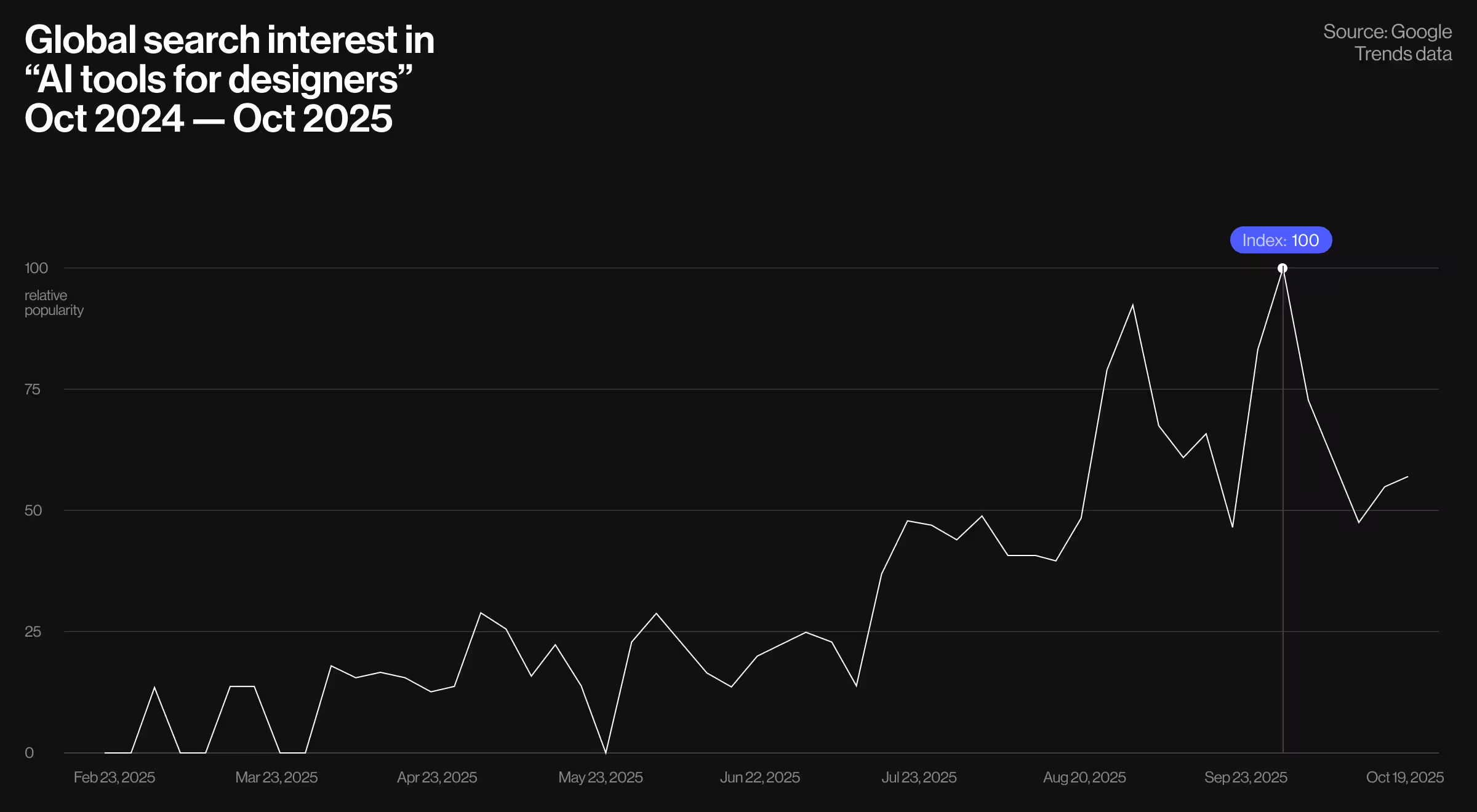
Source: Google Trends data for “AI tools for designers” queries.
States with a 100 index (full interest saturation):
- New York
- Georgia
- Utah
- Colorado
- New Jersey
- California
- Massachusetts
- Maryland
Translation: every major design, tech, and innovation hub is all-in.
States with a 50 index (half-strength but growing fast):
- Florida
- Washington
- Wisconsin
- Minnesota
- Virginia
- Illinois
- Pennsylvania
- Texas
- Arizona
- North Carolina
These are the markets where interest is rising, but not yet peaking. Think early adopters vs. fast followers.
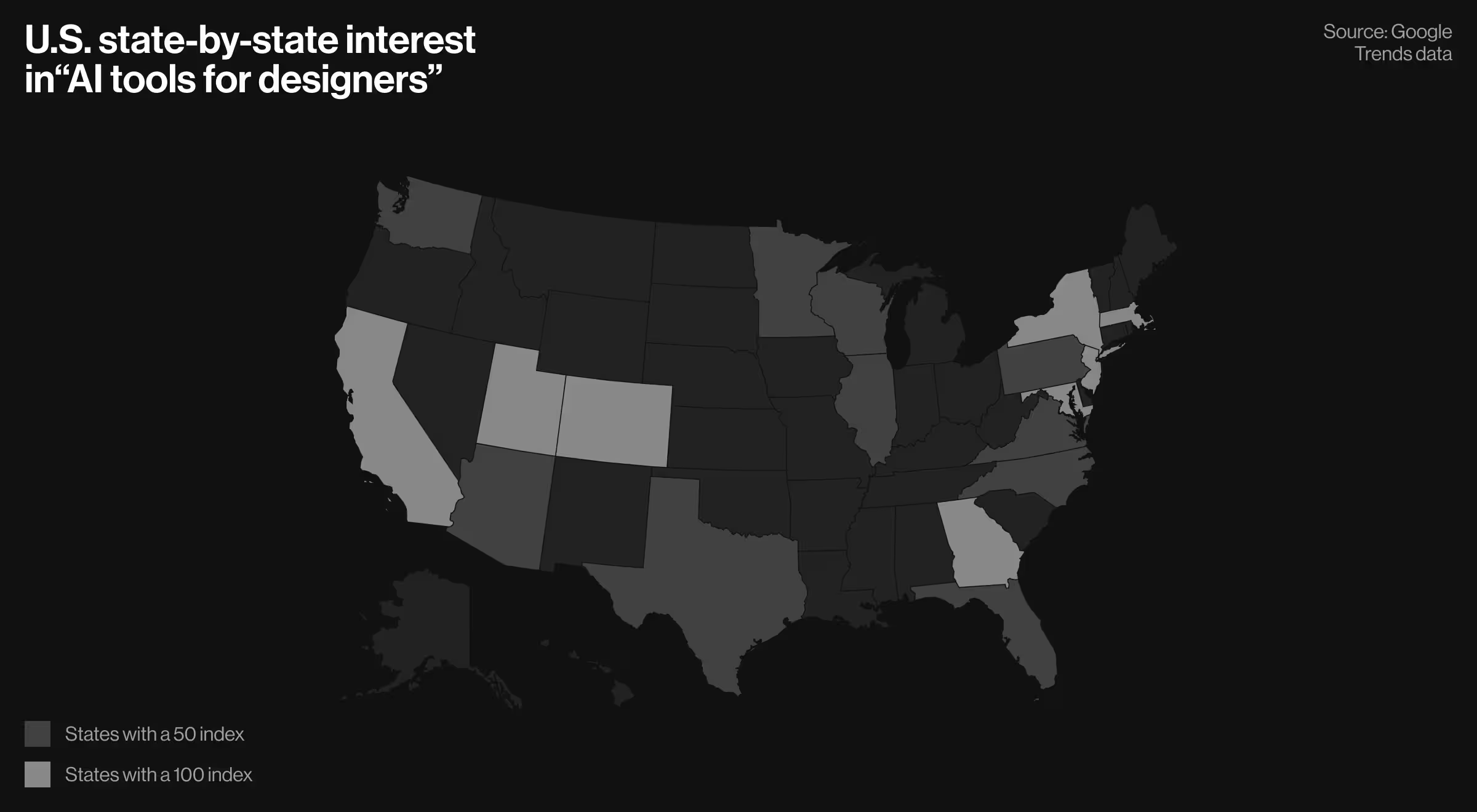
Source: Google Trends data for “AI tools for designers” queries in the USA.
2. Canada and Europe? Barely on the radar
Here’s where things get interesting.
Canada, a country that typically mirrors U.S. tech behavior, is sitting at an index of 1.
Not 10.
Not 20.
Just 1.
The same minimalist interest shows up in Europe’s biggest tech hubs:
- United Kingdom → 1
- Germany → 1
If the U.S. is sprinting, Europe is still tying its shoelaces.
Whether that’s cultural caution, slower workflow adoption, or “we’ll wait for version 3.0,” the data paints a clear picture:
the U.S. is aggressively building AI-native design habits while other regions are standing back and watching.
Source: Google Trends data for “AI tools for designers” queries worldwide.
3. Designers aren’t just searching for tools — they’re searching for workflows
The trend repeats across related queries:
Peak for both: September 21–27, 2025
Designers aren’t randomly browsing. They’re trying to improve the process.
This is the difference between a trend and a genuine AI transformation.
4. The breakout story: ‘AI UX tools’ — a 10× surge
Now for the plot twist.
Searches for “AI UX tools” exploded.
- Nov 2024 – May 2025: index hovering between 0–27
- Jun 2025 – Nov 2025: suddenly 46–100
- Peak again: September 21–27, 2025 (index 100)
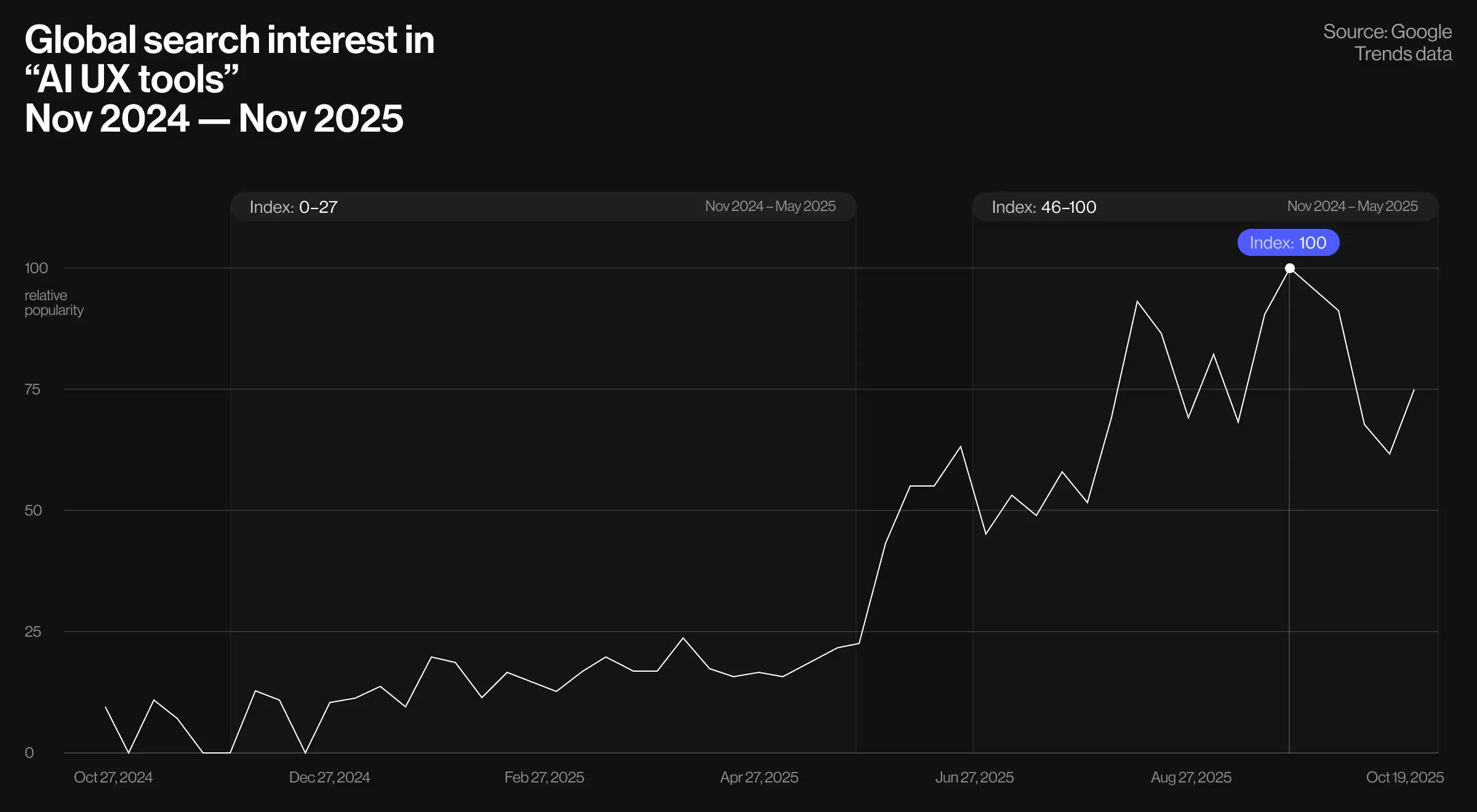
Source: Google Trends data for “AI UX tools” queries worldwide.
That’s a tenfold increase.
This is the clearest signal in the dataset:
designers aren’t flirting with AI anymore — they’re integrating it into the UX foundation itself.
A 10× surge doesn’t mean “cool new tech.”
It means “we can’t work without this anymore.”
What all this tells us
AI designers aren’t chasing novelty.
They’re searching for:
- tools that accelerate decisions
- workflows that compress weeks into days
- AI that integrates quietly into real processes
- and systems that help them keep up with the new design velocity
In other words:
2025 is the year designers went fully AI-native. And the U.S. is leading the way.
Why interest in AI tools for designers is exploding in 2025
Let’s be honest: designers aren’t suddenly waking up craving more tools. Most of us already live in tabs, plugins, and folders we haven’t cleaned out since 2018.
So why the surge?
Because AI didn’t just add another tool to the stack. It rewired the entire stack.
Here’s what we’re seeing across teams, clients, projects, and late-night Slack threads.
1. AI is now faster than our “quick drafts”
We used to sketch wireframes for speed.
Now AI generates them before we’ve even finished writing the prompt.
Designers aren’t searching for tools — they’re searching for leverage.
2. Ideation has shifted from “hours” to “seconds”
Moodboards, visual directions, early layouts… all the messy, magical starter work is suddenly the easiest part.
And once designers taste that kind of acceleration, they want more.
3. UX work finally has an assistant
Research synthesis, competitor scans, flow variations — the tasks no human lovingly volunteers to do have become AI’s love language.
Search interest is rising because UX teams want tools that lighten the mental load, not add to it.
4. Design velocity became a competitive advantage
Let’s say this out loud:
Teams adopting AI are shipping faster, iterating smarter, and spending more time on judgment instead of pixels.
Competitors feel that pressure.
Searches rise.
Everyone hunts for “the tool their friend’s team is using.”
5. Leadership is (finally) asking the right questions
Not “Should we use AI?”
But: “Which AI tools actually improve design quality?”
That’s a very different conversation, and the one driving this search boom.
6. Designers want workflows, not hype
Anyone can drop a list of 40 AI tools.
But designers are searching because they want to know:
- How to integrate AI into their actual process
- What fits into Figma
- What works for motion
- Which tools help with research
- And which ones are… let’s say, “Pinterest with extra steps”
Searches are high because designers are overwhelmed and trying not to look like it.
How AI transforms real design workflows (lessons from the projects we’ve shipped)
If you want to know what AI is doing to design today, the easiest way is to look at the projects teams are shipping.
Lucky for us — and for this conversation — we’ve spent the last few years (actually, from 2017) designing AI-first products across fintech, news, fashion, film, search, and crypto. And the pattern is obvious:
AI doesn’t replace designers.
AI replaces busywork.
Designers replace hesitation with velocity.
Here’s what that looks like in real life, through the projects we’ve built.
1. AI turns complex workflows into intuitive ones
Take Accern Rhea — a financial research tool for analysts drowning in data.
This wasn’t “chatbot with a UI” work. (Still, we do like chatbots and prepared a walkthrough for 33 best chatbot examples for you to consider.)
This was designing an AI-native operating system for analysts working with charts, tables, datasets, footnotes, document uploads, and rapid decision-making.
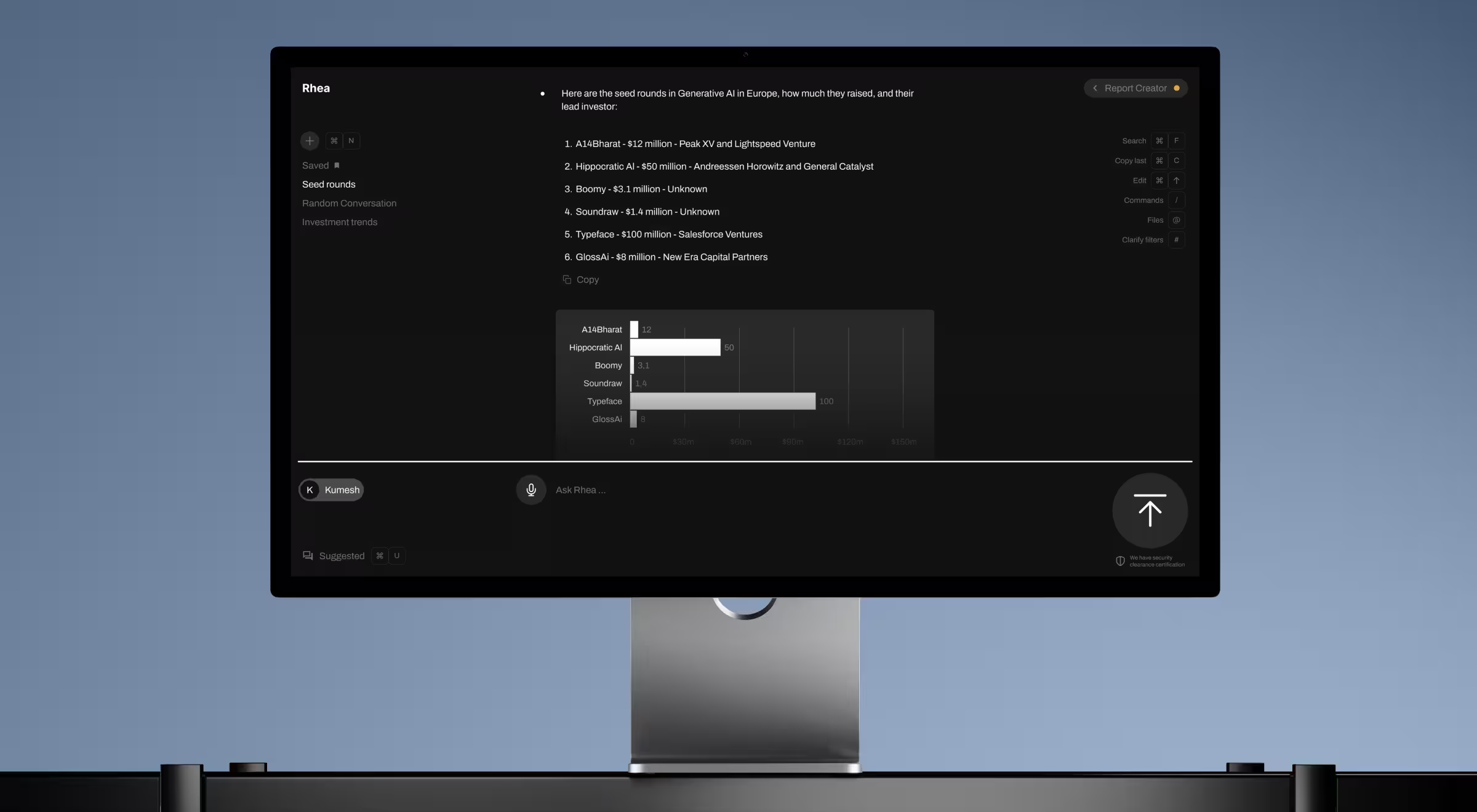
We built a hybrid interface combining:
- a prompt engine
- AI-powered clarifying questions
- dynamic widgets and visual outputs
- a multi-purpose command-line input
- automatic dataset integrations
When analysts type, the system thinks with them. And that’s where AI shines: helping users leap from “I have 140 tabs open” to “I’m in control.”
2. AI makes complicated products feel effortless
Pika AI came to us with a powerful search engine that felt, well… too powerful for regular humans.
Our redesign flipped that script.

We turned the product into a clear, friendly, structured experience:
- An AI-powered chat widget placed right below the search bar
- Layouts built with F-pattern logic
- A block-based design system for clarity
- Tailored results ordered intelligently by relevance
AI handles the complexity.
We design so users only feel clarity.
3. AI helps us visualize what used to take weeks
In Mannequin, our role was storytelling for a fashion-tech company that generates hyperrealistic AI models.
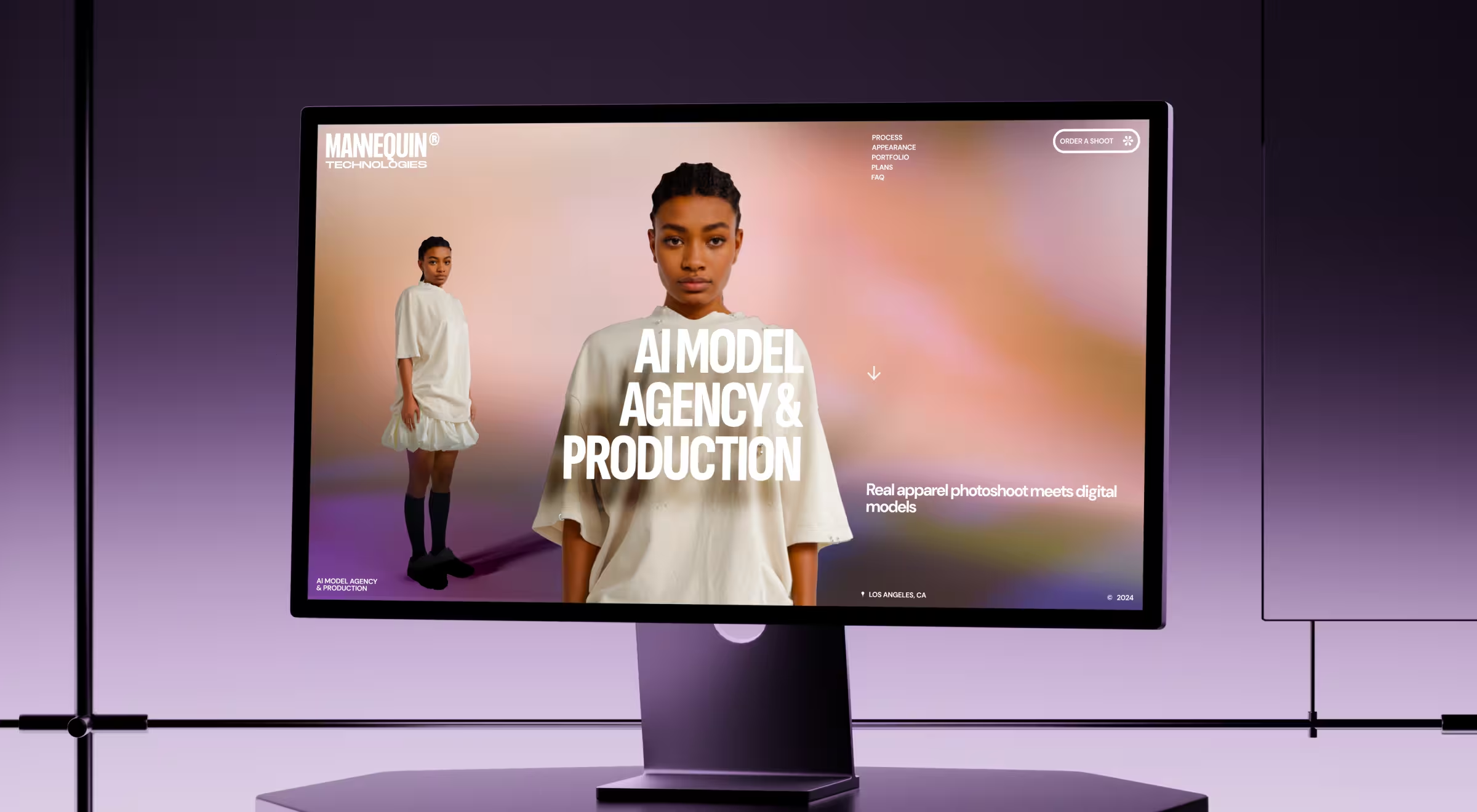
Here’s how AI reshaped the process:
- We demonstrated real garments rendered on AI-generated humans
- All built using 2D assets, engineered to feel 3D
- Parallax, motion, and narrative sequencing created a product story without technical overwhelm
AI gave the company the tech.
Design gave users the “aha.”
An AI-powered workflow every design team can steal (we won’t tell)
Here’s the thing: AI isn’t magic.
It’s just really good at doing the parts of our job that were never the fun parts anyway.
And because everyone keeps asking us, “Okay, but what does an actual AI-enhanced design workflow look like?” — here’s the version we use inside Lazarev.agency.
No sugar coating. No theory. Just the practical flow that takes us from idea → concept → design → motion → handoff without losing a week to the usual chaos.
Steal it. Adapt it. Call it your own.
(We’re all friends here.)
1. Research that doesn’t take three coffees and a headache
Perplexity + client docs → instant industry scan
We drop the client materials and competitor URLs into Perplexity.
It gives us:
- market summaries
- opportunity gaps
- repeated user pain points
- what every competitor forgot to solve
What used to take two days now takes 40 minutes, and the insights are cleaner.
2. UX flows without the existential dread
Diagram (Genius) → first-draft flows
FigJam AI → sticky clustering + variations
We start with a messy prompt like:
“Design a onboarding flow for a rewards-based fintech with optional KYC.”
AI generates:
- a baseline flow
- three alternative paths
- a few smart edge cases we would’ve flagged later anyway
Then we refine with a deep expertise of 10+ years on the market.
3. UI concepts before lunch (wild, we know)
Figma AI → first layouts
Stitch → additional visual directions
Midjourney → brand exploration
This is where the magic happens.
We run:
- “Generate 6 hero sections for a SaaS dashboard targeting analysts”
- “Try a darker, fintech-forward direction with glowing accents”
- “Show a version optimized for mobile-first use”
One hour later, we have 20–40 viable directions to react to.
This used to be a whole sprint.
4. Motion ideas without opening After Effects yet
Runway Gen-3 → motion moodboards
Pika → interaction experiments
Instead of storyboarding motion with notes like: “Imagine this graph animating elegantly…” — we show stakeholders 10-second AI-generated clips.
These aren’t final. They’re decision accelerators.
People react faster to video than to imagination.
5. Final UI that respects the design system
Figma AI → component-level cleanup
v0.app→ component code previews
Once we pick a direction, Figma AI helps:
- generate missing states
- standardize spacings
- apply existing components
- fix accidental inconsistencies we’d otherwise catch two days later
Then devs get early React/Tailwind previews from v0.dev.
Everyone feels aligned before handoff.
6. Handoff that doesn’t feel like a breakup
Custom GPT + project files → automated documentation
We use project-specific GPTs to generate:
- component descriptions
- UX reasoning
- interaction notes
- edge-case behavior
- design-to-dev checklists
It’s consistent, complete, and saves us the soul-drain of writing 40 paragraphs explaining why a button is 32px and not 36px.
The result
A workflow where:
- designers think bigger
- stakeholders decide faster
- motion starts earlier
- UX feels less like archaeology
- UI gets cleaner
- and devs stop asking “Do you have a description for this?”
This is the version of AI-powered design teams secretly want — not a flashy toy stack, but a workflow that gives them their time, clarity, and creativity back.
Principles that matter more than all the AI tools for designers altogether
Here’s the truth we’re reminded of in every AI project: tools may change monthly, but the foundation of good design doesn’t.
AI can generate layouts, flows, and copy, but it can’t replace clear thinking. If the strategy is weak, the outputs are weak — no matter which model you use.
The best AI products we’ve created work not because they have the “latest features,” but because they give people clarity, predictable behavior, and a sense of control. And the more intelligent the system becomes, the more important the human loop is.
Users need to understand what the AI is doing, adjust its course, and trust the outcome. That’s why we design for adaptability: flexible systems, modular flows, and interfaces that can evolve as models evolve. In other words, the tools matter far less than the principles guiding how you use them.
Conclusion: the teams who adapt fast, win fast
If you’ve made it this far, you’ve probably noticed the pattern: AI isn’t a trend designers are observing — it’s a shift they’re already living through. Search data shows it. Our client work proves it. And the velocity of 2025 confirms it.
The teams winning right now aren’t the ones collecting tools; they’re the ones redesigning how they work. They iterate faster, think clearer, and use AI to remove friction instead of adding noise.
This is the moment to choose whether you’re experimenting with AI or building with it. If you’re ready for the second option — the serious one — we’d love to help.
Ready to make AI a real part of your design workflow with Lazarev.agency, an AI product design agency?
Explore our AI case studies or get in touch — let’s design the next generation of products together.




.webp)






