

Your growth slows, dashboards disagree, and every team has a different theory. Support calls it “confusing”, product says “edge cases”, and engineering blames scope.
You need a defensible read on what breaks critical user journeys. A UX expert review is the fastest way to put trained eyes on the problem and turn ambiguity into a prioritized plan.
In this guide, you’ll learn what it is, when to use it, how it works step-by-step, and how it complements usability testing and user testing in a modern design process.
Key takeaways
- Use it when: you need fast, defensible answers about friction before launch, after conversion drops, or ahead of a roadmap pivot.
- What you get: a prioritized backlog of issues (with screenshots and rationale) instead of vague “opinions about design.”
- How it works best: narrow scope to 2–3 key flows, share existing research and KPIs, and agree on success criteria up front.
- How it fits with testing: expert review finds obvious and structural issues fast; usability testing validates the biggest changes with real users.
- Where Lazarev.agency, an UI/UX design agency, fits: we run expert reviews as part of AI, SaaS, fintech, and Web3 product growth audits tied directly to activation, retention, and monetization.
What is a UX expert review?
A UX expert review is a systematic assessment of an interface or flow conducted by experienced reviewers who inspect the user interface against established usability principles and usability guidelines.
Or to put more simply, senior UX experts check your interface, find what’s confusing, and recommend fast improvements without testing on users.
To identify usability issues that block users from completing tasks, instead of live sessions experts evaluate:
- patterns,
- cognitive load,
- information architecture,
- user feedback,
- error messages,
- and affordances.
This independent evaluation yields actionable insights:
- where friction lives,
- why it matters for the business,
- and how to suggest improvements that are feasible in your development process.
An expert review follows set usability rules and heuristics. When it helps, top UX research firms also do a quick cognitive walkthrough of key tasks. The result is a step-by-step list of fixes plus a UX audit checklist your team can ship.
💡 Pro tip: Treat the review process like a short research sprint. Share prior user research, key funnels, and known usability problems so experts can focus on the highest-risk areas and produce actionable recommendations.
🔎 See NN/g’s UX expert reviews for method basics and a video guide for a deeper dive in the UX expert audit theory.
When to use UX design review and why it’s cost-effective
There are three common types of design reviews teams rely on:
- Expert review — a systematic inspection where UX specialists evaluate an interface against usability heuristics and established principles to flag friction.
- Standalone design critique — an analysis focused on design elements such as layout, consistency, and visual patterns to determine whether the product presents a coherent, effective experience.
- Heuristic evaluation — a structured assessment that checks an interface for compliance with widely accepted heuristics, such as Nielsen Norman Group’s 10 usability heuristics.
Use a UX expert review when speed and direction are paramount:
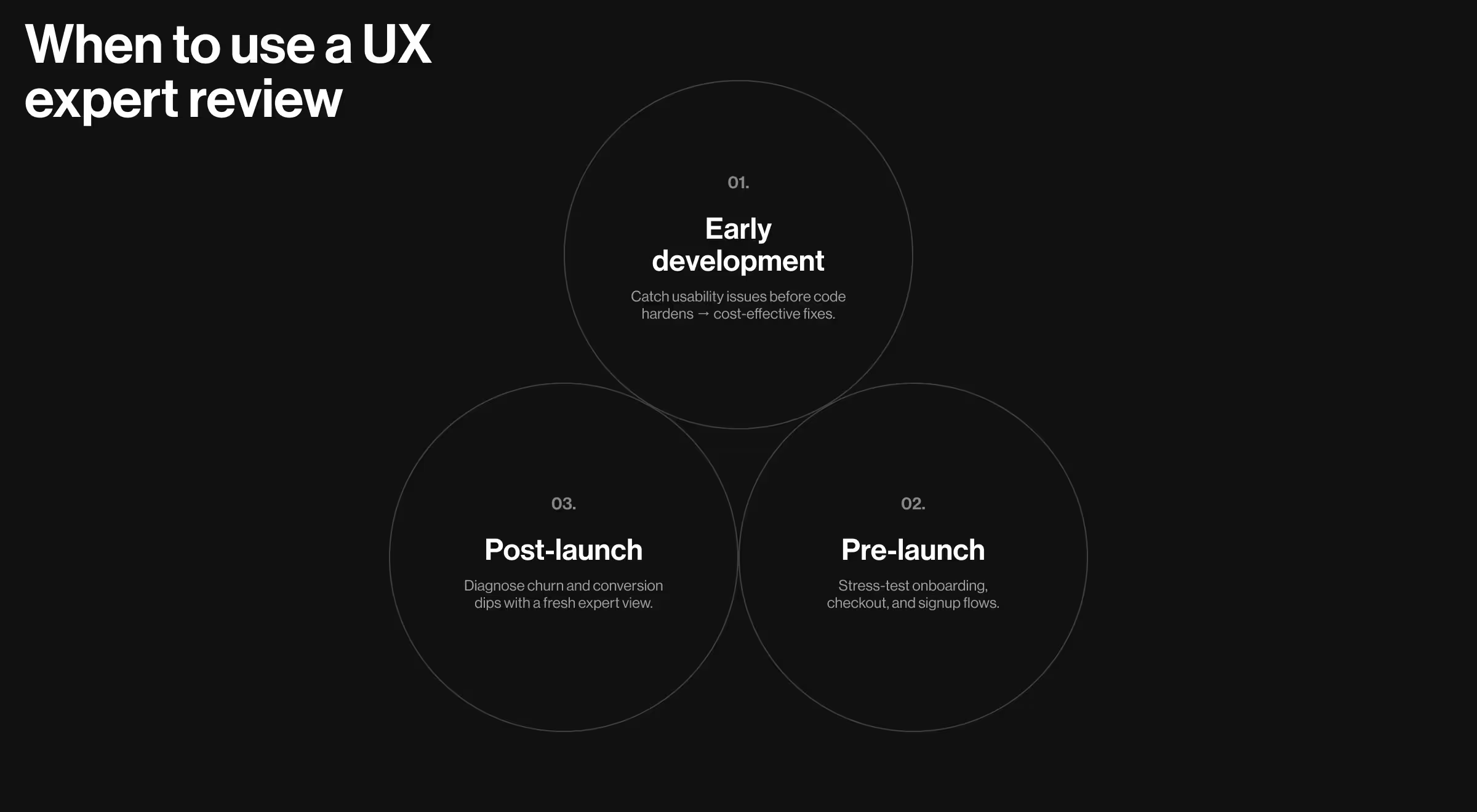
- Early development stages. Spot usability issues before code hardens. Early detection saves cost and prevents rework.
- Pre-launch. Stress-test signup, onboarding, and checkout flows against usability best practices, ensuring your patterns align with user expectations.
- Post-launch. Diagnose conversion drops or churn by reviewing critical flows with fresh expert eyes that catch blind spots internal teams often miss.
For example, in our Dollet Wallet redesign, simplifying onboarding language and surfacing first-week value removed early friction and boosted retention. It’s a classic case where an expert review uncovered high-impact fixes right before traffic scaled.
Compared to larger studies, an expert inspection can be completed in just a few days, giving product leads prioritized insights they can share with distributed teams. Usability testing can still follow, but the expert review clears obvious blockers first.
Process: how UX review is run and what you’ll receive
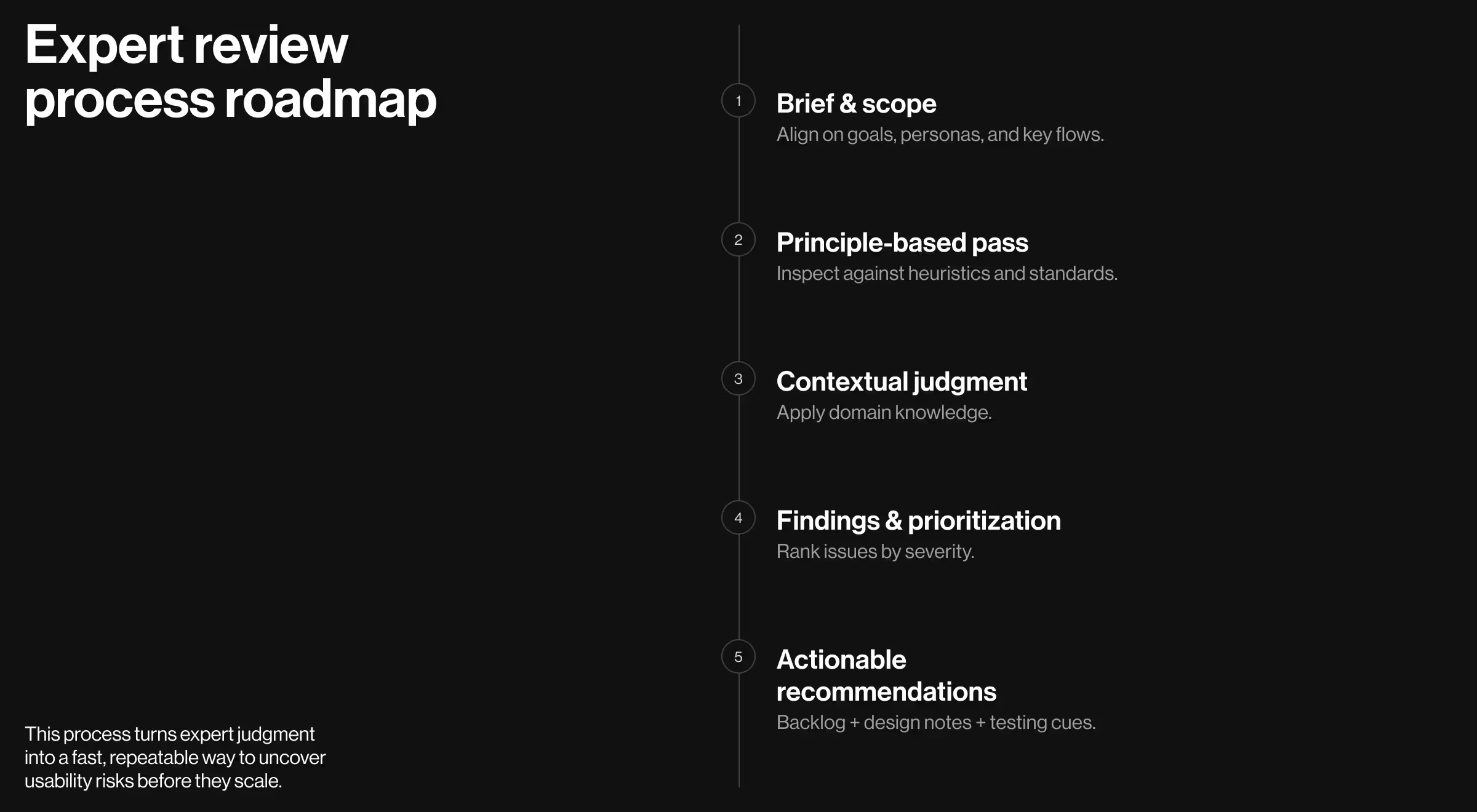
- Briefing & scope. Align on business goals, user personas, KPIs, target audience, and two or three flows that matter most right now.
- Principle-based pass. Inspect against heuristics, accessibility, and platform conventions. Apply usability and user experience standards to spot gaps quickly.
- Contextual judgment. Layer in domain norms (SaaS, fintech, mobile apps) so guidance reflects real-world user expectations and user behavior.
- Findings & prioritization. Cluster issues by severity and impact: critical blockers, major friction, minor polish. Tie each to evidence and risk, document findings with annotated examples.
- Actionable recommendations. Provide design notes, copy rewrites, and a sequenced backlog your PM can schedule immediately. Mark which items need user testing or A/Bs.
A strong report makes trade-offs explicit: where to fix now, where to test, and where to defer. When you need rapid direction, this beats a broad UX evaluation with unclear next steps. For teams that are new to inspections, a UX audit engagement can package the above into a repeatable playbook.
🔍 To understand how structured findings become a prioritized, sprint-ready backlog, check out how to turn UX audit findings into product wins.
How UX design review compares to usability testing
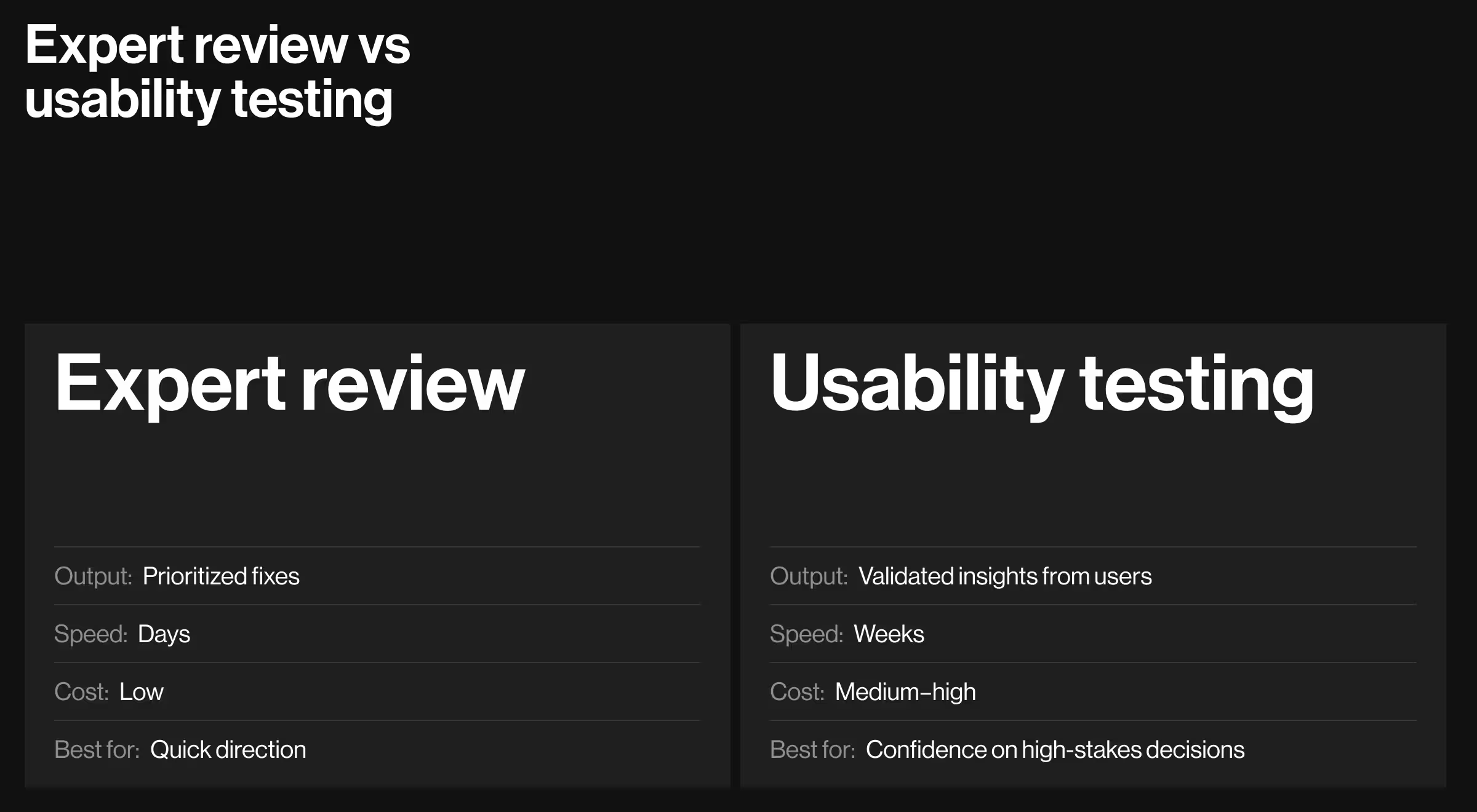
Teams don’t choose one forever — they combine methods across various stages of product work:
- A UX design review is ideal when you need speed, expert triangulation, and a tight action plan.
- Usability testing verifies the riskiest assumptions with actual users and quantifies user engagement and task success.
Both reduce risk, just at different moments:
- Inspections front-load discovery and identify issues fast.
- Tests confirm which fixes create a more user friendly product and improve overall usability.
Where reviews and testing fit into the process
Reviews and tests are not linear; they alternate and repeat throughout product development.
- Standalone critiques happen early. The goal is to assess whether an in-progress design meets agreed objectives. Teams often repeat critiques regularly as concepts evolve, until a stable direction emerges.
- Expert reviews evaluate designs against heuristics, design guidelines, and patterns. Experts bring domain knowledge and usability experience to flag issues and suggest fixes. These reviews are especially valuable during major redesigns or when pursuing a new UX strategy.
- Usability tests uncover issues missed in reviews and validate assumptions with real user behavior. Each iteration of the design should be tested until the interface is demonstrably usable.
Together, this cycle ensures a balance: reviews catch problems early, while tests prove solutions work with actual users.
Why expert reviews work
Effective inspections rely on deep knowledge of usability patterns and UX design conventions. A UX expert brings extensive knowledge of patterns that help users complete tasks with less cognitive load, plus familiarity with various methods for usability research. Because experts anchor notes in principles, teams receive unbiased feedback.
Expect the report to:
- Map issues to violated usability principles and the principle’s rationale.
- Flag risks that require user interviews or testing process follow-ups.
- Indicate quick wins vs. items that need design exploration.
- Call out analytics hooks to measure change and identify areas for further study.
Practical tips to maximize impact
- Set evaluation criteria up front. Define success metrics tied to funnel stages; this keeps recommendations focused and measurable.
- Limit scope to key user journeys. A focused pass beats shallow coverage of “everything.”
- Share context: market norms, competitors users compare you to, and decision constraints from engineering or compliance.
- Pair with testing. After shipping quick wins, run lean usability testing to validate the most consequential changes and keep a record of empirical methods used.
- Close the loop. Re-run a short inspection after fixes to confirm you’re truly uncovering usability issues and not shifting friction elsewhere.
What you’ll walk away with
- A prioritized backlog aligned to business goals, with actionable insights you can schedule this sprint.
- Annotated screens and copy recommendations that reflect your target audience and domain.
- Clear callouts on which items need validation through user research or usability testing.
- A compact UX audit summary you can share across design, product, and engineering.
Considering next steps?
If your team needs a rapid pass to unblock a roadmap, start with a UX expert review and follow it with targeted usability testing.
For a deeper engagement, our UX research package expands the scope, and a focused UX evaluation can confirm high-impact changes before a full rollout. Contact us!












“Through a detailed understanding of the client’s platform, Lazarev. was able to create a clean and intuitive UI/UX design that ticked all the boxes. The team was receptive to all requirements and requests and adapted well to timeline changes. They produced accurate mockups at every iterative stage.”
Founder at Pika AI