10 reasons to hire AI designers for your digital product in 2026

Laptop placed on a sculptural stand, displaying a complex design workspace with multiple UI screens and components arranged on a large canvas in a professional design tool interface
Summary

Reviewed by: Lazarev.agency AI UX and Product Design Team
Last updated:
December 2025
Relevant case studies:
Accern Rhea, VTNews.ai

If you want to hire AI designers, here’s the simplest way to think about their role. AI engineers teach the model to think, whereas AI designers teach it not to confuse people. A small distinction with a huge practical impact.

Sundar Pichai, CEO of Google, put it well:

“The future of AI is not about replacing humans, it's about augmenting human capabilities.”

At Lazarev.agency, we couldn’t agree more. But augmentation only works when someone designs the bridge between machine logic and human intuition.

Most products overlook that bridge. Users notice (not in a flattering way, btw).

This article explains why strong AI design has become essential for any business building AI-powered experiences. You’ll see what a great AI designer does, how to spot early signs your product is begging for one, and the hiring missteps that sabotage otherwise brilliant AI opportunities.

Let’s dig in.

Key takeaways

  • Best AI designers make intelligence usable. A powerful model means nothing if the interface confuses people. Leading artificial intelligence designers like Lazarev.agency shape reasoning flows and user intent pathways that make AI understandable.
  • Better UX means better model performance. When designers guide inputs with smart scaffolding, the model delivers higher-quality outputs.
  • Hiring the wrong designer slows down even the best AI teams. Most AI UX failures come from late-stage design involvement or chat-for-everything thinking. The right AI designer prevents this and accelerates your product’s time-to-value.

What an AI designer does

AI designers sit at the intersection of UX optimization, product strategy, computer vision, and machine learning models. Their job is to bridge two worlds: what users expect and what the model can deliver today.

Here’s the honest version of the role:

  • Clarify intent. They design flows that help users articulate what they want in a way the system can understand, be it through language, clicks, files, prompts, or multimodal inputs.
  • Guide the behavior of AI systems. They shape how the model behaves inside the product through boundaries, fallbacks, confidence cues, and recovery paths.
  • Handle uncertainty. AI technology is highly probabilistic. Designers create user interfaces that surface uncertainty without scaring people off.
  • Structure explainability. When AI reaches a conclusion, users deserve a breadcrumb trail. Designers lay it out.
  • Partner with engineers and PMs. They translate model constraints into UX decisions and mark risks early.

How these creative professionals differ: AI designer vs. product designer vs. AI engineer

“You’d never launch a financial product without a compliance specialist. And the same principle holds for AI. Working on an AI-powered design without a professional with a deep understanding of how users perceive machine-generated decisions is a risk no serious team should take.”
{{Anna Demianenko}}

If AI product teams were a band, these three roles wouldn’t be playing the same instrument. AI designers fine tune the interaction, product designers shape the stage, and AI engineers power the sound system.

The table below breaks down who does what and why mixing them up leads to off-key experiences.

Role Core focus Strengths Where they struggle alone
AI designer Human–AI interaction, reasoning flows, trust, explainability User clarity, UX safety, behavior shaping 🪛 Needs engineers with machine learning expertise and model training skills to define model limits
Product designer Traditional flows, UI, and general user experience Visual systems, usability, layout 🔴 Limited experience with AI frameworks
AI engineer Models, pipelines, data, performance Technical accuracy, model logic 📩 Communicating behavior of AI models to users

🔍 If you’re deciding which role your team actually needs, our breakdown of the difference between a product designer and a UX designer will help, especially when you’re structuring hybrid AI teams where responsibilities overlap.

When it’s time to hire AI designers

If any of these sound familiar, you’re overdue.

  • Users aren’t sure what your AI feature does. Common sign: “What am I supposed to type here?”
  • Your model is fine, yet the adoption lags. Users don’t trust what they don’t understand.
  • You’re adding automation or anticipatory design features that affect real outcomes. Sales forecasts or fraud alerts leave no room for ambiguous design.
  • Your AI solutions create more questions than answers. “I don’t know why it did this” – a sentence you never want to hear in customer interviews.
  • You’re increasing system autonomy. More independence means higher expectations for AI transparency and safety.

Hire AI designers before your team starts layering fixes on top of fixes. It saves months and a fair amount of budget.

10 reasons to hire AI designers for your next product

These are not theoretical benefits. They’re patterns we at Lazarev.agency, top AI UX design agency, observed in dozens of AI products.

1. Give your AI features a confident voice

Users trust AI when they understand what the system wants from them. Conversely, they disengage when the interface feels directionless.

An AI designer fixes that by shaping:

  • Input scaffolding that nudges users toward meaningful requests.
  • Examples and templates that take the cognitive pressure off.

Your AI tools shouldn’t feel like a blank page. You want it to be a knowledgeable partner who knows how to guide the conversation.

Ask your team these 3 questions:

  1. If I land on the AI feature for the first time, do I instantly know what to do?
  2. Does the interface teach me the model’s strengths and limits without reading documentation?
  3. Can I complete one meaningful action within 15 seconds?

If any answer is no, your AI needs design intervention.

2. Build predictable AI behavior users can rely on

AI becomes frustrating when it surprises people with outputs they can’t explain. Creative professionals with AI expertise step in to define:

  • where the AI should take initiative
  • where it must ask for confirmation
  • how it communicates reasoning
  • how it handles uncertain or incomplete data

Put differently, AI design experts prevent the What on earth is this? moments that kill trust early in a product’s life cycle.

3. Improve the quality of model output through smarter user inputs

Model performance depends on the quality of user input, but most interfaces leave the user to guess what the AI needs.

AI designers fix this by creating input strategies that make accurate results more likely, such as:

  • guided prompts
  • field-level constraints
  • contextual examples
  • conditional formatting for queries
  • hybrid GUI and natural language inputs

💡 Practical insight: Our collaboration with Accern.Rhea captures the last strategy in action.

Lazarev.agency’s multi-purpose input field consolidated structured filters, natural-language queries, and dataset selection into a single, adaptive interface. Instead of forcing analysts to navigate multiple menus, the design created a unified entry point that guided users toward providing more contextual prompts.

The result was operational. By elevating the structure of user inputs, Rhea’s pre-trained model generated sharper insights. This is the core of effective AI product design: when the interface systematically improves the data users feed the system, a baseline model evolves into a reliably high-performing product.

Laptop on a minimal stand displaying a dark-mode AI research interface with a U.S. market summary table, showing stock indexes, commodities, and price changes in a data-driven dashboard layout

4. Reduce friction in multi-step AI workflows

AI often stands behind complex workflows like onboarding, reporting, user research, planning, analysis, forecasting… you name it. Left to its own devices, though, these flows quickly feel brittle and downright frustrating when the data shifts.

That’s where AI designers step in. They:

  • Map the decision tree so users never feel lost.
  • Spot drop-off points before frustration sets in.
  • Break the journey into micro-goals with phased steps.

5. Deliver explainability without overloading users

Users want to understand why the system responded the way it did. Still, no one’s excited to read a 500-word technical essay.

AI designers solve this by creating easy-to-digest explanations that clarify model behavior without slowing down the experience:

  • short reasoning notes
  • highlighted evidence or inputs
  • confidence levels
  • clear warnings when the model is uncertain

6. Design onboarding that teaches users how to collaborate with AI

AI features require users to understand how to ask for things, what the system can do, and where its limits are.

AI designers create an optimized onboarding process that gets people comfortable fast:

  • guided first tasks
  • example inputs
  • hints placed at the right step
  • simple explanations of what the AI can remember or reference

As a result, users reach value moments faster and adopt the feature with far less hesitation.

7. Ensure AI autonomy doesn’t outpace user comfort

Autonomous systems can feel either magical or… downright alarming. AI designers make sure your product walks that line responsibly by:

  • highlighting actions the system took
  • showing triggers and logic behind those actions
  • asking for confirmation when autonomy crosses a critical threshold
  • giving users a simple way to reverse or refine automated steps

Autonomy with insufficient clarity feels risky. In parallel, autonomy with transparent grounding feels powerful.

8. Replace the “chat bubble for everything” mentality with purpose-built interfaces

Chat digital transformation is real, but even the strongest chatbot UI examples show that chat isn’t a one-size-fits-all interaction model.

Mature AI products succeed because designers know when and how conversational UI and UX enhance understanding and when structured interfaces deliver faster, more trustworthy outcomes.

AI designers know when to use:

  • structured inputs
  • dropdown selectors
  • dynamic cards
  • form → AI → refinement loops
  • side panels
  • hybrid chat and GUI interfaces

💡 Practical insight: The VTnews.ai project illustrates this balance with precision. Conversational AI is used only where dialogue genuinely adds value, i.e., real-time Q&A, rapid political insights, and personalized follow-ups tailored to each story page. Everywhere else, the platform adopts purpose-built interfaces through bias-detection visuals, left-center-right story breakdowns, predictive scenario modeling, configurable timelines, and reader analytics.

This hybrid information architecture drives adoption because every interaction matches the cognitive task. Users use chat when it serves them. They switch to structured UI when accuracy and speed matter more. That’s the hallmark of expert AI UX design.
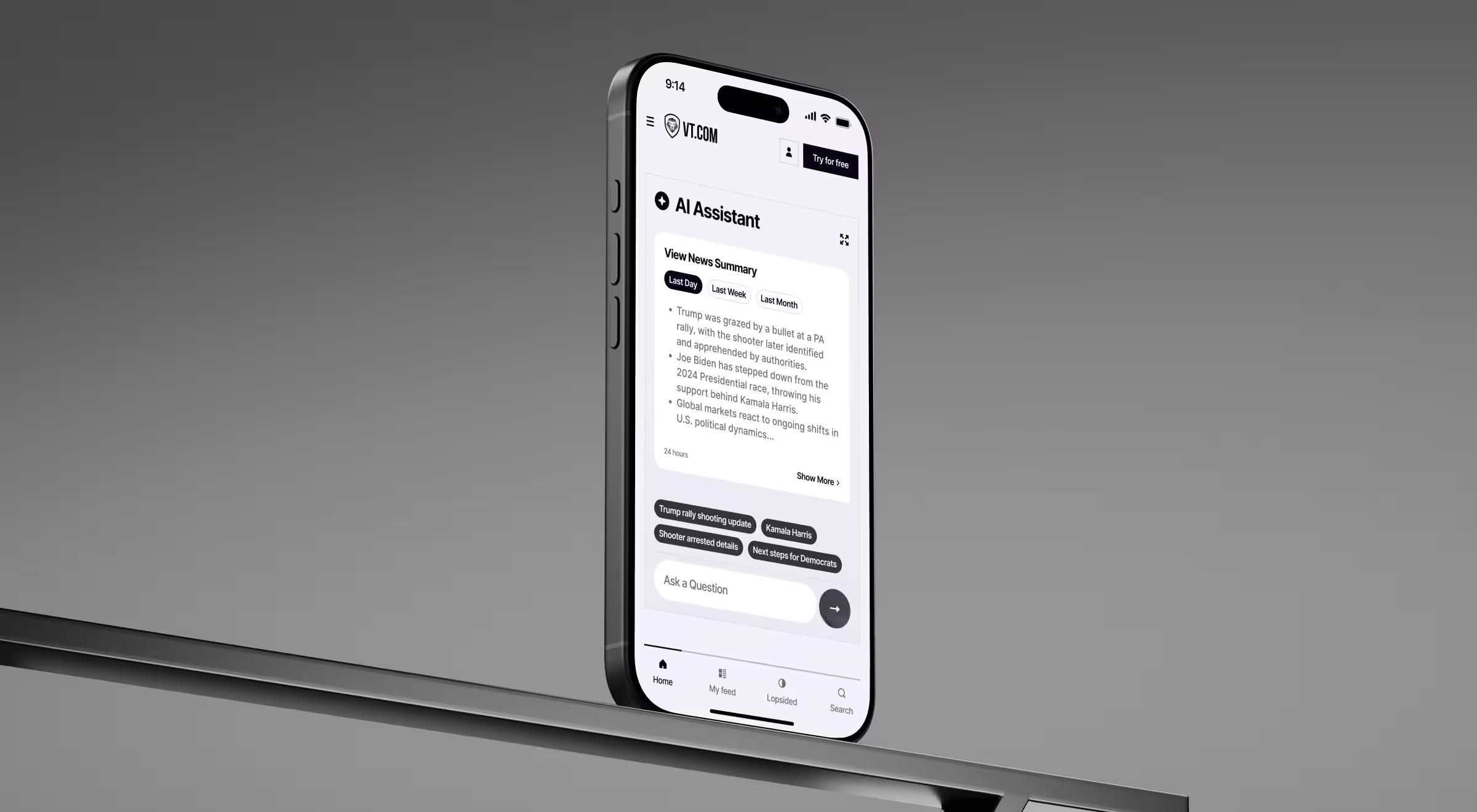
Smartphone displaying a mobile AI news assistant interface with summarized political and market updates, showing conversational AI cards, topic chips, and a clean UX-focused layout on a minimal stand

9. Expose AI constraints gracefully, so they don’t look like failures

AI has its limits. Every model does. When these limits aren’t communicated, users interpret them as bugs.

That’s where AI UX designers come in. They define guardrails, fallback states, confidence ranges, and visible boundaries for unsupported actions. These measures also prevent the wave of support tickets and negative product perception that becomes far more costly to correct after launch.

10. Shape memorable AI experiences users want to return to

Good AI helps solve complex problems. Great AI empowers people.

AI designers craft the emotional tone of the product:

  • the pacing of interactions
  • the sense of momentum in workflows
  • the feeling of being supported instead of corrected

That’s where adoption is won. Not on a model-accuracy chart, but in the small, human moments that make someone choose your product again tomorrow.

Common mistakes teams make when hiring AI designers

The fastest way to waste money on AI? Hire the wrong designer with limited technical expertise and questionable collaboration skills.

These mistakes show up in almost every company that struggles to deliver a consistent AI-powered experience. Good news, you can avoid them with a strategic hiring lens.

To make your evaluation sharper (and faster), our team has prepared a table that captures each common mistake, why it matters, and how to avoid making it.

Use this when interviewing candidates and looking through portfolios.

Mistake Why it hurts Fix this
🎨 Hiring a “visual-only” designer Focus on screens, not how the AI thinks. Results look good, but behave poorly. Ask for reasoning flows. Look for system logic and critical thinking.
🖼 Treating the portfolio like a Dribbble parade Zero insight into failure states, uncertainty, or real problem-solving abilities for diverse projects. Request a walkthrough of messy scenarios (errors, edge cases).
💬 Assuming chat UI equals AI design mastery Designer forces chat into places it doesn’t belong, leading to performance constraints. Ask: “When is chat the wrong choice?” Expect a clear answer.
⚠️ Ignoring uncertainty and failure in design AI fails often. Without guardrails, users lose trust. Review their low-confidence flows and fallback logic.
🧩 Skipping prompt–interaction strategy Prompt engineering suffers from the lack of training data sources. Model behavior becomes unpredictable. Have them explain a prompt strategy they designed.
🧱 Hiring someone who doesn’t understand model limits The designer creates unrealistic flows the model cannot support. Ask: “What if accuracy drops 20%?” Their reaction tells you everything.
🚧 Bringing top designers in after the model is done Leads to UI band-aids over deeper UX issues. Expensive rework later. Involve design in use cases, risks, and interaction mapping.
🔍 Using standard UX research instead of AI-specific testing You miss trust gaps, fear points, and mental-model misalignment. Ask how they test user trust.
📉 Hiring someone who can’t integrate design into business operations You design visually appealing screens instead of adoption-boosting UX. Ask for one design decision that moved a metric.
🧙 Expecting one person to do everything You get a generalist who’s stretched thin and shallow. Build a small, focused team. Focus on 3 major roles: AI lead designer, product designer, and engineering specialist.

Partner with the right team to build AI products users trust

Great AI doesn’t happen by chance. It’s the result of a smart product strategy combined with AI expertise.

That’s why choosing the right partner matters. When you work with Lazarev.agency, you collaborate with a team that has a proven track record of developing industry-defining AI experiences, designing multi-layer reasoning flows, and building products that lead markets.

If you’re building an AI feature that needs to stand out, this is the moment to align with specialists who know how to translate machine learning algorithms into human confidence.

Explore our portfolio and get in touch with us to design AI solutions your users will come back to.

No items found.
No items found.
No items found.
No items found.

FAQ

/00-1

What does an AI designer actually do that my current product designers and engineers don’t?

Most teams realize they need to hire AI designers after they’ve shipped a few AI features and users still look confused. That’s because AI engineers focus on machine learning models, data pipelines, and model training, while product designers shape UI and visual flow.

AI designers bridge the gap between artificial intelligence and human logic. They translate machine learning algorithms, language models, and system constraints into experiences people understand instantly. They design how users articulate intent (via natural language processing, clicks, files, or multimodal inputs) and how the AI system responds with clarity and predictability.

They also help teams avoid exposing the raw complexity of AI technology, which is where most AI projects struggle.

If your current team lacks someone who can combine critical thinking, UX, and basic knowledge of machine learning expertise, that’s the gap an AI designer fills.

/00-2

Do I really need a dedicated AI designer, or can my current UX/product team handle AI features?

If your AI is just a small feature, a generalist might be enough. But once your product handles:

  • complex AI systems,
  • real-time data analysis,
  • generative AI interactions,
  • or high-stakes AI decisions (fraud, forecasting, automation),

you need specialized skills your current team likely doesn’t have.

An AI designer understands model performance, edge cases, prompt engineering, and technical expertise behind how AI models behave under different inputs. They also work closely with PMs and AI developers to ensure the UX aligns with training data sources, constraints, and the ethical considerations of deep learning systems.

If you rely on freelance AI designers, verify that they’ve worked on diverse projects and understand AI frameworks, otherwise adoption issues will appear fast.

/00-3

When is the right time to hire AI designers?

Teams usually hire AI talent when they notice clear symptoms:

  • Users keep asking, “What am I supposed to type here?”
  • AI outputs seem random because prompts weren’t structured properly.
  • Your AI applications are powerful, but user adoption is weak.
  • Support teams are explaining how the AI works more than the product itself.
  • The AI is making decisions autonomously, and you need safe transparency.

If you’re adding automation, predictive insights, or innovative solutions powered by neural networks, you need AI designers before the system behavior becomes unpredictable or hard to trust.

Hiring early prevents costly rework, especially if your team is juggling tight deadlines, project managers, and multiple AI initiatives at once.

/00-4

Should I hire an in-house AI designer or work with an AI design agency like Lazarev.agency?

Both models work, but each solves different problems.

In-house AI designer

  • Best if AI is core to your business operations long-term.
  • Ideal when your roadmap includes multiple AI projects, data-heavy automation, or complex computer vision or NLP features.
  • Gives you consistent access to someone who can stay up to date with fast-changing AI tools and programming languages.

AI design agency Lazarev.agency

  • Perfect if you need senior-level expertise fast.
  • Helps you avoid the wrong hire (a common issue due to unclear required skills).
  • Has a proven track record across diverse projects, combining UX, model constraints, and strategic AI thinking.
  • Gives you a multidisciplinary team: product strategy + UX + AI architecture + creative direction.

If you’re unsure, start with an agency to build patterns and guardrails, then bring in an in-house designer or freelance talent to maintain and evolve them.

/00-5

What skills should I look for when interviewing AI designers?

Hiring the right AI designer requires looking far beyond “nice screens.” A strong candidate blends technical skills, UX expertise, and the ability to communicate with engineers and data scientists.

Look for:

  • Strong background in computer science or deep understanding of ML concepts. They don’t need to be an AI developer, but they must understand machine learning, probabilities, and model constraints.
  • Prompt engineering & reasoning flow design. They should know how to fine-tune prompts, structure inputs, and improve model performance through UI.
  • Collaboration skills. They must work well with AI engineers, PMs, and developers, translating technical limitations into user-friendly flows.
  • Handling uncertainty and failure states. Ask how they design for low confidence, unsupported actions, or errors.
  • Soft skills + communication skills. They should explain AI behavior clearly to stakeholders and not hide behind jargon.
  • Experience with real AI applications. Not just chat bubbles. Look for work involving cloud platform deployments, predictive tools, virtual assistants, data-heavy dashboards, or diffusion models.
  • Ethical considerations. They should mention safety, risk scoring, bias, and transparency.

Ask them to walk you through a scenario where the AI behaved unexpectedly. Their thought process reveals whether they can solve complex problems or just design glossy UI.

/00-6

How do AI designers collaborate with AI engineers, PMs, and data scientists day-to-day?

Healthy AI teams don’t silo designers from engineers. AI designers collaborate tightly with:

  • data scientists (for training data quality, edge cases, constraints),
  • AI engineers (for model behavior, latency, and performance constraints),
  • product managers (for business goals and user expectations),
  • and developers (for system integration with existing systems).

Together, they define:

  • how users interact with AI systems,
  • what patterns reinforce trust,
  • which behaviors need confirmation,
  • how outputs should be explained,
  • and how to prevent failure states.

This collaboration ensures your next project isn’t shaped by guesswork but by aligned problem solving abilities, real user behavior, and the limits of the underlying artificial intelligence.

/00-7

How fast can an AI designer improve my AI feature or product?

A strong AI designer can improve user clarity and model performance within 4–6 weeks by:

  • redesigning your main AI surface (input, examples, quick actions),
  • structuring prompts to improve accuracy,
  • clarifying boundaries for your AI models,
  • adding confidence indicators and reasoning snippets,
  • and creating onboarding that teaches users how to collaborate with the system.

This single investment improves user trust, reduces support tickets, and multiplies the ROI of your engineering team’s work, especially if you rely heavily on training data sources or large language models.

/00-8

What mistakes do companies make when hiring AI designers?

After reviewing hundreds of portfolios and supporting teams across markets, we see the same hiring pitfalls:

  • Hiring a visual-only designer with no understanding of ML logic.
  • Choosing someone who can’t evaluate performance constraints or ethical considerations.
  • Treating AI design as “just another UI project.”
  • Confusing AI developer skill sets with AI design expertise.
  • Hiring someone with zero experience in prompt engineering or probabilistic UX.
  • Relying on general freelance platforms without evaluating for ML-related work.
  • Expecting one person to be designer + engineer + researcher.
  • Bringing design in too late, when the AI system is already bolted in place.

Avoid this by screening for specialized skills, portfolio depth, and the designer’s ability to explain real-world AI solutions they’ve shaped.

/00-9

/00-10

/00-11

/00-12

/00-13

/00-14

Read Next

Abstract 3D organic form with translucent, fluid-like layers in purple and red tones on a deep violet background

12 AI conversational UX agencies that reinvent business operations

3D illustration of a human brain made of small white cubes dissolving into colorful flowers and organic fragments on a blue background, symbolizing AI, creativity, and human intelligence

11 generative AI UX design agencies challenging orthodox UX frameworks

AI & digital transformation
Weekly design & tech digest 3D cube poster for December 15–19, 2025

Weekly design & tech digest | December 15–19, 2025

News & digests
Abstract 3D visualization of AI data streams converging into a central system, symbolizing adaptive intelligence and modern AI UX design

15 AI UX agencies making AI feel simple

AI & digital transformation
3D search bar UI with the query ‘AI design jobs’ on a dark gradient background, illustrating rising interest in AI-driven design careers

Global interest in “AI design jobs” collapsed 87% after its 2025 peak, signaling a shift from hype to hybrid skills

News & digests
3D yellow cube graphic featuring bold white arrows and black typography announcing ‘Weekly fintech AI news’ and the date range Dec 11–18, 2025. Modern, high-contrast editorial design on a bright yellow background

Weekly AI fintech news digest | Week of December 11–18, 2025

News & digests
Gradient arrow icon pointing upward in vibrant pink, orange, and blue tones on a black background

The U.S. leads 2025 Google searches for “AI tools for designers”

AI & digital transformation
Your Custom Space is Almost Ready!!! <1 min

We’ve created this space specially for you, featuring tailored ideas, design directions, and potential solutions crafted around your future product.

Everything’s Ready!

Your personalized space is ready to go. Dive in and explore!

12%
Analyzing data...
Explore Now
Hey, your personal page is being crafted.
Everything’s Ready!
12%
Go
Your Custom Space Ready!!!
00 FPS