
Conversation is the fastest layer to launch. Plus, it borrows credibility from products like ChatGPT. And for lightweight tasks, it works.
But defaulting to chat for all business problems is not product thinking. It’s interface inertia.
A text thread is a linear container. Most real work is not linear. Strategy is not linear. Financial modeling is not linear. Design systems, research synthesis, and enterprise workflows — none of them fit into sequential prompts and scrolling answers.
In this article, we examine why chat alone is limiting, where AI chatbot UX design must evolve past the single text thread, and what mature AI interface designs look like beyond it.
Key takeaways
- Chat is paradigm 0. It works for simple queries but compresses intricate workflows into linear threads.
- Exploration, delegation, and precision require different paradigms. Hybrid, agentic, canvas, and ambient UIs solve distinct cognitive needs.
- Strategic UI choice determines adoption. The wrong interface limits trust and professional usability.
Chatbot trap: why chat isn't the answer
“100% of the chat interface is the bad version of the interface. Not because chat never works. It does. But when you reduce an entire product to a single text thread, you compress a multidimensional workflow into a linear conversation. You hide structure, remove visual state, and centralize control inside the model. Most teams choose pure chat because it’s fast to implement and aligns with ChatGPT hype, and not because it’s the right interface for the user or the task.”
{{Kirill Lazarev}}
What Kirill emphasizes here is that the conversational interface became synonymous with AI. That association is now constraining AI chat UX design and broader product experience design.
Chat is not inherently flawed. It is simply too narrow. It fits certain tasks and misaligns with others. The problem begins when teams apply it universally.
The limitations of chat can be summarized across 6 dimensions as illustrated in this table.
At the same time, when the cognitive load is low and the output is singular, conversation is efficient and sufficient, provided it follows proven chatbot design best practices.
Chat works well in the following scenarios:
- Simple Q&A. Clear question. Clear answer. Minimal parameters.
- Search-like queries. Retrieval-focused tasks where users want a direct response.
- Initial discovery or clarification. Early-stage intent shaping before moving into a more structured interface.
- Lightweight ideation. Brainstorming concepts where precision and comparison are secondary.
- Casual consumer interactions. Low-stakes tasks where simplicity outweighs control.
Four paradigms beyond chat
The era of AI transformation has just begun. And chat is paradigm 0.
McKinsey estimates that generative AI could add $2.6–4.4 trillion annually across industries, but only when integrated into existing business workflows. That’s how the interface determines whether AI becomes embedded infrastructure or a peripheral tool.
As AI products mature, their interfaces evolve beyond conversation. At Lazarev.agency, we see 4 recurring paradigms emerging in successful AI systems.

Paradigm 1: hybrid UI
What it is: Hybrid interfaces combine conversation with structured visuals. Chat captures intent and contextualizes reasoning. The visual layer presents results, options, sources, and interactive elements.
There’s a scientific rationale for distributing tasks this way. Cognitive psychology research shows that when information is organized visually rather than just being textually described, users perceive it more efficiently and with less cognitive effort.
Hybrid systems operationalize this principle by pairing conversational reasoning with visually structured output. This way, they align interface design with how the brain naturally perceives visual information.
When it works:
- Exploratory research
- Multi-option comparison
- Decision contexts requiring evidence
- High-value analytical tasks
Design pattern:
- Conversation sidebar for contextual refinement
- Central exploration space (table, map, chart, or structured results)
- Evidence panel with citations or metadata
Key decisions:
- Conversation explains why something appears.
- Visual outputs are interactive.
- User selections feed back into the conversation.
- Chat history is accessible but not dominant.
Case study: Accern, a leading NLP company in the USA, partnered with us to design Rhea, an AI-powered research platform for financial analysts and VC investors.
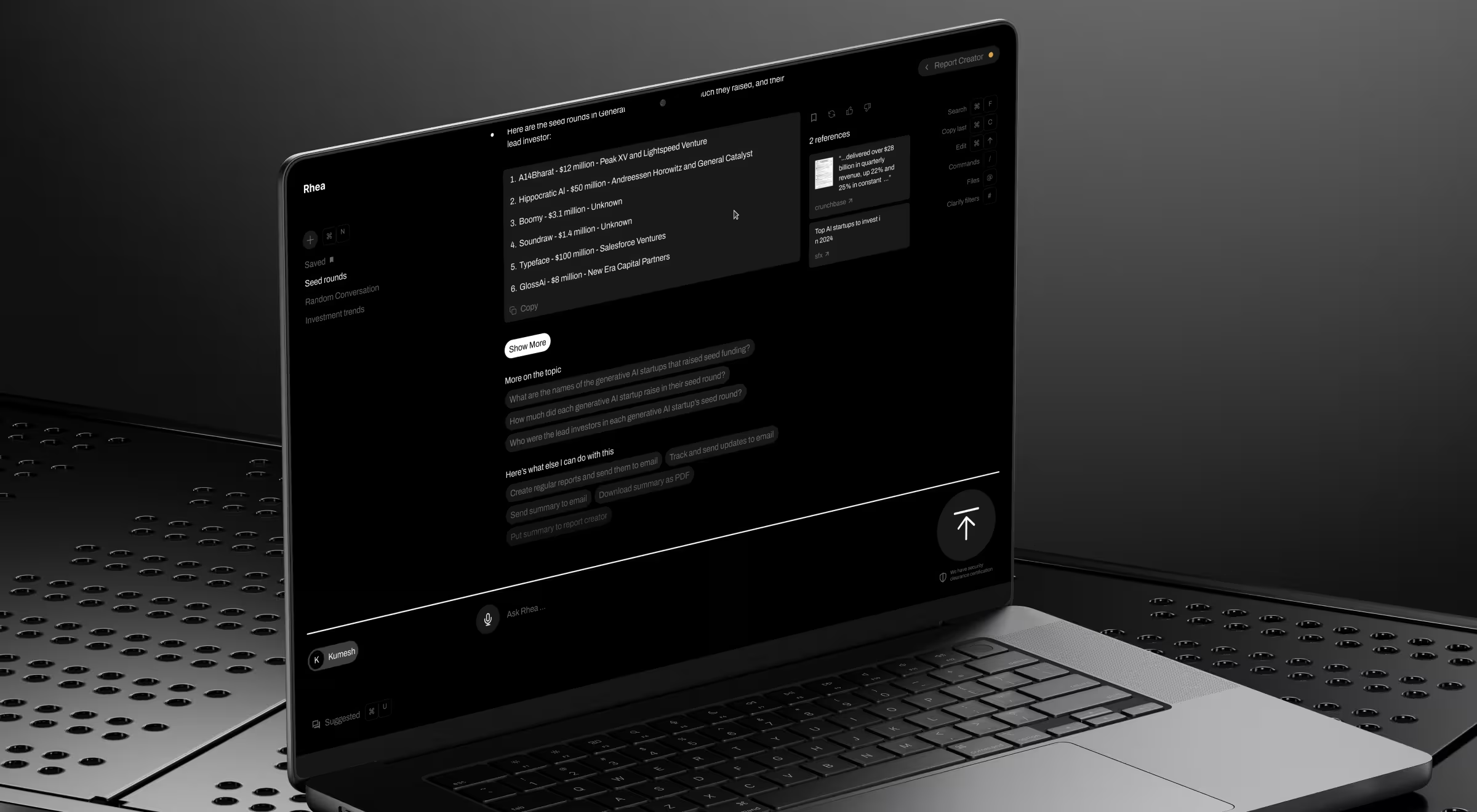
Unlike consumer AI products, Rhea operated in high-stakes financial environments where decisions impact capital allocation, and outputs must be exportable and report-ready.
Rather than building a chatbot with occasional visual outputs, we designed a system as a widget-based dynamic interface:
- Split-screen mode: conversation + interactive workspace
- AI responses could trigger charts, references, or graphical controls
- Visual widgets surfaced in direct response to prompts
- Conversation contextualized what users were seeing
Following the redesign, Rhea became a catalyst for Accern’s growth, helping the system:
- Progress from Series B
- Raise $40M+ during partnership
- Move toward acquisition
Paradigm 2: ambient AI interfaces
What it is: Ambient AI enhances an existing interface without becoming the interface itself. The user performs a task. AI supports the activity by offering suggestions based on the known context. In this paradigm, AI operates as an assistant force.
According to Microsoft’s Work Trend Index, employees spend up to 57% of their time on tasks related to communication and coordination. This is where ambient AI can shine by reducing that overhead without introducing another interaction layer.
When it works:
- Routine workflows
- Productivity tools
- Low-error environments
- Scenarios where AI reliability is high
Design pattern:
- User performs the primary task.
- AI proposes contextual suggestions.
- User accepts, modifies, or ignores.
- System learns from choices.
Key decisions:
- Suggestions appear in context.
- Acceptance is one click.
- Transparency appears when helpful.
- Override is always possible.
Case study: Gmail Smart Reply is one of the earliest large-scale demonstrations of ambient AI. You open your inbox and receive a short email: “Can we reschedule to Thursday at 3 PM?”
Before you type anything, three suggestions appear:
- “Thursday works for me”
- “3 PM is perfect”
- “Can we do 4 PM instead?”
You tap one, and it’s done. That interaction captures the essence of ambient AI.
Gmail Smart Reply did not introduce a chatbot. Nor did it ask users to “talk to AI”. Google embedded machine learning directly into the email composition flow. The system analyzes the intent from the incoming messages and surfaces context-aware responses inline.
Paradigm 3: intent-based or agentic UI
What it is: Intent-based systems invert interaction. Users define outcomes, and AI determines execution paths to achieve those objectives. This paradigm reflects a broader shift toward agentic systems: AI capable of planning and acting autonomously.
When it works:
- Multi-step tasks
- Clearly defined goals
- High-stakes environments
- Enterprise workflows
Design pattern:
- Goal definition interface
- AI-generated plan preview
- Human approval checkpoint
- Execution monitoring
- Feedback on outcome alignment
Key decisions:
- Goals must be precise.
- Plan must be visible before execution.
- Irreversible actions require approval gates.
- Progress is monitorable.
- Outcomes are evaluated against intent.
Case study: Elva, an AI video editor app Lazarev.agency designed end-to-end, brings agentic UI to consumer mobile.

Instead of learning a timeline-based editor, users state an outcome by voice. A user says "make a travel reel from last weekend," and Elva handles everything downstream.
The system then:
- Interprets the open-ended request
- Asks a clarifying question when intent is ambiguous
- Selects the best clips, cuts to rhythm, and layers music
- Presents a draft for approval
- Learns user preferences over time
The user reviews the draft before it is published. As with any agentic interface, the critical shift lies in transparency and explainability: Elva exposes the plan before committing, and every result can be refined by voice. It shows intent-based UI reaches beyond developer tools, since defining a goal by voice can replace the entire manual interface when the output is a single deliverable.
Paradigm 4: visual or canvas-based interface
What it is: A canvas-based UI is a spatial workspace where users can manipulate elements directly. AI augments inside the canvas. It suggests improvements and optimizes configurations. This paradigm acknowledges that professional tools must be compositional.
When it works:
- Creative tools
- Design environments
- Financial modeling
- Data workflows
- Multi-parameter systems
Design pattern:
- Canvas as the main surface
- Nodes or components
- Property panel with structured parameters
- AI suggestions as overlays
- Undo/redo for all AI actions
- Automation optional
Key decisions:
- Control is explicit.
- AI suggestions are inspectable.
- Users can refine every parameter.
- Automation never replaces visibility.
Case study: Canva’s Magic Design integrates AI into an existing visual canvas.
Instead of generating entire outputs in a conversational stream, AI operates at the component level within a persistent visual structure. The canvas remains the system of record.
A typical workflow illustrates the difference:
- User selects a hero section.
- AI proposes multiple layout variations.
- AI rewrites headline options.
- User edits typography manually.
- AI suggests color palette adjustments.
At every stage, the canvas persists. This preserves three critical properties:
- Parallel comparison — multiple layout options are visible simultaneously.
- Granular override — users adjust individual elements without restarting generation.
- State transparency — structure remains visible; nothing is hidden in dialogue history.
Canvas-based AI allows users to build products they need with intelligence layered directly into the structure.
How to match UI type to use cases
The essence of the task should determine the shape of the interface. A simple query does not call for an intricate UI. A professional workflow cannot survive inside a text box.
The table below maps common AI use cases to the interface paradigms that support them best.
Interface is the product so design it strategically
When the UI paradigm matches the task, AI supercharges your product. It supports decision-making and earns professional trust. When it clashes with what your product conceptually offers, even advanced models feel constrained.
Choosing the right paradigm — chat, hybrid, ambient, agentic, or canvas-based — determines whether AI functions as a novelty layer or as operational architecture.
At Lazarev.agency, an AI product design agency, we design AI-native product systems where intelligence is structured and aligned with real workflows. From high-stakes financial platforms to agentic enterprise tools, we architect conversational interfaces that make AI usable at scale.
If you are building or redesigning an AI product and want to ensure the interface matches the complexity of your use case, get in touch. Let’s structure your product interface strategically.



.webp)