
The underlying idea behind a UX design sprint sounds simple: just five days, one testable prototype, and a clear product direction. But simplicity in format does not mean simplicity in execution.
As our CEO puts it:
“Can you build a building in 4 months? It depends. A small cabin? Yes. An office complex? No. Design works the same way. The question isn’t ‘can you do it fast?’ It’s ‘what are we actually building?’”
{{Kirill Lazarev}}
That distinction defines whether a UX design sprint will be a catalyst for your business growth.
What goes unseen is the level of creative energy and focus the process demands. A design sprint is called a sprint for a reason. It requires strategic velocity and disciplined execution.
In this guide, we examine the methodology, structure, trade-offs, and evaluation criteria to help you determine whether a UX design sprint aligns with your business model and product development stage.
Key takeaways
- A UX design sprint is a decision framework. It merges Lean UX, Agile, and Design Thinking into a structured week to validate high-risk assumptions before development spend.
- The real ROI is the avoided rework. If a sprint prevents months of misaligned development, it justifies five focused days instantly.
- Context determines value. Sprints are most valuable when the strategic alignment around what you’re building feels off, and an actionable prototype would resolve debate.
What’s the methodology behind a UX design sprint?
A UX design sprint is a structured convergence of three mature disciplines: Lean UX, Agile, and Design Thinking.
Understanding how each contributes to the sprint clarifies what you are investing in. Below is a snapshot of how each methodology shapes the sprint model and what that means for your team.
What does a UX design sprint process look like?
A sprint is a tightly structured decision cycle. Each day has an objective: align, expand, converge, simulate, and validate.
When it works, the week tunes your strategy to the observable user behavior. When it doesn’t, it devolves into a series of disconnected activities that drain your resources.
Understanding what happens each day shows whether your team is prepared to extract value from the format.
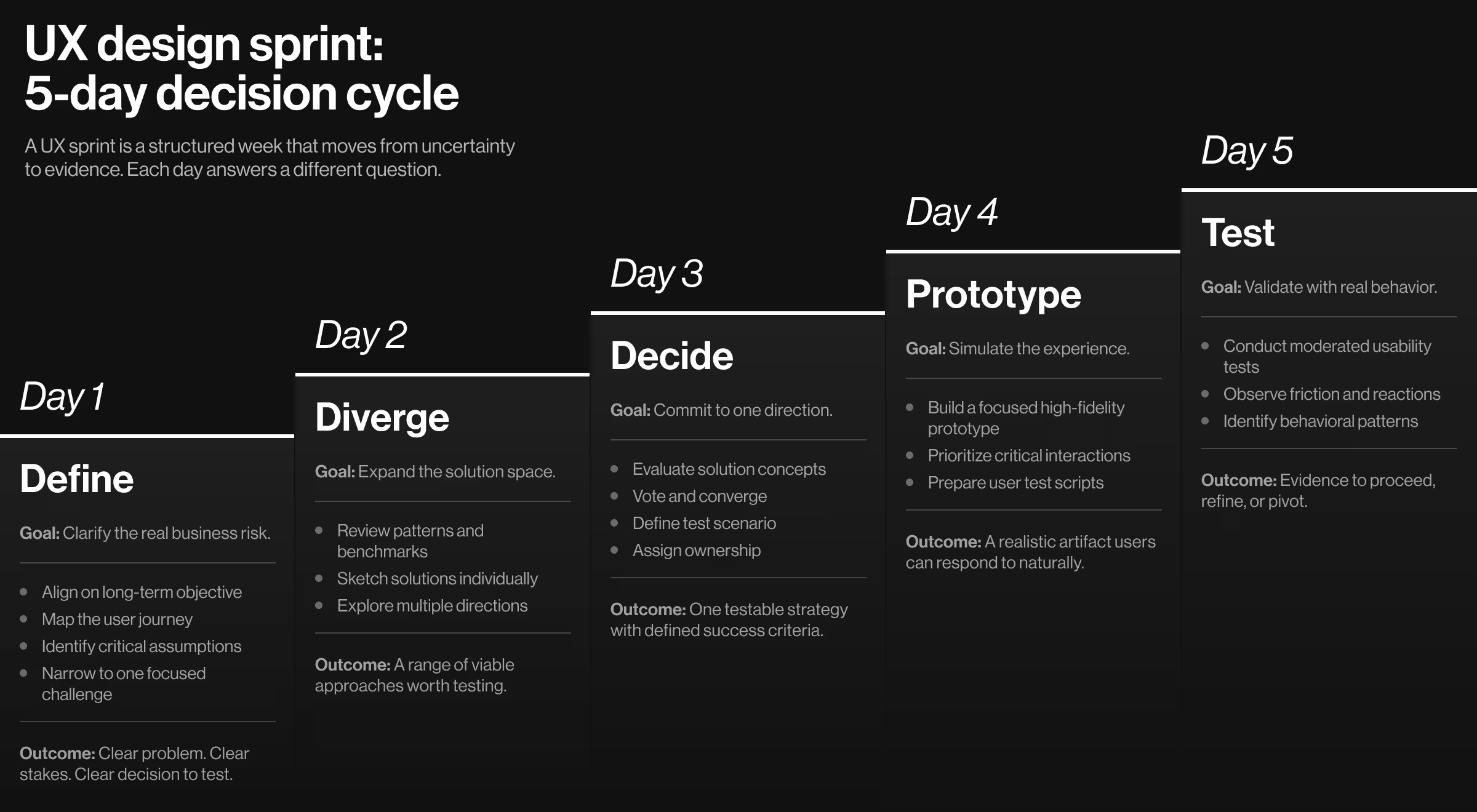
Day 1: Define
The first day establishes intellectual discipline and a structured path for the entire sprint. It aligns the problem your team seeks to solve with the stakes attached to solving it.
Key activities:
- Define the long-term business objective.
- Map the end-to-end user journey.
- Identify critical assumptions and risks.
- Narrow the scope to one focused challenge.
⚡ Practical insight: Don’t walk in with a solution already in mind and attempt to validate it. Start with an audit: articulate the underlying business risk before defending a preferred answer.
By the end of Day 1, the team should answer:
- What business decision are we trying to make?
- What assumption, if wrong, would invalidate this direction?
- What user moment carries the highest uncertainty?
Day 2: Diverge
Day 2 challenges default thinking and expands the solution space for your team to explore and ultimately act on.
The day starts with a quick review of default assumptions. Then, the focus shifts to individual ingenuity. Instead of debating ideas as a group, participants generate solutions independently.
Key activities:
- Review relevant patterns and benchmarks.
- Sketch alternative approaches individually.
- Push beyond the obvious solution.
⚡ Practical insight: Group brainstorming often sets in prematurely. Encourage individual contributions first. This helps surface unconventional directions and prevents hierarchy from obscuring creativity.
By the end of Day 2, the team must be aligned on:
- A diverse set of viable solutions.
- Recognition that multiple directions exist to explore further.
- The understanding that the goal is breadth and variety.
Day 3: Decide
With a focused understanding of the problem and a stack of actionable solutions, it’s time for strategic convergence. That’s what Day 3 is for — a transition from creative exploration to commitment.
Key activities:
- Structured discussion of proposed solutions.
- Voting to identify ideas with the highest internal buy-in.
- Define the solution to be prototyped.
- Assign ownership and allocate responsibilities.
⚡ Practical insight: Decision discipline is essential here. The sprint requires a designated decision-maker to prevent the so-called consensus paralysis.
By the end of Day 3, the team must be aligned on:
- What exact scenario will be tested.
- What success and failure look like.
- What decision will follow the test outcomes.
Day 4: Prototype
Day 4 converts strategy into a believable artifact. Up to this point, the sprint has been intellectual — mapping assumptions, exploring alternatives, and committing to a direction. Now the team turns strategy into an experience users can respond to.
Key activities:
- Build a high-fidelity but narrowly scoped prototype.
- Set realistic expectations for critical interactions.
- Script user testing scenarios.
- Prepare interview guides.
⚡ Practical insight: Don’t confuse a sprint prototype with a production-ready design. It is a simulation designed to evoke authentic user behavior.
Teams often over-invest in perfectionism. The rule of thumb is: if users behave naturally during testing, the prototype has done its job.
By the end of Day 4, the team must be aligned on:
- A realistic, testable prototype that reflects the chosen strategy.
- The scope and critical interactions to prioritize in the prototype.
- The scenarios and guides for user testing.
Day 5: Test
Testing is the inflection point. It exposes whether the direction you committed to survives contact with real users. Not in theory or stakeholders’ imagination. In observable behavior.
This is where the decision you made on day three faces evidence. A sprint only earns its value if day five introduces new information — information strong enough to confirm direction or challenge it.
Key activities:
- Conduct moderated usability testing sessions.
- Observe user behavior in real time.
- Capture emotional reactions and barriers in user flows.
- Identify patterns across user interviews.
⚡ Practical insight: Make learning your key objective. Prioritize behavioral observation over opinion-based feedback.
By the end of Day 5, the team should know:
- Is this direction viable?
- What needs refinement?
- Should we pivot or proceed?
🔍 For a structured approach on how to collect and interpret user feedback, explore our Design Lead’s miniguide.
If the sprint concludes without a clear decision implication, it has not fulfilled its purpose.
Would a UX design sprint work for your team? Pros and cons of the method
Some teams opt for a design sprint, assuming it’s a shortcut to success. Both in effort and timelines. That point of view is a misconception.
“There’s a difference between moving fast and moving blindly. A UX design sprint isn’t about low effort or quick visuals. It’s about concentrating the team’s intelligence into a structured, high-discipline window. We don’t sprint to skip thinking — we sprint to think harder, together, before real money is spent.
I’ve heard some founders question the need for R&D for their product. The truth is, when you remove discovery, you may save weeks on the calendar, but you introduce months of correction later. Strategy compresses time differently. It builds the foundation first, so what you ship can scale. That’s the difference between a fast project and a strategic one — one chases visible progress, the other builds durable growth.”
{{Kirill Lazarev}}
Kirill makes it clear: strategic velocity is an undeniable strength of a design sprint — unless it becomes a justification for rushing things. In that case, it’s a barrier.
Deciding whether a UX design sprint fits your team requires an objective evaluation of both its advantages and operational trade-offs.
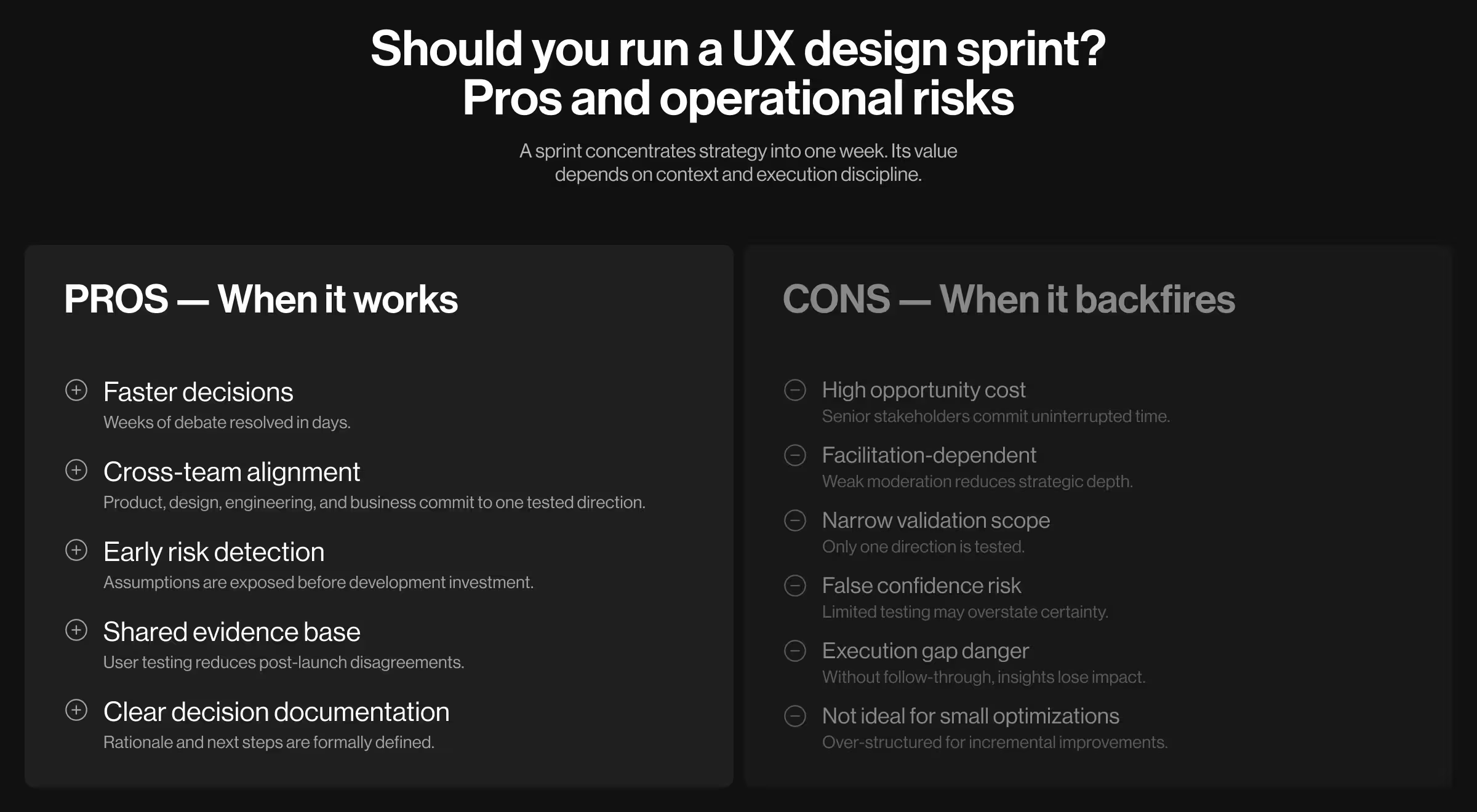
Pros of the UX design sprint model
When the stakes are high, and debate is going in circles — that’s when a sprint earns its place.
- Accelerated decision-making. Forces clarity within days instead of weeks of debate.
- Cross-functional alignment. Product, design, engineering, and business stakeholders align around one tested direction.
- Early risk exposure. Identifies flawed assumptions before engineering investment begins.
- Reduced stakeholder misalignment later. Shared testing experience minimizes post-build disagreements.
- Clear decision documentation. The sprint creates a traceable rationale for why a direction was chosen.
The core advantage: speed combined with evidence.
Cons of the method
A sprint is not universally efficient. In the wrong context, it introduces cost without proportional value.
- High opportunity cost. Senior team members dedicate multiple uninterrupted days.
- Dependency on strong facilitation. Poor moderation reduces depth and clarity.
- Narrow scope. A sprint validates one focused direction, which (without proper managerial oversight) might fragment the entire product ecosystem.
- Risk of false confidence. Shallow user testing can create misleading assurance.
- Post-sprint execution gap. Without implementation commitment, sprint outcomes lose relevance.
- Not suited for incremental optimization. If your problem is iterative improvement, a sprint may be excessive.
The method is powerful under the right constraints. Misapplied, it becomes an expensive workshop.
How to interpret pros and cons in your context
A UX design sprint is neither inherently efficient nor inherently excessive. Its value depends on context.
Use the table below to evaluate your situation objectively. Each row represents a structural variable that determines whether a sprint will catalyze improved performance or consume capacity without proportional return.
If multiple rows lean green, your context supports a UX design sprint. If most lean red, a lighter discovery model will likely be more efficient.
🔍 For expert-level insight, consider bringing in external design specialists who have run high-stakes sprints before. Explore our guidelines on how to outsource product design the right way.
Make an intentional decision
A UX design sprint is not a universal approach that fits all scenarios across industries. But if it does chime with your team’s dynamics, it pays off.
Its purpose is singular: resolve a high-stakes product question before real money is committed.
If your challenge is misalignment or high-stakes feature bets, a sprint lets your team focus on what matters. Yet, if your challenge is execution discipline or long-cycle user research, it will not compensate for those gaps.
If you’re weighing that decision and want a structured, senior-led perspective, reach out to discuss whether a UX design sprint is the right move for your product stage.
.avif)