

“AI-native product design is the discipline of building B2B product UX around probabilistic AI features so the AI features users see in the workflow get adopted. What makes it different from a conventional design approach is the convergence of 4 principles: being visible at decision points, controllable by the user, explainable when it matters, and recoverable when wrong.”
{{Kirill Lazarev}}
Every Head of Product and Head of AI is having the same quarterly conversation in 2026. The C-suite wants AI ROI before the next board meeting. Sales says enterprise prospects ask sharper questions about AI than they did six months ago. The internal design team is already underwater on incremental tickets.
The solution is here. This article is for Heads of Product and Heads of AI under board pressure to show AI ROI. Adoption is lagging the story you're telling, and you have one quarter to close the gap. We walk through what AI-native product design is, why retrofitted AI features bring your product down, the five UX patterns at the core of the discipline, and a 90-day plan to apply AI-native product design without rebuilding the product from scratch.
Key takeaways
- AI deployment is the easy part — adoption is the gap. 88% of organizations now use AI in at least one function, but only 21% have redesigned the workflows around it.
- AI projects stall after proof of concept, in the UX layer between the model and the user. At least 50% of gen AI projects were abandoned after proof of concept by the end of 2025.
- AI-native product design pays back in measurable ARR. Lazarev.agency's AI-native redesign of Accern.Rhea helped move the company from Series B to an eight-figure acquisition with $40M+ raised across the partnership. VTnews.ai's AI-native launch onboarded 85k users in the first month, with 90% reporting it broke their bias bubbles.
How AI-native product design closes the AI adoption gap
The unit of value of AI-native product design is adoption. Measurable, defendable, expansion-linked usage of the AI capabilities you've already built or are about to launch. Everything else, like design systems and UI components, is in service of that.
The adoption equation is direct, even if the work isn't. Here’s what Lazarev.agency calls an AI-native product design adoption equation:
Visible × Understandable × Controllable × Recoverable = Used.
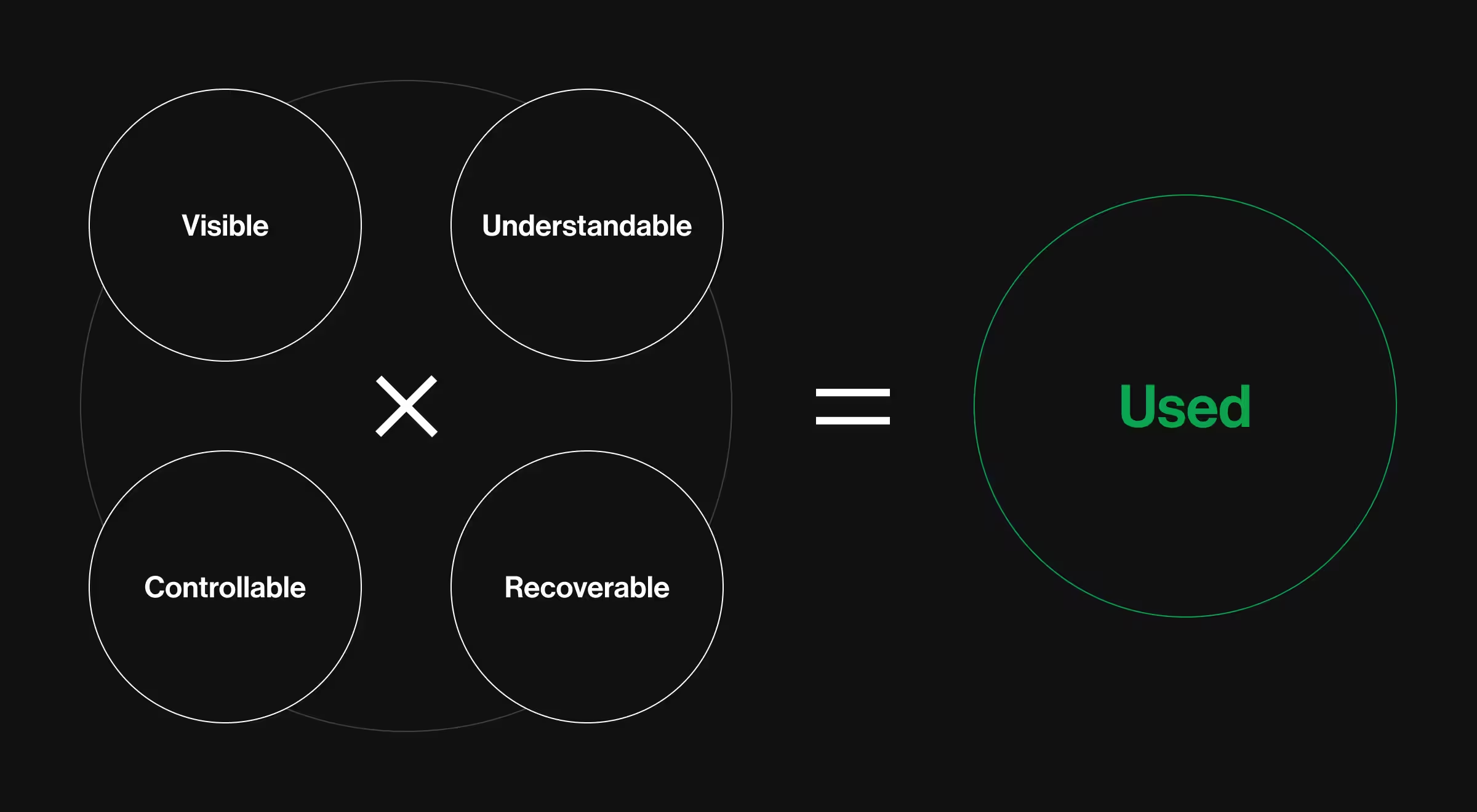
Four scenarios, yet the same output:
- If the AI is invisible in the workflow, users don't reach it.
- If it's visible but inscrutable, they don't trust it.
- If they can't control or override it, they can't take the risk.
- If it can't recover gracefully when it's wrong, they stop relying on it after the first bad answer.
Each factor is a multiplier. Get one wrong, and the others can't compensate.
When all four hold, the result shows up in the dashboard metrics every Head of Product is already tracking: AI feature activation rate, repeat usage of AI-assisted workflows, win rate in deals where AI is part of the demo narrative, expansion and upsell tied to AI-bundled plans, and time-to-insight in critical workflows.
Marketing can't drive adoption of a feature users don't understand. Sales can't expand into AI tiers when the AI feels like a black box. The conversion happens in the product. If your model works and your numbers don't, the gap is AI-native product design.
The data shows exactly how such a gap compounds across the market:
- Stage 1 — Deployed → 88% of organizations have AI at least in one business function (McKinsey).
- Stage 2 — Architected → 21% have redesigned workflows around it (McKinsey).
- Stage 3 — Activated → Only one third of organizations have moved AI from pilot to scale across the enterprise, as mentioned in The state of AI in 2025: Agents, innovation, and transformation.
- Stage 4 — Trusted → Only 46% of people globally are willing to trust AI systems (KPMG).
- Stage 5 — Compounding → 5% of businesses are AI-future-built and can achieve 5× revenue growth compared to other companies (BCG).
The gap from 88% deploying AI to just 5% capturing real value is what AI-native product design is built to close. Accern reached Stage 5 by designing every layer of Rhea around the V × U × C × R equation above.
Practical insight from Lazarev.agency's portfolio: When Accern returned to us in 2024 to design Rhea, the goal was to design a research-to-report workflow financial analysts would trust with regulated decisions. We applied AI-native product design to each factor of the adoption equation:
- Visible — A hybrid GUI-and-prompt interface placed AI at the decision point. We built a widget-based system with a dynamic UI. It surfaces references, charts, footnotes, and graphical controls in response to voice or text prompts.
- Understandable — An adaptive natural language communication system makes the AI's reasoning legible. When answers are unclear or queries are ambiguous, Rhea steps in with clarifying questions, suggestions, and hints.
- Controllable — A multi-purpose command line transformed the standard prompt field into an advanced control surface. Users can search files, set notifications, manage automated emails, schedule calls, and trigger alerts.
- Recoverable — Integrated datasets and file management let users ground Rhea in the right context. Pre-configured "Lenses" or custom datasets connected via Accern's NLP Platform mean the AI runs on data the analyst trusts.
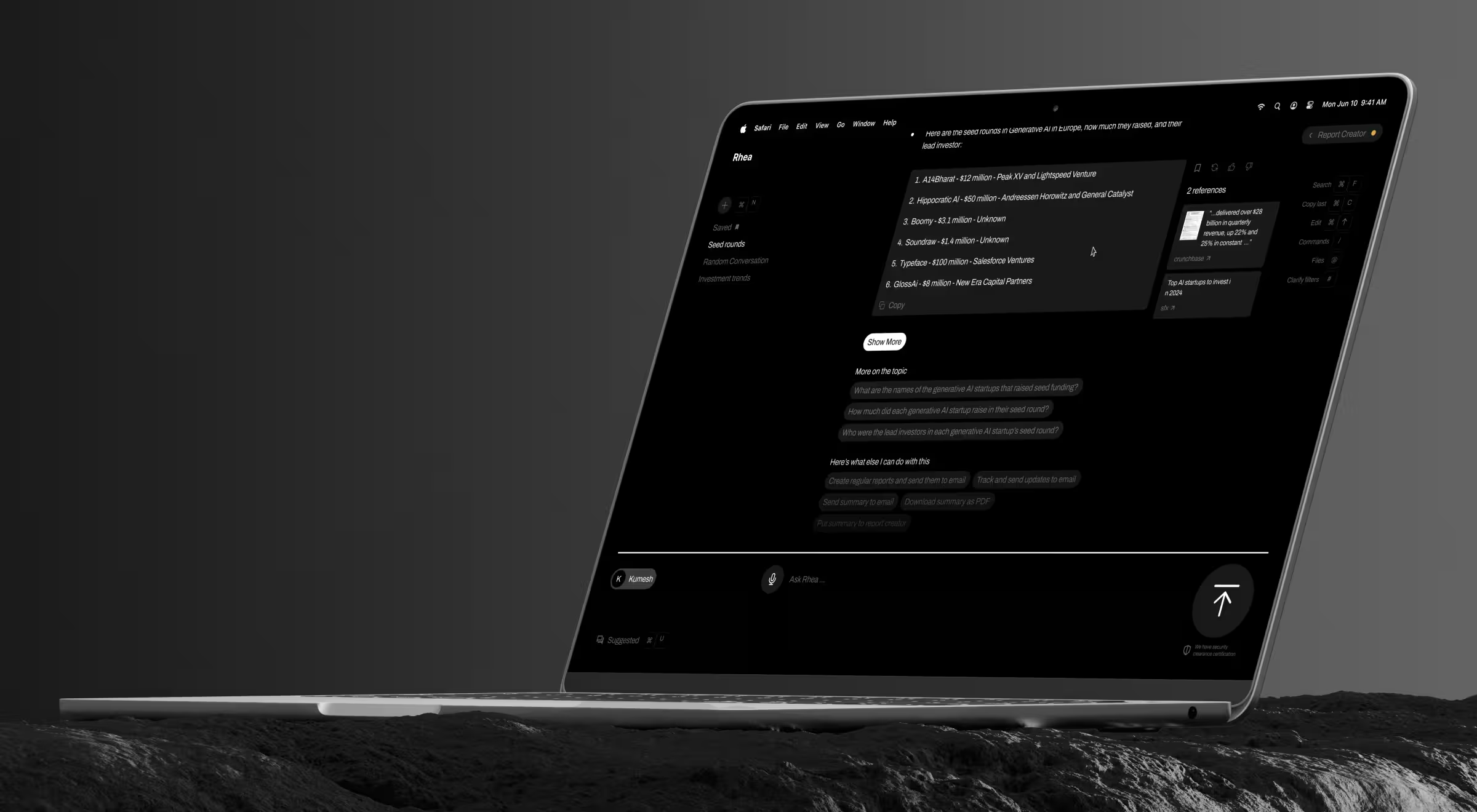
Result: Rhea moved Accern from Series B to an eight-figure acquisition, with $40M+ raised across the partnership.
3 reasons your AI feature adoption stalls
The pre-AI version of this problem is documented in website dashboard design.
Data insight: At least 50% of gen AI projects were abandoned after proof of concept by the end of 2025, Gartner reports. Another Gartner survey of 782 I&O leaders puts the share of AI use cases that fully meet ROI expectations at as little as 28%.
Most "AI adoption is low" reviews end up in the same three buckets, and none of them are about model quality. All three are AI-native product design failures.
Failure mode #1. The AI no one can find
The feature exists in the product, but it lives in a settings tab or behind a feature flag. When someone asks "do you have AI?", the answer is technically yes. When someone asks "where do customers experience the AI?", the room goes quiet.
Spot it in your product:
- If you had to demo the AI to a new enterprise prospect tomorrow, would you have to start on a settings page to show it?
- Can a non-power user reach the AI surface without coaching or a tooltip walkthrough?
- Does the AI feature appear more often in your sales demo than in actual usage logs?
Failure mode #2. The AI no one can trust
The AI is visible, but it offers no explanation, no override. Power users figure it out. Everyone else either ignores it or avoids the corresponding workflow. In regulated B2B contexts like fintech, healthcare, or legaltech this failure mode kills enterprise expansion conversations before they start.
Spot it in your product:
- When the AI is wrong, what does the user see — a recovery path or a generic error?
- When the AI is uncertain, do users know, or does every output look equally confident?
- When users disagree with a recommendation, can they override it without leaving the flow?
Failure mode #3. The AI that only works in demos
The AI looks great in QBRs and lighthouse demos, but it doesn't survive contact with the production workflow. Sales tells one story, the product tells another, and the post-sale activation team is left re-explaining what the customer bought.
Spot it in your product:
- Does your demo run on a curated dataset the average customer will never have access to?
- After a demo, how often does sales need to "set expectations" about what the AI does in production?
- In your post-sale activation tickets, are the most common questions about features sales already showed in the demo?
💡Expert tip: If any of the diagnostics above made you pause on "we'd have to check," that's the AI-native product design gap, named. Learn more about
What "AI-native" means and why most B2B platforms aren't
AI-native describes a behavior set, and AI-native product design is the discipline of building products around it. As highlighted above, a product is AI-native when AI is:
- visible at decision points — surfaced where the user makes a choice
- controllable by the user — granular accept, edit, reject, and escalate-to-human states
- explainable when it matters — progressive disclosure: a one-line rationale by default, deeper provenance and sources one click away
- recoverable when it's wrong — override path and graceful fallback
Most B2B platforms have AI in production. Few are AI-native by that definition. The difference shows up most clearly in a side-by-side comparison:
The reason most teams sit in the left column is that AI features were retrofitted onto a UX architecture designed for deterministic SaaS: clean data in, clean answer out, no probabilistic states to surface.
Probabilistic outputs need a different visual grammar, and AI-native product design is what builds it.
💡Practical insight from Lazarev.agency's portfolio: When Patrick Bet-David partnered with us to launch VTnews.ai, the brief centered around AI-native product design from the ground up — a platform where seven-plus AI tools (real-time bias analysis, AI summaries, a prediction engine, contextual chat assistant, configurable timeline of past coverage) shared a single design language and behaved as one coherent product.
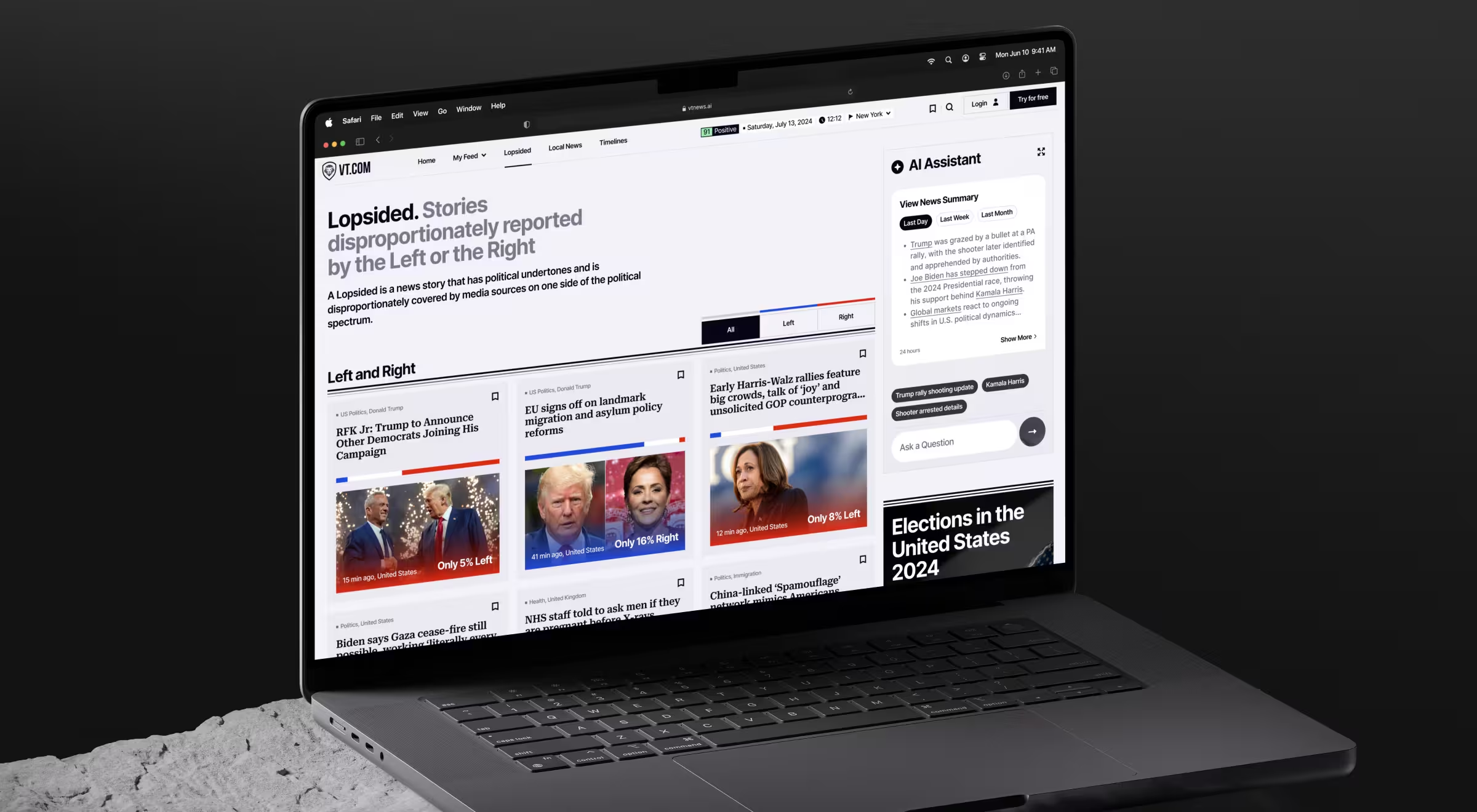
The result: 85,000 users onboarded in the first month after launch, with 90% confirming the platform helped them step out of bias bubbles — a 30-day adoption signal most B2B AI platforms don't reach in 12 months.
The five AI UX patterns of AI-native product design
Across the AI products we've shipped for the last 10+ years, the same five pattern families show up wherever activation curves bend upward. Together, they form the working library of AI-native product design.
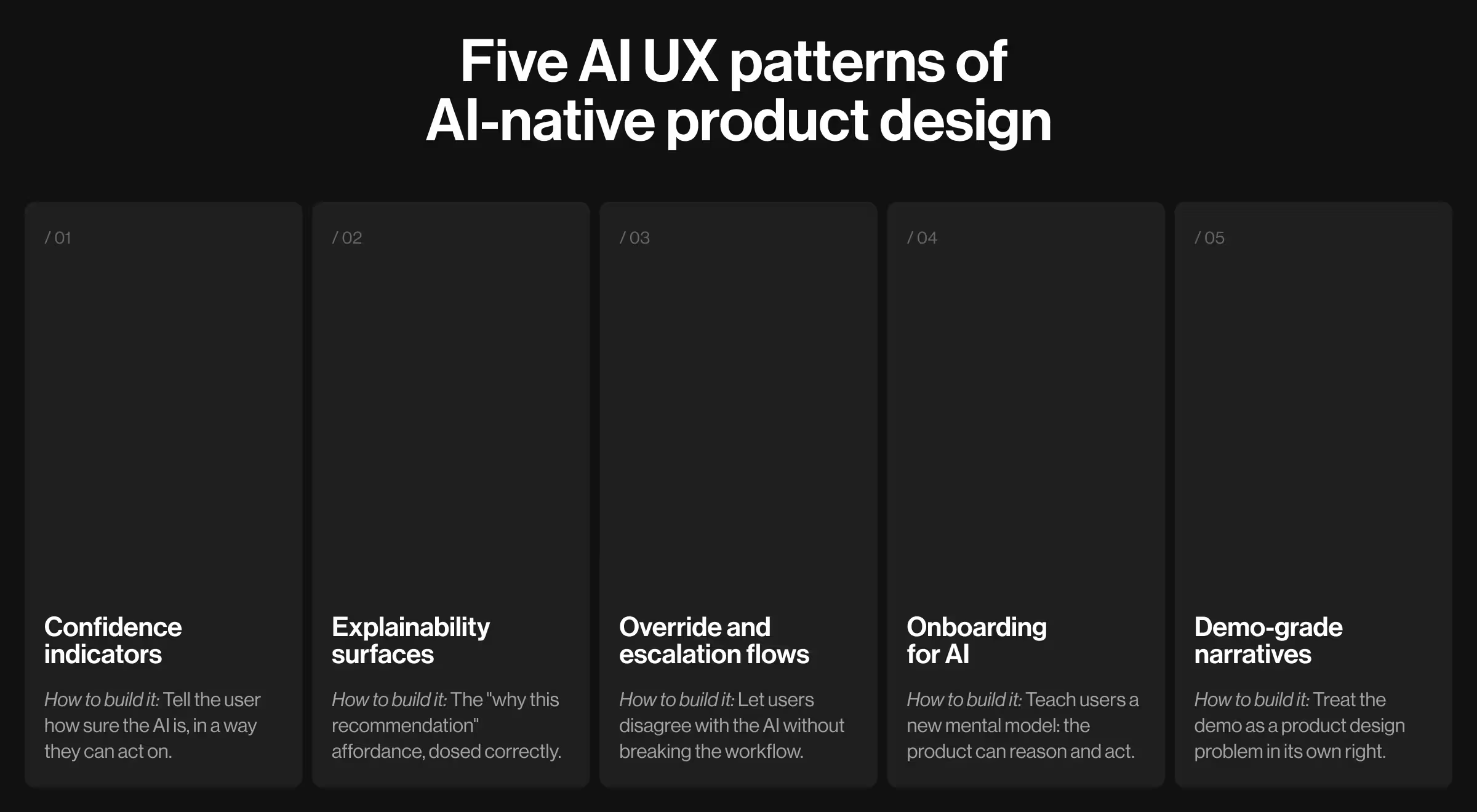
Pattern 1: confidence indicators
The principle: Tell the user how sure the AI is, in a way they can act on.
Sometimes it’s a percentage. More often, it's a band like "high confidence" / "review recommended" or a contextual qualifier embedded in the language of the recommendation itself.
"Treat confidence as an authorship problem. Every AI-native interface has to make the user feel like the co-author of the output, with the right to edit, override, and reshape it."
{{Anna Demianenko}}
Practical case: GitHub Copilot greys low-confidence completions and brightens them as confidence rises. It is a visible cue developers can act on without leaving the flow.
Metric this moves: AI feature activation rate; demo win rate in regulated buyer cycles.
Pattern 2: explainability surfaces
The principle: The "why this recommendation" affordance, dosed correctly.
Too much explanation overwhelms non-experts. Too little erodes trust with regulated buyers. The pattern is progressive disclosure: a one-line rationale by default, deeper provenance and source citations one click away.
Data insight: Explainability is the second-most-cited AI risk by enterprises, as highlighted in The state of AI in 2025: Agents, innovation, and transformation. But it's not among the most-mitigated, which is exactly why the buyers asking sharper questions in demos right now keep finding the same gap.
Practical case: Perplexity surfaces a one-line citation under every AI answer with one-click access to the full source.
Metric this moves: demo win rate; expansion in regulated tiers.
Pattern 3: override and escalation flows
The principle: Let users disagree with the AI without breaking the workflow.
Users need granular control: accept, edit, reject, or escalate to human review. Every override is also a feedback signal the model can learn from but only if the UX captures it.
Practical case: Cursor binds accept, reject, and redirect to keyboard shortcuts (Tab, Esc, Cmd+K) so developers stay in flow when overriding suggestions.
Metric this moves: repeat usage of AI-assisted workflows; workflow completion rate.
Pattern 4: onboarding for AI
The principle: Teach users a new mental model: the product can reason and act.
Traditional SaaS onboarding teaches users where things are. AI-native onboarding teaches them what their job becomes once the product can act on its own.
Practical case: Notion AI's first-run onboarding teaches the slash-command pattern, training users to invoke AI inline to compose, summarize, or generate information.
Metric this moves: AI feature activation rate; time-to-first-value.
Pattern 5: Demo-grade narratives
The principle: Treat the demo as a product design problem in its own right.
AI features that work in production but don't tell a coherent story in a 20-minute demo lose deals to competitors with weaker AI but tighter narratives. A demo-grade narrative is the in-product story sales can run with.
Practical case: Glean's enterprise sales motion uses production-like search queries in demos that mirror what a paying customer experiences.
Metric this moves: demo win rate; expansion close rate.
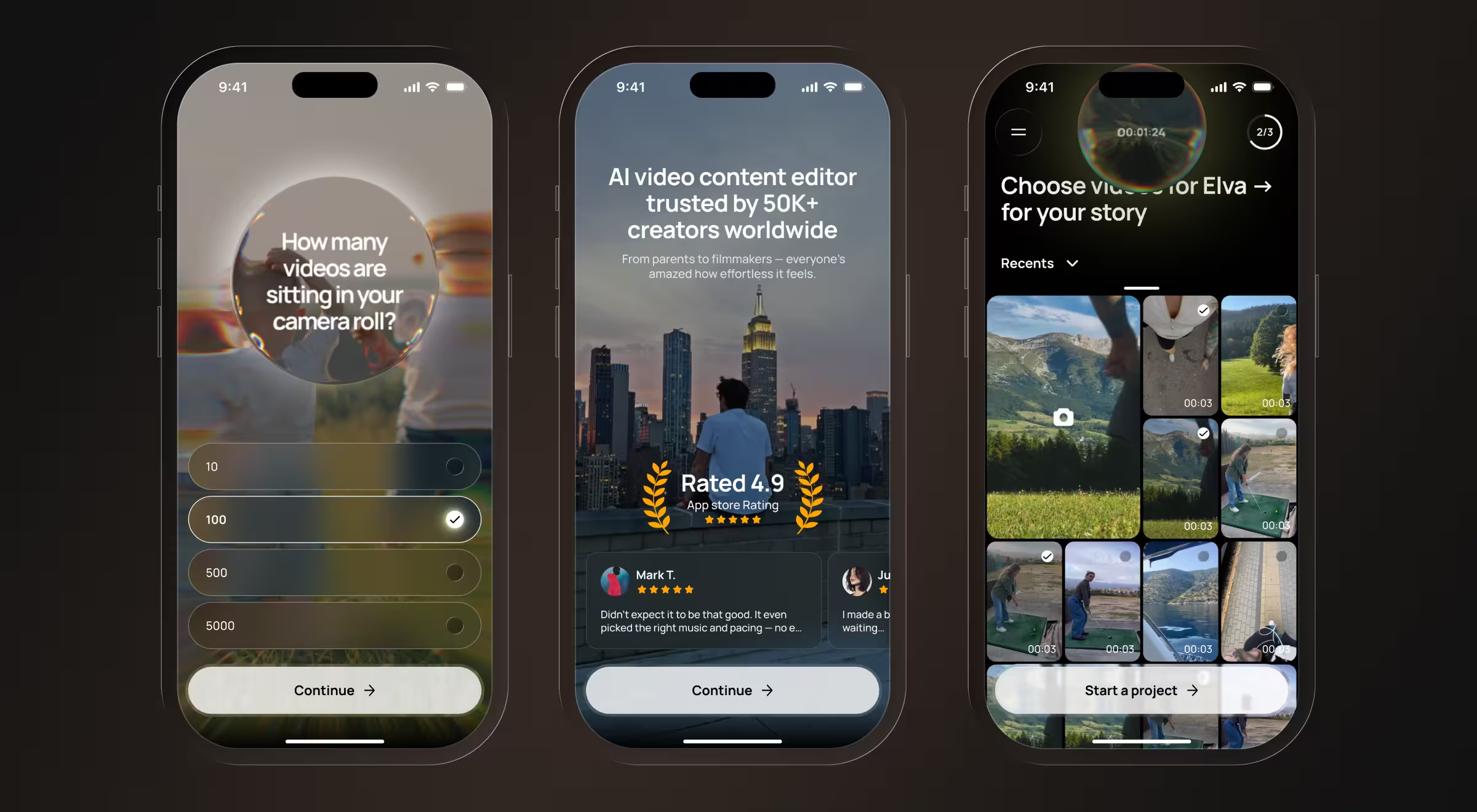
💡Practical insight from Lazarev.agency's portfolio: Elva, the Webby Award-winning voice-first agentic mobile video editor, was designed end-to-end — brand, onboarding, in-app UX, and monetization shipped as one launch package. The product codifies several of the patterns above:
- Pattern 1 (confidence indicators): The signature blob persona communicates processing states, capabilities, and "thinking" cues through motion and color.
- Pattern 3 (override and escalation): Clarifying questions for ambiguous intent, drafts for approval before commit, and smart suggestions ("Looks like a beach trip — want a travel reel?") that solve the blank-page problem.
- Pattern 4 (onboarding for AI): A personalization quiz with FOMO prompts ("How many unused videos are sitting on your phone right now?") surfaces the cost of inaction; preference learning keeps onboarding alive past session one.
The two AI-native product design moves and how to choose the right one for your product
When adoption doesn’t meet the board’s expectations, two distinct AI-native product design programs move it. Both work. Yet they solve different problems and shouldn't be confused.
Move A: full AI and data product UX redesign
Duration: Four to eight months.
Best for: when the core information architecture is broken, dashboards are dense, multiple AI features have no shared home in the workflow, and retention or activation has been bleeding for more than a quarter.
What it entails: End-to-end AI-native product design, including information architecture, system, AI patterns, design system extension, dev handoff, and rollout, delivered as one connected program.
Move B: AI product launch program
Duration: Four to eight months.
Best for: when you're moving a model or pilot from R&D into a production-grade, demoable feature, and the launch has to land for a board, a lighthouse customer, or a category-defining moment.
What it entails: Focused work on the single AI surface and the surrounding launch story. It has a tighter scope than a full redesign, with the same depth on the patterns that determine adoption.
Most teams misread their situation as Move B when it's Move A. The signal: if your product has more than one AI surface and no two of them feel like they were designed by the same team, you're in AI-native redesign territory, whether you like it or not.
💡Read more about our AI-native product design work across the portfolio for examples of both moves in production.
Metrics that prove AI-native product design is working
The board has moved past "do you have AI?" to "is anyone using it, and does it change the numbers?" That's the right question, and it's answerable with instrumentation most teams could add to a redesigned flow inside a sprint.
The metrics worth tracking before and after any AI-native product design work:
- AI feature activation rate — what percentage of eligible users reach and use the AI surface in their first session.
- Repeat usage — what percentage come back to the AI workflow within 7 and 30 days.
- Workflow completion — does the AI step lead to a completed task or a dropped flow
- Demo win rate — close rates in deals where AI was part of the demo versus where it wasn't.
- Expansion — upgrade and upsell rates tied to AI-bundled plans.
- Time-to-insight — how long it takes a user to reach the answer or decision the AI is supposed to support.
- Customer lifetime value — total revenue per customer across the relationship, lifted indirectly by every other metric in this list.
A simple before/after instrumentation checklist:
- Define the metric — check out our guide on key UX performance metrics worth analyzing.
- Baseline it for at least four weeks before any UX change ships.
- Instrument the redesigned flow in the same way.
- Report side-by-side.
Boards trust their data more than your word, which is what makes this method politically durable.
Lazarev.agency’s 90-day AI-native product design plan to lift adoption
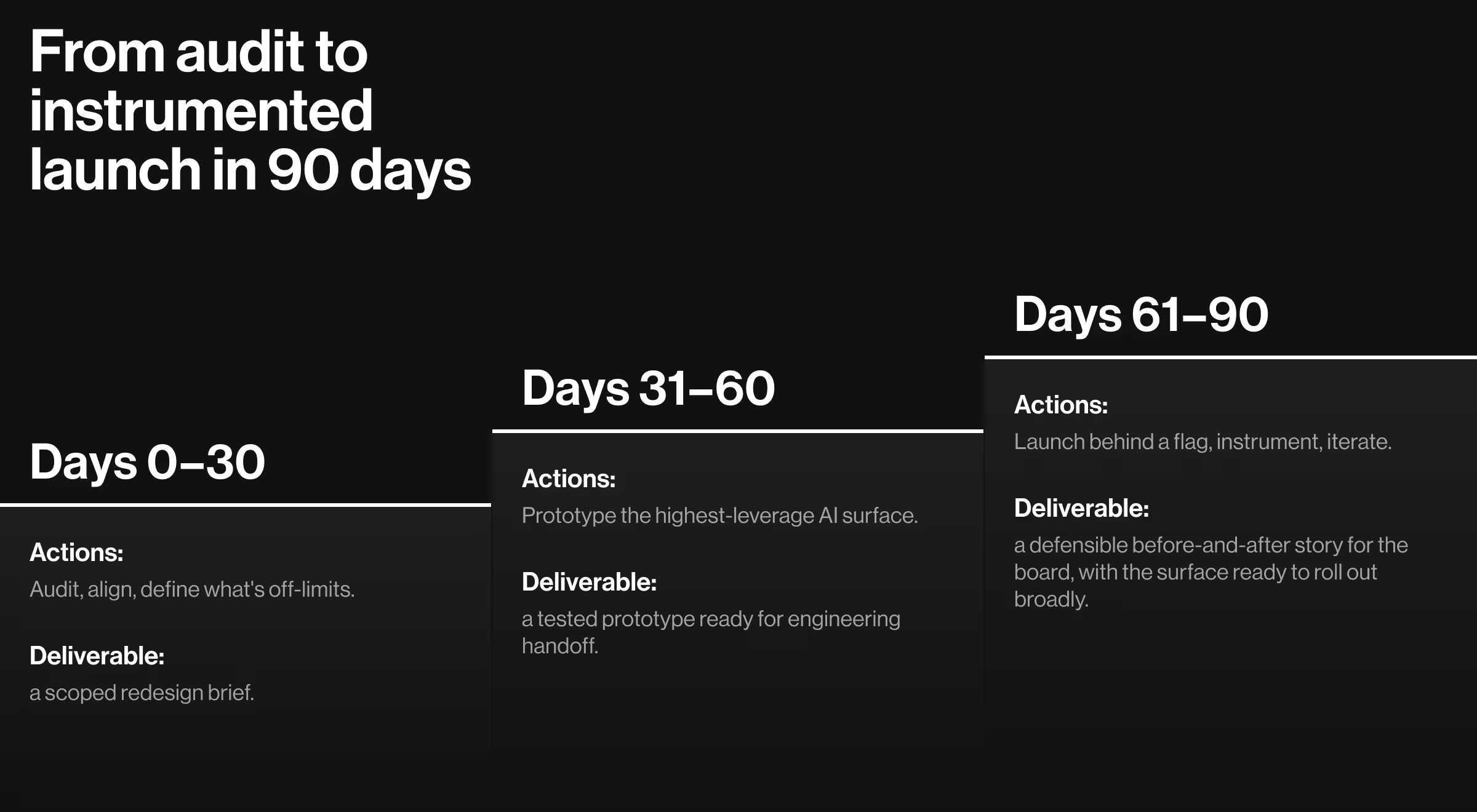
If you have one quarter to move a metric and don't have a full redesign budget yet, here's the 90-day AI-native product design structure that has worked across most of the launches we've supported.
Before committing to the 90-day plan, the five failure modes in AI-driven design are worth ruling out.
Days 0–30: audit, align, define what's off-limits
Goal: Get a clear picture of where AI shows up in the product, where it's underused, and which parts of the product are politically off-limits before any design work starts.
Key activities:
- Audit the current design system against the five AI-native pattern families above
- Pull the analytics and identify the two flows where AI shows up most and adoption is lowest
- Get explicit alignment on which surfaces are off-limits to redesign this quarter
Deliverable: A scoped redesign brief that names the target surfaces, the off-limits surfaces, and the activation metric each surface has to move.
Days 31–60: prototype the highest-leverage AI surface, test with data
Goal: Build a working prototype of the redesigned AI surface and validate it against real or synthetic data before any production code ships.
Key activities:
- Pick one surface — usually the most-demoed AI feature with the largest activation gap
- Prototype the AI-native flow with realistic or synthetic data
- Test with internal users, design partners, and, where possible, a small cohort of real customers behind a feature flag
- Document each AI-native pattern explicitly
Deliverable: A tested prototype with documented patterns, ready for engineering handoff.
Days 61–90: Launch behind a flag, instrument, iterate
Goal: Ship the redesigned surface to a controlled cohort and measure the lift against the baseline established on day zero.
Key activities:
- Ship the redesigned surface to a controlled cohort behind a feature flag
- Compare activation, completion, and repeat usage against the baseline
- Iterate based on the gap between prototype assumptions and live behavior
Deliverable: A defensible before-and-after story for the next board update, with the redesigned surface ready to roll out to all users.
Bring us your adoption gap, and we'll close it
If your model works and your numbers don't, the gap is AI-native product design. Pilots are easy, whereas production is not. The features users adopt look different. They must be visible at decision points, controllable, explainable, and recoverable.
You built the AI. We build the experience around it.
Lazarev.agency has shipped 30+ AI products since 2017 and helped clients secure $500M+ in funding along the way. Our work splits into two complementary programs depending on which move fits your situation:
- Full AI and data product UX redesign — rebuilds IA, system, and AI patterns end-to-end across web and native.
- AI product launch program — moves a single pilot or v1 module into production with onboarding, guardrails, and demo-ready narratives built in.
Tell us where adoption stalls. Book a consultation, and you'll hear back from a senior product and UX lead.




.webp)






