
.avif)
"Static interfaces are long dead. The future is hybrid — a chat layer that summons widgets on demand, so users finish the job in two clicks instead of ten prompts."
{{Kirill Lazarev}}
For a decade, voice was a side quest. You built a graphical product, then bolted on an Alexa skill or a "Hey Siri" shortcut so the roadmap slide had a voice row. Large language models (LLMs) changed the stakes. Speech is now a primary way people give instructions to software, and a voice agent can hold a real conversation instead of matching a fixed grammar of commands.
That shift moved voice UI design from a novelty craft into a core product discipline. The hard part was never the microphone. Good voice UI design is a set of decisions about what the system says, how it recovers when it mishears, and how a user with no screen to look at learns what the product can even do.
This guide is written for the product leaders, founders, and design leads deciding whether to add a voice layer to an AI product, and how to design one people keep using. It covers why voice user interface design matters commercially right now and the patterns that make it work.
Key takeaways
- Voice UI design is a conversation problem before a visual one. The deliverable is dialogue, error recovery, and persona, so the screen-design skills that make a good GUI don't carry over automatically.
- Discoverability breaks first. With no buttons to scan, users can't see what they're allowed to say, so the design has to teach capability inside the conversation itself.
- Adoption and engagement are different metrics. Broad ownership hasn't turned into deep use, and a voice agent earns daily use only when it removes steps a screen would have required.
- AI voice agents raised the ceiling and the risk. LLMs make free-form speech usable, and they also introduce hallucination, latency, and trust problems the design has to hold.
Why voice user interface design matters
Voice user interface design matters because it shapes how fast people can get their work done. Its clearest advantage is hands-free: a technician with both hands full, a driver who can't look away from the road. When reaching for a screen is unsafe or impossible, speech keeps the task moving.
That hands-free advantage is the strongest case for adding a voice layer, and it drives most of the industry applications discussed later in this guide. Even away from those hands-busy moments, a single spoken request can replace a sequence of taps, so voice earns its place whenever speaking is faster than tapping.
And the commercial momentum behind this tendency is already here:
- The global voice user interface market is projected to reach USD 92.4 billion by 2030, growing at a 21.3% CAGR from 2023, Grand View Research reports.
- The conversational AI market, which now underpins most serious voice agents, was valued at USD 14.3 billion in 2025 and is expected to hit USD 78.9 billion by 2033, according to another forecast by Grand View Research.
- Nielsen Norman Group's landmark usability study of Alexa, Google Assistant, and Siri found the assistants "work well only for very limited, simple queries", with delivered usability "grossly inferior to promised usability".
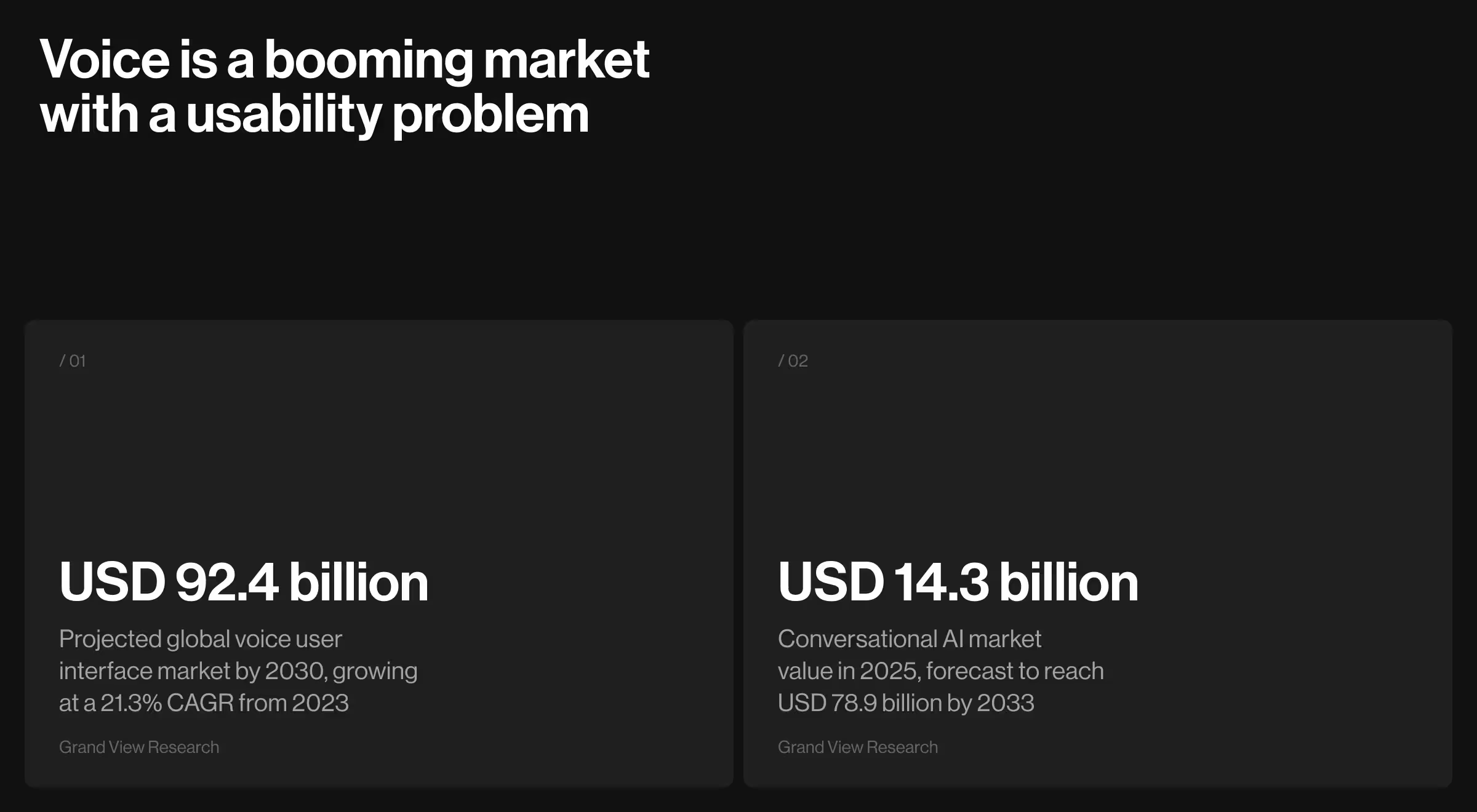
The numbers show that the voice and conversational AI markets are growing fast, while the usability most people get still lags what they're promised. The gap between rising expectations and delivered experience is the opening, and strategic conversational UI, including voice UI design, is what turns the productivity promise into repeat use.
Command-based VUI vs AI-native voice design
Most published voice UI advice describes the world before LLMs: a user says a memorized phrase, the system matches it to an intent, and a scripted response comes back.
AI-native voice design starts from a different assumption. The user talks in natural language, the model interprets intent probabilistically, and the interface has to account for responses that are fluent, occasionally wrong, and rarely identical twice.
The distinction matters because it changes what and how you need to design. A command-based system fails when the user says something outside the script. An AI voice agent fails in much subtler ways: it answers confidently from a hallucination, it pauses two seconds too long, and the user talks over it, or it completes a risky action without confirming.
The table below maps the difference.
The one-line frame: command-based voice design asks "what can the user say?", whereas AI-native voice design asks "what happens when the model is slow, wrong, or ambiguous, and how does the conversation recover?"
Voice interface components: speech recognition, language understanding, and dialog management
A voice UI runs on three key components working in sequence:
- Automatic speech recognition (ASR) converts sound into text.
- Natural language processing (NLP) converts text into intent.
- Dialog management decides what happens next and holds the conversation together.
1. Automatic speech recognition (voice recognition technology)
ASR is the component that converts spoken audio into text, and it sets the ceiling for everything downstream. When the transcription is wrong, no amount of language understanding can recover the meaning. Two decisions carry most of the weight:
- Select the ASR engine. Cloud and on-device options such as Google Speech-to-Text, Amazon Transcribe, and OpenAI Whisper trade off accuracy, latency, language coverage, privacy, and cost, and the right pick depends on where and how your users speak.
- Evaluate ASR accuracy across conditions. Word error rate looks clean in a quiet demo and climbs with accents, background noise, domain jargon, and far-field microphones, so measure it under the real use conditions.
Expert tip from Lazarev.agency's team: Benchmark ASR on your own domain vocabulary (product names, medical terms, place names), because a generic accuracy score hides the errors that surface once real users start talking.
2. Natural language processing and intent recognition
NLP is the component that turns transcribed text into structured intent, so the system understands what the user wants and which details it still needs. Three tasks define the work:
- Map intents. Enumerate the actions users can take and the range of phrasings that should resolve to each.
- Define slot schemas. Specify the parameters every intent needs, such as date, amount, or destination, and their types, so the system knows what to ask for when a request arrives incomplete.
- Train NLP with varied utterances. Feed the model the many ways real people phrase the same request, because users rarely say it the way the spec writer imagined.
Platforms like Amazon Lex are built around this intent-and-slot structure. In LLM-based voice agents, the model absorbs much of the parsing, and the task stays the same: you still define the intents, the required data, and the phrasings you test against.
3. Dialog management and context awareness
Dialog management is the component that decides what the system does next and keeps the conversation coherent from one turn to the next. This is where a voice product feels intelligent or brittle. The work spans five jobs:
- Design dialog flows with state tracking. Map the multi-step paths a conversation can take so the system always knows where it is in a task.
- Preserve short-term context. Resolve references like "book it for tomorrow" against what was said moments ago, so the user never has to repeat themselves.
- Preserve long-term context. Carry preferences and history across sessions, so a returning user doesn't start from zero every time.
- Handle interruptions. Support barge-in so a user can cut in mid-response without derailing the flow.
- Support conversational threading. Let users open a new topic and return to the previous one without losing their place.
Context awareness is what lets an agent follow the conversation. It is also the hardest of the three components to get right, because the system has to decide what to remember, how long to hold it, and when to let it go.
Common failure modes in production
Voice products fail in a handful of predictable scenarios, and each surfaces only when real users start talking under real conditions, with background noise, accents, interruptions, and actions the system can't undo. Five failures do the most damage:
- Confident hallucinations. The model answers from a hallucination and sounds certain, so the user believes a wrong answer.
- Latency and talk-over. The response lags a beat too long, the user talks over it, and the exchange collapses.
- Unconfirmed actions. A misheard command fires a real action because nothing confirmed it first.
- Recognition loops. Background noise defeats speech recognition, and the system repeats an identical reprompt.
- Discoverability gaps. With no menu to signal what's possible, people guess what they can say, guess wrong, and stop asking.
Every one of these traces back to a design decision, which is why deliberate voice UX design is what keeps them out of production.
The voice UI design patterns
Voice UI design comes down to a handful of recurring patterns. Each one addresses a specific way voice fails, one that a graphical interface never has to worry about. The overview below is the map; the sections after it go deep on each. The named products in those sections are the clearest voice user interface examples of each pattern at work.
1. Discoverability: teaching users what they can say
Discoverability is the pattern that solves the blank-canvas problem of voice: with no menu, buttons, or icons to scan, users have no way to see what the product can do. A graphical interface advertises its own capabilities. A voice user interface hides all of them behind an open microphone, which is why so many people ask a smart speaker two things, hit a wall, and never explore further.
Good voice UI design teaches capability inside the conversation. Amazon's Alexa design guidance leans on this heavily: greet users with a concrete example of what to say, suggest a next action after each response, and surface new features through the dialogue. The design goal is a user who finishes an interaction knowing one more thing they can do next time.
Expert tip from Lazarev.agency's team: Write your onboarding prompt as the single most valuable sentence the user could speak, then design the product to make that sentence work flawlessly. First impressions in voice are auditory, and a failed first request rarely gets a second try.
📍Design rule: End every response by surfacing one more thing the user can say next.
2. Conversational flow: designing the back-and-forth
Conversational flow is the pattern that governs how turns pass between the user and the system, keeping the exchange closer to real conversation. This is where voice design borrows least from screen design and most from scriptwriting. You draft sample dialogues, map the branches a real person might take, and decide what the system says when the conversation goes sideways.
For a deeper look at how conversational patterns extend into copilots and in-product chat, see our guide on AI UX patterns.
📍Design rule: Ask one question at a time, keep prompts short, and read the script aloud before you ship it.
3. Error recovery: designing for the mishear
Error recovery is the pattern that decides what happens when speech recognition fails or intent is ambiguous, and it separates tolerable voice products from infuriating ones. Background noise, accents, homophones, and half-finished sentences guarantee the system will misunderstand user intent. The question is whether the recovery moves the user forward or traps them in a loop.
Weak voice design repeats the same prompt louder, in effect. Strong voice design does three things:
- Distinguishes a no-input (the user said nothing) from a no-match (the system couldn't parse what they said).
- Rephrases instead of repeating.
- Offers a concrete example or a narrower question to disambiguate.
When a banking voice agent hears an unclear amount, "Did you mean fifty or fifteen?" rescues the task; "I didn't understand" abandons it.
Expert tip from Lazarev.agency's team: Escalate reprompts. The first recovery attempt should be light and specific, the second should offer an example, and the third should hand off to a fallback — a human, a screen, or a graceful exit.
📍Design rule: On failure, rephrase and narrow the question. Never replay the same prompt.
4. Confirmation and trust: making invisible actions safe
Confirmation is the pattern that protects users from voice actions they can't see or easily undo. On a screen, a user reads a summary before hitting "confirm." In voice, the action can happen the instant the system thinks it understood, which is fine for a timer and dangerous for a payment. The design choice is implicit versus explicit confirmation, and getting it wrong costs either trust or speed:
- Implicit confirmation keeps low-stakes flows moving: "Adding milk to your list" tells the user what happened without demanding a response.
- Explicit confirmation guards high-stakes actions: "You're about to send this to the whole team, should I post it?"
The stakes set the rule. For AI voice agents, trust also depends on provenance: showing users where an answer came from at the moment they act on it.
"Trust in AI is won by showing users exactly where each answer came from, in the moment they're reading it."
{{Kirill Lazarev}}
📍Design rule: Confirm low-stakes actions implicitly, require explicit confirmation for anything irreversible, and show where each answer came from.
5. System persona: the voice has a personality either way
System persona is the pattern that shapes the tone, vocabulary, and response style of the voice, whether or not anyone designed it on purpose. Every generated sentence implies a character. Skip the work, and you get an inconsistent one that undercuts the brand. Do the work, and the persona sets expectations and makes the product recognizable.
Duolingo's characters carry a personality that reinforces the product's playful tone. Conversely, a legal or financial voice agent should sound precise and reserved for the opposite reason. The persona has to match the stakes of the task, because a chatty apology lands very differently during a wire transfer than during a trivia game.
📍Design rule: Document the voice's tone and formality before writing a single prompt.
6. Multimodal handoff: knowing when to use a screen
Multimodal handoff is the pattern that decides which parts of user interactions belong in speech and which belong on a display. Voice is excellent for short commands and quick answers and poor for anything a user needs to compare or hold in memory, because audio passes through working memory and raises cognitive load. Reading a list of ten restaurants aloud is a usability failure; showing them on a screen while the user speaks their choice is not.
This is the hybrid interface in practice. An in-car assistant speaks turn-by-turn directions and shows the map. A voice agent inside a data product answers a spoken question and renders the chart on screen. The design question for each step is simple: does this information survive being heard once, or does it need to be seen? That decision, made deliberately across a flow, is what our founder means by a chat layer that summons widgets on demand.
📍Design rule: Speak what a user can act on after hearing once. Put anything they must compare or scan on a screen.
7. Latency and turn-taking: real-time or it's broken
Latency is the pattern that most separates modern AI voice agents from the command era, because real-time conversation collapses the moment the system lags. When a person asks a question and hears silence, they repeat themselves, talk over the response, or assume it failed. Voice has no spinner. The gap between speaking and hearing back is the entire perception of quality.
Designing for latency means streaming responses so the system starts talking before it has finished thinking, and building short filler that buys time without sounding evasive. OpenAI's Advanced Voice Mode set a new bar here by responding at conversational speed with interruptions handled gracefully, and it reset what users now expect from any voice agent.
📍Design rule: Stream responses, support barge-in, and treat any perceptible pause as a bug.
VUI real-world examples across industries
Voice user interface design shows up differently in each industry, because the task, the risk, and the environment change what "good" means. The examples below are where voice is doing real work today, each leaning on a different pattern from the section above.
Healthcare voice interfaces support clinical documentation and patient data entry
Healthcare voice interfaces let clinicians capture notes and enter patient data by speaking, which keeps their attention on the patient. The design stakes are steep: a misheard dosage or a value dropped into the wrong field is a safety issue, so error recovery and explicit confirmation carry more weight here than in almost any other setting.
Product example: Microsoft's Nuance Dragon Ambient eXperience listens to a visit and drafts the note, cutting the after-hours charting that drives clinician burnout.
Voice UIs in automotive systems prioritize safety by minimizing driver distraction
Automotive voice UIs exist to keep the driver's hands on the wheel and eyes on the road, which makes distraction the metric that governs every design choice. Short prompts, fast responses, and forgiving error recovery are safety features in this context, because a confusing reprompt at 70 miles per hour is more dangerous than a slow one at a desk.
Product example: Google's Android Auto and Apple CarPlay handle navigation, calls, and messages by voice so the driver never reaches for the screen.
Voice UIs improve accessibility for users with disabilities across various industries
Accessibility is one of the clearest cases for voice UI design, because speech gives people who can't easily use a screen or keyboard a direct way to operate a product. For users with motor, visual, or dexterity impairments, a voice interface becomes the primary way into the product.
Product example: Apple's Voice Control shows the bar with full device operation by voice, which depends on supporting varied speech patterns, generous timing, and reliable error recovery, since users who rely on voice have no easy fallback when it fails.
Voice UIs enhance productivity in logistics by enabling hands-free operations
Logistics voice interfaces let warehouse and field workers run operations with both hands free. Latency and clear confirmation are the make-or-break patterns here: a picker moving at speed needs the system to keep pace and to confirm each action without slowing the line.
Product example: Voice-directed picking systems such as Honeywell Voice guide a worker through an order by audio, so they never stop to read a screen or a printed pick list.
Banking voice interfaces require explicit confirmation for transactions to ensure trust
Banking voice interfaces handle balance checks, transfers, and payments by voice, which puts trust and confirmation at the center of the design. Because a spoken transfer can move real money the instant the system thinks it understood, high-stakes actions need explicit confirmation and clear provenance before they run.
Product example: Bank of America's Erica assistant applies the confirmation-by-stakes principle in its highest-stakes form: light, implicit confirmation for a balance check, and explicit, reversible confirmation for a payment.
Consumer creative apps replace complex tools with a voice-first interface
Consumer creative apps are where voice can remove an entire tool rather than sit beside it. Categories like mobile video editing traditionally ask users to learn timelines, layers, and dozens of taps per cut, and most people abandon the effort before they ship anything. A voice-first interface changes the deal: the user states the outcome, and the product handles the production.
Practical insight from Lazarev.agency's portfolio: We designed this end-to-end for Elva, an AI mobile video editor built around voice as the only interface, with zero taps and no timeline. A user says "make a travel reel from last weekend," and Elva selects the clips, cuts to rhythm, adds music, and applies a style.
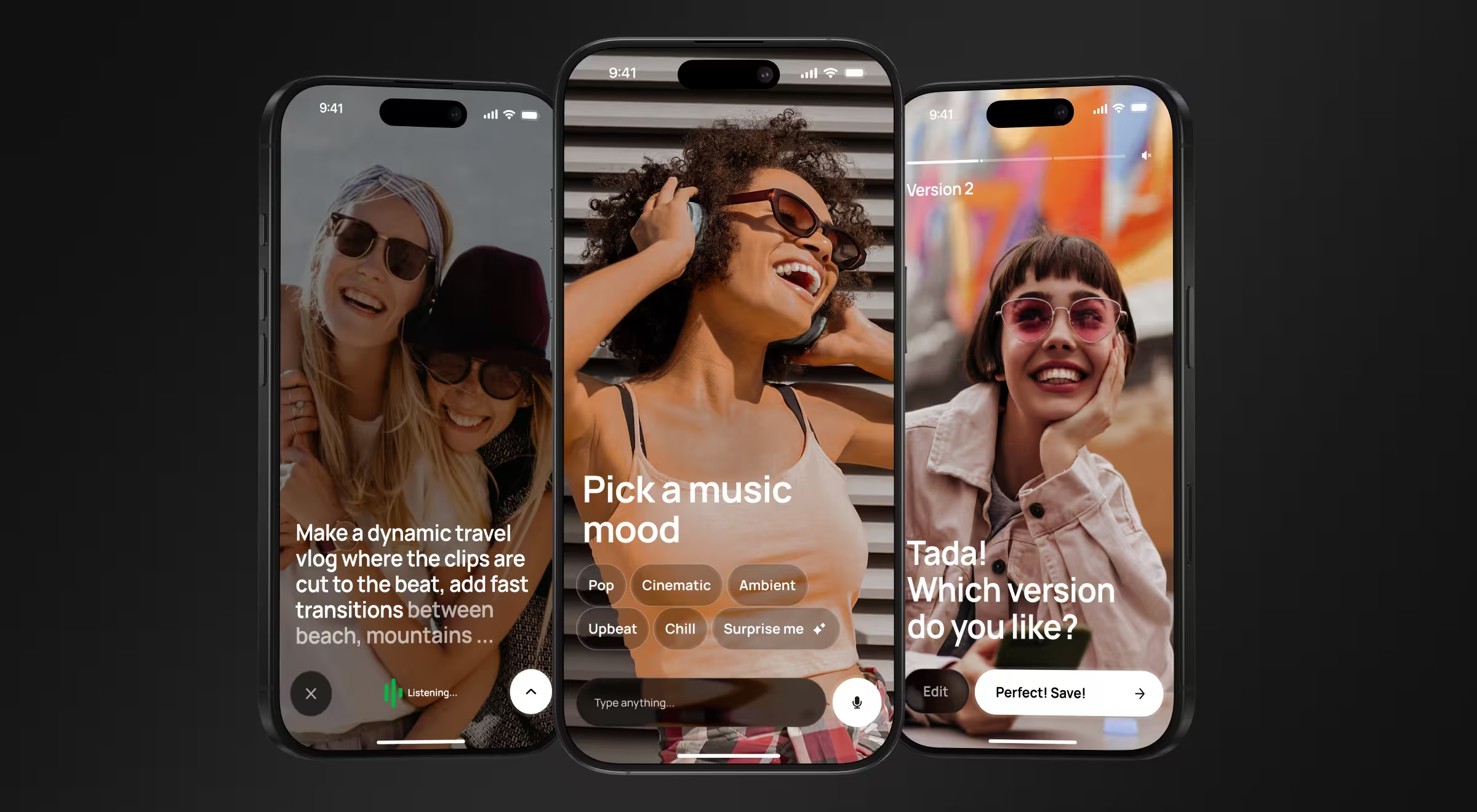
The work leans on several patterns at once: an expressive persona that shows what the AI is doing behind the scenes, an agentic flow that asks clarifying questions when a request is ambiguous and presents drafts for approval, and smart suggestions that head off the blank-page problem before it appears.
Make voice UI design your moat
The products that win with voice treat it as a way to remove steps. Owning a voice device is common; relying on one is rare, and the difference is almost always design. When a voice agent lets someone finish a task in one spoken sentence a screen would have needed six taps for, it earns a place in the daily routine. When it makes people repeat themselves and check the screen anyway, it becomes the row nobody uses.
That gap is a design opportunity, and it's the layer competitors can't copy with a weekend of prompt engineering. A few principles we design around at Lazarev.agency:
- Start from the task. Design the one job voice does better than a screen, and build the whole experience around finishing it.
- Design the failure modes first. Map the misheard inputs, the ambiguous requests, and the risky actions before you script the happy path.
- Confirm by stakes. Keep low-risk flows implicit and fast; make high-risk actions explicit and reversible.
- Measure repeat use. Rising talk time can mean users are stuck repeating themselves, so treat it as a warning sign as readily as a win.
"If a user has to prompt six times to get an answer, your time-on-product metric goes up and your product is still failing. Our job is to reduce prompts."
{{Ostap Oshurko}}
Design a voice layer people come back to
Voice UI design is a product decision before it's a design deliverable. Get the discoverability, error recovery, confirmation, and latency right, and your voice agent becomes something people reach for without thinking. Get them wrong, and it joins the pile of features that demoed well and shipped dead. Designing voice well is hard, and that difficulty is exactly why it pays off: most teams get it wrong, so a product that gets it right pulls ahead of competitors still treating voice as a novelty row.
Lazarev.agency has designed AI-native products since 2017, across 30-plus AI products and $500M-plus in funding raised by the teams we've worked with. We design conversational and voice-agent experiences the same way we design the rest of an AI product: workflows, failure modes, and trust surfaces first, then the interface that ties them together.
Bringing in a seasoned design team to own that hard part is one of the highest-ROI decisions you can make on a voice product. If you're deciding whether voice belongs in your product, or you have a voice UX that isn't earning repeat use, book a product and AI UX strategy session, and we'll pressure-test it with you.













“Through a detailed understanding of the client’s platform, Lazarev. was able to create a clean and intuitive UI/UX design that ticked all the boxes. The team was receptive to all requirements and requests and adapted well to timeline changes. They produced accurate mockups at every iterative stage.”
Founder at Pika AI