
.webp)
"Most chatbots are designed for the welcome screen. Real users abandon them on the second message — the moment the bot can't answer, can't recover, and can't tell you why. The work isn't the greeting. The work is everything that happens after."
{{Kirill Lazarev}}
We've designed AI-native products since 2017, and we've watched the same pattern repeat across enterprise and B2B SaaS: the chatbot shipping with the press release seldom matches the one driving adoption a quarter later. Pretty greeting with no fallback strategy and no idea what intent recognition looks like in production.
In this article, we walk through 11 chatbot design rules we apply when we redesign AI-native chatbots for adoption, organized in three layers most teams under-invest in.
Key takeaways
- The AI failure problem is a UX problem. 42% of companies abandoned most of their AI initiatives in 2025, up from 17% the year before — most failures trace to user experience.
- Scoped, context-aware AI chat scales adoption fast. Our VTnews.ai design onboarded 85k users in its first month, with 90% of users confirming the AI helped them step outside biased-news bubbles.
- Strong AI UX is an exit-grade asset. Our work on Accern.Rhea helped move Accern from Series B to an eight-figure acquisition, with $40M+ raised across the partnership and chatbot design patterns since adopted by OpenAI and other AI leaders.
What chatbot design means now that the AI does the talking
Chatbot design used to mean two things: a UI window with a text field, and a decision tree behind it.
That definition ceased to reflect reality the moment large language models (LLMs) took over the response generation. Today, chatbot design covers four interlocking surfaces:
- visual interface
- AI user experience patterns around it
- conversation logic
- AI behavior at inference time
The last surface is the one most teams haven't started designing yet. Inference-time behavior is what users experience: how the bot handles ambiguity, when it hallucinates, how fast it streams, what it does when a tool call fails, when it asks for clarification, when it escalates to a human. None of that is a screen. All of it is design.
“We see the same misframing in most briefs: 'Design our AI chatbot.' The team usually means 'design the chat widget.' The widget is 10% of the work. The other 90% lives in the AI product roadmap, conversation flows, failure-mode handling, and the operational layer, where the experience improves after launch. Confuse AI-native chatbot UX design process with traditional chatbot work, and you'll pay the difference in wasted months and missed adoption.”
{{Anna Demianenko}}
Reading down the right-hand column makes the point: AI-native chatbot design lives in continuous behavior across all four surfaces — interface, UX patterns, conversation logic, and inference-time behavior. The chatbots people return to are designed for all four. The chatbots they abandon are designed for the first one alone.
🔎 Explore our chatbot UI examples breakdown for a deeper view of how interface patterns translate into AI-native chat surfaces.
5 principles of effective chatbot design for AI-native products
The four design surfaces above are how we frame the work. The five chatbot design principles below are the floor of every AI chatbot redesign, the same AI user experience framework we apply across AI products: non-negotiables underneath every decision we make.
The stakes earn this scope of rigor: S&P Global's Voice of the Enterprise: AI found 42% of companies abandoned most of their AI initiatives in 2025, up from 17% the year before, with 46% of proof-of-concept projects scrapped before reaching production.
Failure lives in the experience layer, well upstream of model choice. Each principle reinforces the others, and missing just one weakens the rest.
.avif)
1. Ease of use
A genuinely useful AI chatbot lowers the cost of getting an answer. It does not introduce a new vocabulary the user has to learn. Prompt engineering should not be a job description for the user.
Ease of use shows up in concrete patterns:
- Clickable suggested prompts instead of blank text fields.
- Plain-language confirmations before destructive actions.
- Summaries before details.
- A one-click off-ramp to a human when the user wants one.
2. Accessibility
Data insight: World Health Organization estimates 1.3 billion people — 16% of the global population, or 1 in 6 — experience significant disability.
The chatbot designed without accessibility at its core automatically narrows its addressable audience by a meaningful share.
AI chatbots inherit accessibility UX design expectations from the products they live inside. Three baselines define the floor:
- Technical. WCAG-level keyboard navigation and screen-reader compatibility.
- Voice. Voice input for users with motor or vision impairments and contexts where typing is inconvenient or unsafe.
- Linguistic and cognitive. Plain, conversational language in fallbacks, captions on voice output, eighth-grade reading level.
3. Responsiveness
"Static interfaces are dead. The future is hybrid — a chat layer that summons widgets on demand, so users finish the job in two clicks instead of ten prompts."
{{Kirill Lazarev}}
Responsive UX in AI chatbot design has two layers. The first is technical: latency budgets, streaming, status states during slow tool calls. The second is contextual: the chatbot adapts what it surfaces to where the user is, what device they're on, and what they were doing a moment ago.
A responsive AI chatbot feels alive on every device and always knows the page it sits on. Static, page-agnostic chat boxes belong to the previous era of conversational design.
4. Transparency
Trust in AI is engineered into the product’s backbone (design), never requested. This is how:
- Inline citations on every retrieval-based answer.
- Visible reasoning on multi-step actions.
- Plain disclosure of the bot's generative nature.
- Surfaced capabilities and limits — what the bot can do, what it can't, and what happens when it isn't sure.
For enterprise products, transparency is the procurement gate. Buyers reject any AI surface asking them to trust a black box. Your product’s design layer either answers that objection, or the deal moves on.
5. Alignment with business objectives
The strongest AI chatbots are designed to specific UX performance metrics. Onboarding completion, ticket deflection, demo win rate, retention. Every prompt, every fallback, every escalation route should serve a measurable outcome the team agreed to before kickoff.
Brand alignment is the partner principle: the chatbot's personality, tone, and visual style should feel like a continuation of the product. A chatbot speaking in a different voice from the product around it weakens both.
11 chatbot design best practices for AI-native products
With these five principles as the framing, the 11 design rules below translate them into specific practices we apply to every AI-native chatbot we redesign.
Lazarev.agency’s team organizes them into three layers:
- Layer 1 is conversation design: how the bot communicates.
- Layer 2 is interface and user interactions: how users move through the surface.
- Layer 3 is AI-native operations: the often-forgotten work deciding whether the chatbot behaves correctly in production.
.avif)
Layer 1: Conversation design
Chatbot conversational design covers what the bot says, when it asks for clarification, how it routes to humans, and how it recovers from mistakes. The four practices below are the ones we revisit on every project.
1. Anchor every conversation to a single user intent
An effective chatbot dialogue design begins by narrowing what the bot will and won't talk about. We map the top 3-5 intents the bot must serve, write the third response before we write the first, and prune everything else into an explicit out-of-scope route.
Why it matters for AI products: LLMs will produce a confident answer to almost any prompt. Without an anchored intent, the bot will answer questions it has no business answering and leak your product's credibility.
Make it actionable:
- Write a one-line intent statement for the bot you would put on a slide for the CEO.
- List 3-5 intents inside the scope. Anything else gets a one-message route to docs or a human.
- For each in-scope intent, script the third response before the first.
- Pressure-test the script with 5 real prompts from your support inbox.
🤖 Product example: Harvey anchors its assistant to a small set of legal-research and drafting intents and routes anything outside this scope to a clear "we don't handle that" message. The narrowness is the product.
2. Set explicit capability and limit expectations at first contact
Data insight: A study from MIT and Arizona State University found priming users with beliefs about an AI's intent increased their perceived trustworthiness, empathy, and effectiveness of the bot — independent of the actual model output. How the bot introduces itself is design work.
Every AI chatbot needs a 30-second contract with the user: what the bot can/can’t do and what to do when the bot is wrong — the foundation of how you design AI products that users understand and keep using.
Why it matters for AI products: Hallucinations are inevitable in generative chat. Pre-disclosing the bot's limits is what makes the AI experience credible.
Make it actionable:
- State 2-3 things the bot can do in the opening message. Skip the generic greeting.
- Include a one-line disclosure that the bot is generative and may make mistakes. Place it where the user will see it.
- Surface the most common limits inline: "I can't process payments" or "I won't access account-level data."
- Refresh the opening message based on the page or workspace context the user is on.
🤖 Product example: Anthropic Claude opens with task-specific suggested prompts and signals limits explicitly when asked for content outside its policy. Honesty about limits builds trust.
3. Show capabilities through context-aware suggested prompts
When a user opens the chat for the first time, suggested prompts teach the user what the bot is for. A static set of prompts is a missed signal. A dynamic set reflecting the product page, the workspace, or the user's recent actions tells the user the bot is paying attention.
Why it matters for AI products: Users don't ask for capabilities they can't see. If the bot can recall prior context or answer product-specific questions, the prompts are the only way the user discovers it.
Make it actionable:
- Generate suggested prompts from the current page or workspace.
- Show 3-4 prompts at first open, and refresh them after each bot response.
- Render them as clickable buttons. Buttons remove typing and signal interactivity.
- Drop prompts the user has already declined.
🤖 Practical insight from Lazarev.agency's portfolio: On VTnews.ai, an unbiased news platform, we built clickable prompts tailored to the specific story the reader was on, so each story page became a tailored conversation starter.

The platform onboarded 85k new users in its first month, with 90% of users confirming the AI helped them step outside biased-news bubbles. That’s why VTnews.ai is recognized industry-wide with 2 Webby Honors.
4. Design fallbacks as first-class flows
With 61% of customers preferring self-service, according to Salesforce, the bot's job is to exhaust self-service options before it reaches a human. A well-designed fallback acknowledges what the user said, explains what went wrong without blame, and offers two routes forward: a rephrase suggestion and an escalation path.
Why it matters for AI products: Generative chatbots fail in more ways than rule-based ones, and they fail more often during the first weeks after release. Users will see your fallback. Make it the most considered part of the conversation.
Make it actionable:
- Write 3 fallback variants per scope. Rotate them so the bot doesn't sound stuck.
- Always offer a rephrase suggestion based on the user's last message.
- Always offer a human-handoff route on the second consecutive failure.
- When handing off, pass the full conversation context to the human agent.
🤖 Practical insight from Lazarev.agency's portfolio: Our work on Accern.Rhea, the AI research assistant we designed for financial analysts and ESG specialists, set a new bar for clarification UX.
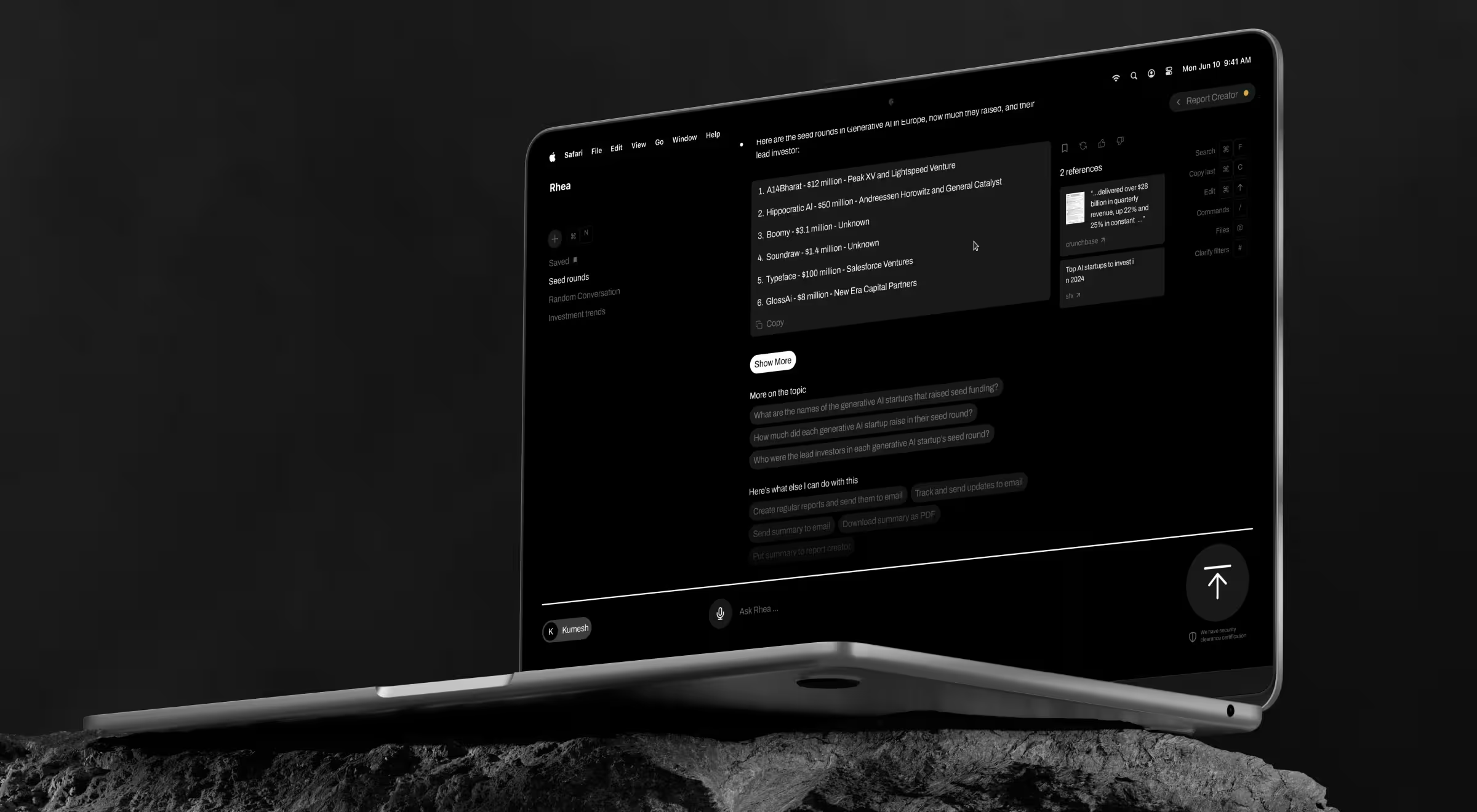
We built an adaptive natural-language communication system: when the model's answer is unclear or the user struggles to frame the query, Rhea steps in with clarifying questions, suggestions, and hints to help users reach an accurate result faster. Rhea helped move Accern from Series B to an eight-figure acquisition, with $40M+ raised across the partnership.
Layer 2: Interface and interaction design
The visible surface is where most agencies spend the majority of their time, and it's also where the easiest wins live. The three rules below are the ones showing up most often in our usability audits of AI chatbots already in production.
5. Make the bot persistent and findable across the product
The chatbot disappears once users navigate away from the search bar, and they give up trying to return to it. This pattern is common for enterprise digital products: the bot is great at the first task and invisible at the second.
A chatbot helping users across a multi-step workflow needs to follow them across that workflow. That sounds obvious. It is consistently violated.
Why it matters for AI products: Multi-step AI experiences are stateful. If the user can't return to the conversation knowing what they were just doing, they restart it from scratch and lose trust in your product’s efficiency.
Make it actionable:
- Place the chatbot entry point in the same screen position on every page in scope.
- If the bot is intentionally scoped to one workflow, say so on the page where it disappears.
- Ensure the entry point is keyboard-accessible and at least 44x44 pixels tappable on mobile.
🤖 Product example: Microsoft Copilot maintains a single chat thread across Word, Excel, PowerPoint, and Outlook. The context is there even if the user moves between apps. Persistence across surfaces is what makes Copilot feel like a smart assistant.
6. Use progressive disclosure to keep the chat readable
AI chats get long fast. A user comparing three products in an enterprise SaaS catalog can generate a 4,000-word transcript in five exchanges. Without progressive disclosure, the chat becomes unreadable and useful answers from earlier in the session scroll into the void.
Progressive disclosure means letting the user expand and collapse details inline. It also means designing message density: short opening summaries with optional drill-down.
Why it matters for AI products: LLMs default to verbose. Without UX patterns that let the user control depth, the chat becomes a wall of text.
Make it actionable:
- Open every long response with a one-sentence summary, then offer "show more" inline.
- Render product comparisons and structured data inside collapsible cards.
- Never autoscroll to the end of a streaming response. Hold the scroll at the top of the new message.
- Allow the user to resize or maximize the chat window when responses include rich content.
🤖 Product example: Perplexity opens long answers with a TL;DR and offers follow-up prompts that don't push the prior content out of view. Density is a design decision.
7. Surface AI rationale and citations inline
For B2B and enterprise products, the principle is operational. Users want to see why the bot said what it said. That means citing sources for retrieval-based answers and making it possible to verify a claim without leaving the chat.
Why it matters for AI products: Hallucination risk is the single most common objection enterprise buyers raise against gen AI. Inline citations and visible reasoning are how the design layer answers that objection.
Make it actionable:
- Show the source document the answer came from. Link directly to it.
- For multi-step actions, render the step list inline so the user can audit what the bot did.
- For numerical claims, show the calculation or the underlying data the model used.
- When the bot is uncertain, say so.
🤖 Product example: Glean cites every source inline, surfaces the connector the result came from, and lets the user open the original document in one click. The citation pattern makes Glean defensible against generic LLM wrappers.
Layer 3: AI-native operations
This is the layer almost no chatbot best-practices article covers, and it's the layer most production failures live in. Operations-grade design covers what the bot does at inference time: how fast it responds and what performance and usage signals the team can see after launch. The four practices below are the ones we add to a product redesign brief most often.
8. Design for latency: streaming, status, and perceived speed
Data insight: Google's RAIL performance model defines two thresholds for user perception of delay: past 1 second of wait, users lose focus on the task they're performing; past 10 seconds, users are frustrated and likely to abandon the task. AI chatbots regularly exceed both thresholds, and unlike a search box, the user has no progress signal unless one is designed in.
Latency is a design problem as much as an engineering one. The choice of where to render an "AI is thinking" state and what to show during a slow tool call all sit inside the UX brief.
Why it matters for AI products: Real generative chatbots have variable latency: sub-second for cached responses, 10-15 seconds for multi-step agents.
Make it actionable:
- Stream every response longer than two sentences. Render tokens as they arrive.
- Define a latency budget per intent: sub-2 seconds for retrieval, sub-10 seconds for agentic flows.
- For waits longer than three seconds, show what the bot is doing: "searching policy docs," "checking inventory."
- Allow the user to cancel a slow response. Slow responses without a cancel control feel like a hang.
🤖 Product example: ChatGPT streams relevant responses by default, surfaces a "browsing" or "analyzing" status during tool use, and lets the user stop generation at any token. Streaming is the single largest perceived-speed lever in chatbot design.
9. Run a UX eval harness before release
Imagine launching a chatbot to 50,000 users and discovering on day three that 30% of conversations end in fallback because intent recognition fails on a phrasing pattern none of your designers used. This scenario is not hypothetical. It's the most common post-launch crisis we get pulled into.
A UX eval harness is the design-side equivalent of a test suite. Before release, the team runs the bot against a curated set of real prompts and measures its performance against agreed thresholds.
Why it matters for AI products: Subjective stakeholder review falls short of prompt-level testing. The bot will be exposed to thousands of phrasings on launch day. Evaluating it on twenty before launch is reckless.
Make it actionable:
- Build a corpus of 100-300 real prompts per priority intent before kickoff.
- Define pass/fail criteria for each: correct intent recognition, on-scope response, appropriate fallback when out of scope.
- Track three metrics per release: intent accuracy, hallucination rate, fallback rate.
🤖 Product example: Klarna's AI assistant handled 2.3 million conversations in its first month and dropped average resolution time from 11 minutes to under 2 minutes.
The scale was only safe to attempt because Klarna ran a rigorous prompt corpus before opening the floodgates. Eval harnesses convert "we'll see what breaks in production" into "we already know what breaks and we've fixed it."
10. Design guardrails and human-in-the-loop checkpoints into the UX
Guardrails are the constraints preventing the bot from doing something it shouldn't, like generating content outside policy or executing an irreversible action without confirmation. In rule-based systems, guardrails were if-then statements in code. In generative systems, they are UX patterns: confirmations, scope boundaries, content filters, and human-in-the-loop checkpoints.
Why it matters for AI products: Generative chatbots can take destructive or sensitive actions with the same confidence they greet you.
Make it actionable:
- Identify every irreversible action in scope and require explicit user confirmation for each one.
- For sensitive intents (legal, financial, medical), route the response through a human reviewer before display.
- Show the user what the bot will do (in plain language) before executing tool calls.
- Make the user's "stop" or "undo" command a first-class action in the interface.
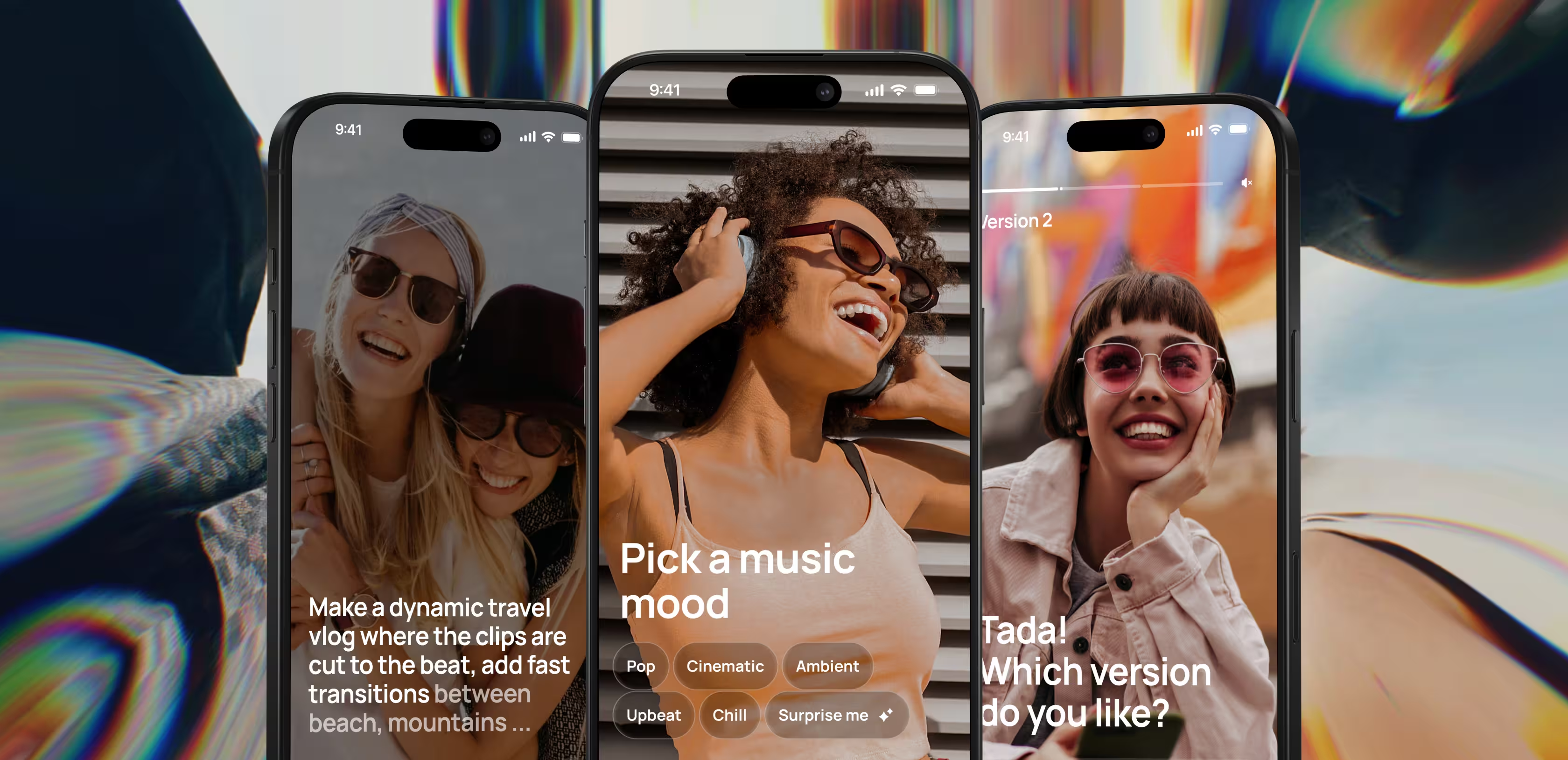
🤖 Practical insight from Lazarev.agency's portfolio: On Elva, the voice-first agentic video editor we designed, the AI never commits a generated edit blind. She interprets an open-ended request, asks a clarifying question when intent is ambiguous, and presents a draft for approval before finalizing. For agentic products that produce rather than retrieve, that draft-and-approve checkpoint is the guardrail: the human stays in the loop on every generative action without touching a timeline.
11. Instrument observability before launch
Data insight: Pew Research found 52% of US adults decided not to use a product or service because of privacy concerns.
AI chatbots amplify those concerns. They collect, generate, and infer enormous amounts of user data, often more than the team can see. Without observability designed in from the first sprint, you don't know what's working and what's failing. And the team can't improve either of the two.
Why it matters for AI products: What you don't measure, you can't improve. Most chatbots work fine on some intents and fail badly on others, but the team can't tell because the analytics layer has been largely overlooked.
Make it actionable:
- Define the event schema during UX. Every prompt, every handoff is a tracked event.
- Track 3 operational metrics from launch: intent accuracy, fallback rate, escalation rate.
- Track 3 experience metrics from launch: completion rate per intent, average exchanges to resolution, customer satisfaction score per session.
- Review the dashboard weekly for the first quarter, monthly thereafter. Adjust prompts and flows accordingly.
🤖 Product example: Intercom Fin ships with a resolution-rate dashboard, intent-level analytics, and a human-handoff inbox out of the box. The observability layer is the product.
6 chatbot design mistakes to avoid
The 11 practices above are what we add to a redesign brief. The list below is what we strip out. Most chatbot redesigns we run start by undoing one or more of the following:
Spotting these patterns in your own work is the harder problem. The questions below convert the table into a self-audit. If you're a Head of AI watching the dashboard go nowhere, a Head of Product fielding "why doesn't anyone use it?" from leadership, or a Design Lead absorbing the design debt, start with these six:
- Intent clarity. Can you state your bot's 3-5 priority intents in one sentence?
- Fallback design. Have you written and tested the third-message fallback for every priority intent?
- Capability disclosure. Does the opening message name 2-3 concrete things the bot can do?
- Eval harness. Is there a documented prompt corpus with pass/fail thresholds, run on every model or prompt change?
- Observability. Are intent recognition rate, fallback rate, and escalation rate live on a dashboard the team watches?
- Journey integration. Is the chat connected to the surrounding product journey — entry, exit, and follow-up?
Each "no" or "I'm not sure" maps to one of the six mistakes above. Start your product redesign there.
How we design AI-native chatbots at Lazarev.agency
We've shipped 30+ AI products since 2017 — fintech risk engines, B2B copilots, agentic assistants, conversational interfaces. Our chatbot design process runs in five stages, each producing a build-ready artifact.
We lead the work. Your team brings goals and constraints, and we bring options worth deciding between.
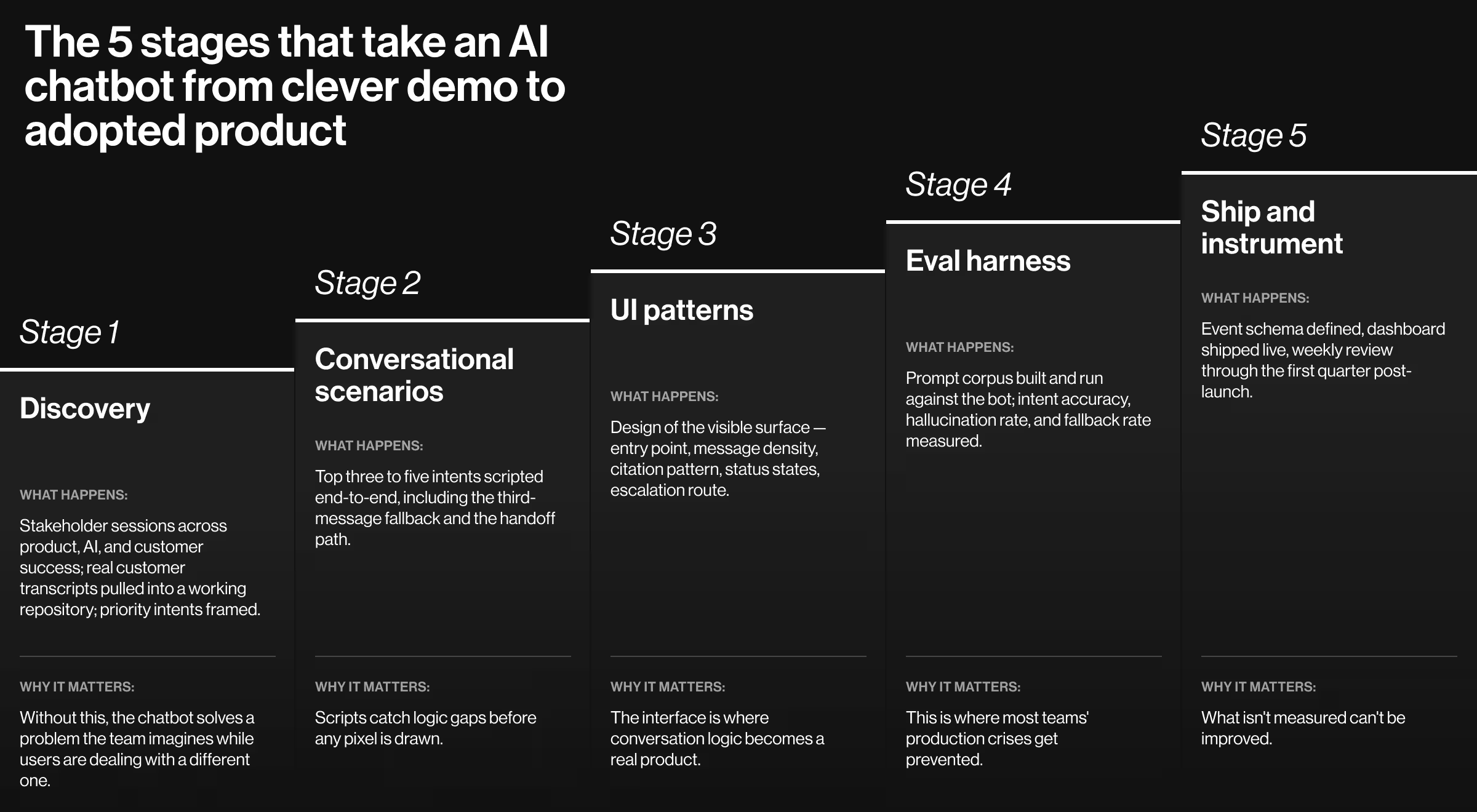
Stage 1. Discovery and system intake
⏳ Duration: 1–2 weeks.
Week one is stakeholder sessions across product, AI, and customer success. Real customer-service transcripts, sales-call recordings, dashboard analytics, and your existing Figma library go into a single working repository. We frame the top 3-5 priority intents the chatbot must serve, the metric each one moves, and the budget the work lands within.
For product redesigns, discovery doubles as a teardown. We name the patterns blocking adoption in the current product, the design debt the team has been carrying, and the integrations we'll keep or rip out before stage two. Your design system, tokens, components, and breakpoints become inputs we extend in stage three.
🔍 Explore our end-to-end AI & data product UX redesign service for chatbot work inside complex AI platforms.
The deliverable: A signed-off scope sheet engineering, design, and AI can all act on, plus a short audit of the current system with the gaps and extension points named.
Stage 2. Conversational scenarios
⏳ Duration: 2–4 weeks.
We script the top 3-5 intents end-to-end, including the third-message fallback, escalation routes, AI confidence and uncertainty states, human-in-the-loop checkpoints, and explicit "out of scope" handling. Each scenario gets pressure-tested against real prompts from the discovery corpus.
The first AI UX design patterns get codified here: welcome-message structure, suggested-prompt logic, fallback library, citation surface, handoff pattern, explainability view, confidence-state UI. Each one extends your existing system into the design library stage three inherits. On a redesign, we retire any existing patterns reinforcing the adoption gap.
🔍 See our AI UX patterns service for layering chatbot and copilot patterns onto an existing product without a full redesign.
The deliverable: Five scripted scenario maps, an extended AI UX pattern library named to match your team's library structure, and a decision log of what we tried and rejected.
Stage 3. UI patterns and build-ready specs
⏳ Duration: 6–12 weeks (the longest stage of the engagement).
We design the visible surface against the codified scenarios: entry point, message density, citation pattern, status states, escalation route, and cross-product persistence. Every component lands in your design system as a reusable AI UX design pattern other AI features can call without reinventing the surface.
The deliverable: Figma components with redlines aligned to your existing library, a pattern entry per element, and a developer handoff that reads as documentation.
Stage 4. Eval harness
⏳ Duration: 2–3 weeks.
We build the prompt corpus and run the bot against it before release. Our team measures intent accuracy, hallucination rate, fallback rate, and confidence-state behavior against thresholds set during scenarios. We rerun the harness on every model swap and prompt change.
This is where AI UX design patterns get pressure-tested against probabilistic reality. Synthetic users and real prompts both feed the harness — the same realistic-data approach we use across our AI product portfolio. We've caught intent collisions in eval that would have hit thousands of customers post-launch and forced an unbudgeted redesign cycle.
The deliverable: A prompt corpus, pass/fail thresholds per intent, a regression report the team owns going forward, and an exit criterion engineering can sign off against.
Stage 5. Ship and instrument
⏳ Duration: Launch day, then a 12-week fortnightly review cycle through the first quarter in production.
We define the event schema during the UX phase and ship with the dashboard live on launch day. Intent recognition rate, fallback rate, escalation rate, completion rate per intent, average exchanges to resolution, and user satisfaction score are tracked from the first user prompt.
Every fortnight for the first quarter, dashboard review with the team produces adjustments (prompt tweaks, scenario expansions, UI refinements) based on what production users do. The AI UX pattern library updates with each cycle, and the next AI feature your team ships starts from a stronger system than the last.
🔍 Read more about our AI product launch program for chatbot launches moving from pilot to production this quarter.
The deliverable: A live observability dashboard, a quarterly redesign cadence, a documented system the in-house team can run on its own, and a summary you can put in front of a board, an investor, or an enterprise prospect.
🔍 Explore our perspective on conversational AI in enterprise products for the strategic frame behind the process above.
Build AI chatbots people return to
The chatbots earning enterprise adoption aren't the ones with the cleverest welcome screen. They're the ones handling the second message, the wrong question, the slow tool call, and the moment a user needs a human. And they do it consistently, week after week, on the dashboard the team watches.
We design AI-native chatbots for adoption: scoped intents, instrumented operations, and the kind of build-ready AI UX letting engineering ship without rework. If your chatbot demos well and is stuck at low adoption, the redesign is bigger than the welcome screen.
Tell us where adoption is stuck. Get in touch with our team, and you'll hear back from a senior product and UX lead within one business day.





.webp)





