
.avif)
Picture a loan applicant reading a single word on the screen: declined. No reason, no next step. The model behind it may be perfectly accurate and still lose the person's trust, because a correct prediction with no explanation is, to the human reading it, indistinguishable from a guess.
AI transparency and explainability are how a right answer becomes a trusted one: transparency shows how the system works, explainability shows why it produced this one answer. Together they decide whether anyone believes the output enough to act on it.
This guide takes the practitioner's route for the product designers, UX leads, and design-minded product managers building AI products. It covers what AI transparency and explainability mean, the methods any seasoned design team works with, how to match an explanation to whoever is asking, and what 2026 regulation demands, each point anchored to primary research worth reading next.
Key takeaways
- Transparency and explainability are separate deliverables. Transparency documents the system, whereas explainability justifies a single output.
- Almost everyone names the risk; almost no one designs for it. Teams rank explainability as a top AI risk, yet far fewer have built it into the product, which is exactly where trust is won.
- Explanations can be wrong. An explanation is itself a model of a model, and a confident, good-looking explanation that misrepresents the real logic is more dangerous than none.
- The right explanation depends on who is asking. A debugging engineer, a rejected applicant, and an auditor need three different artifacts from the same prediction.
Transparency vs explainability: two jobs product teams keep confusing
Transparency and explainability solve different problems, and teams that treat them as one word ship half of what they need.
Transparency focuses on how AI systems work as a whole: the overall process, what data trained the model, the architecture, what it was tested on, and where it is known to fail. It is the set of inner workings a team can put on record. So what is AI explainability, by contrast?
Explainability addresses a specific decision: which data inputs drove this output, and what would have changed it. A system can be fully documented and still unable to explain one prediction, and a model can produce a crisp local explanation while its training data and limits stay hidden.
The table breaks the distinction down across six dimensions:
Why AI transparency and explainability matter in 2026
AI transparency and explainability matter because they are now the gate between a working model and a deployed one, and the numbers show teams naming the problem far faster than they solve it. The commercial case, the trust case, and the regulatory case all point the same direction:
- In its state of AI survey, 40% of respondents identified explainability as a key risk in adopting generative AI, yet only 17% said they were currently working to mitigate it, according to McKinsey. Naming the risk is nearly universal. Building against it is rare.
- Only 46% of people are willing to trust AI systems, 70% believe AI regulation is needed, and 83% are interested in learning more about AI, per the 2025 global study of over 48,000 people across 47 countries run by KPMG and the University of Melbourne. AI trust is the ceiling on adoption, and it sits well below raw capability.
- The explainable AI market was valued at USD 7.79 billion in 2024 and is projected to reach USD 21.06 billion by 2030, Grand View Research reports. Spend is following the requirement into the stack.
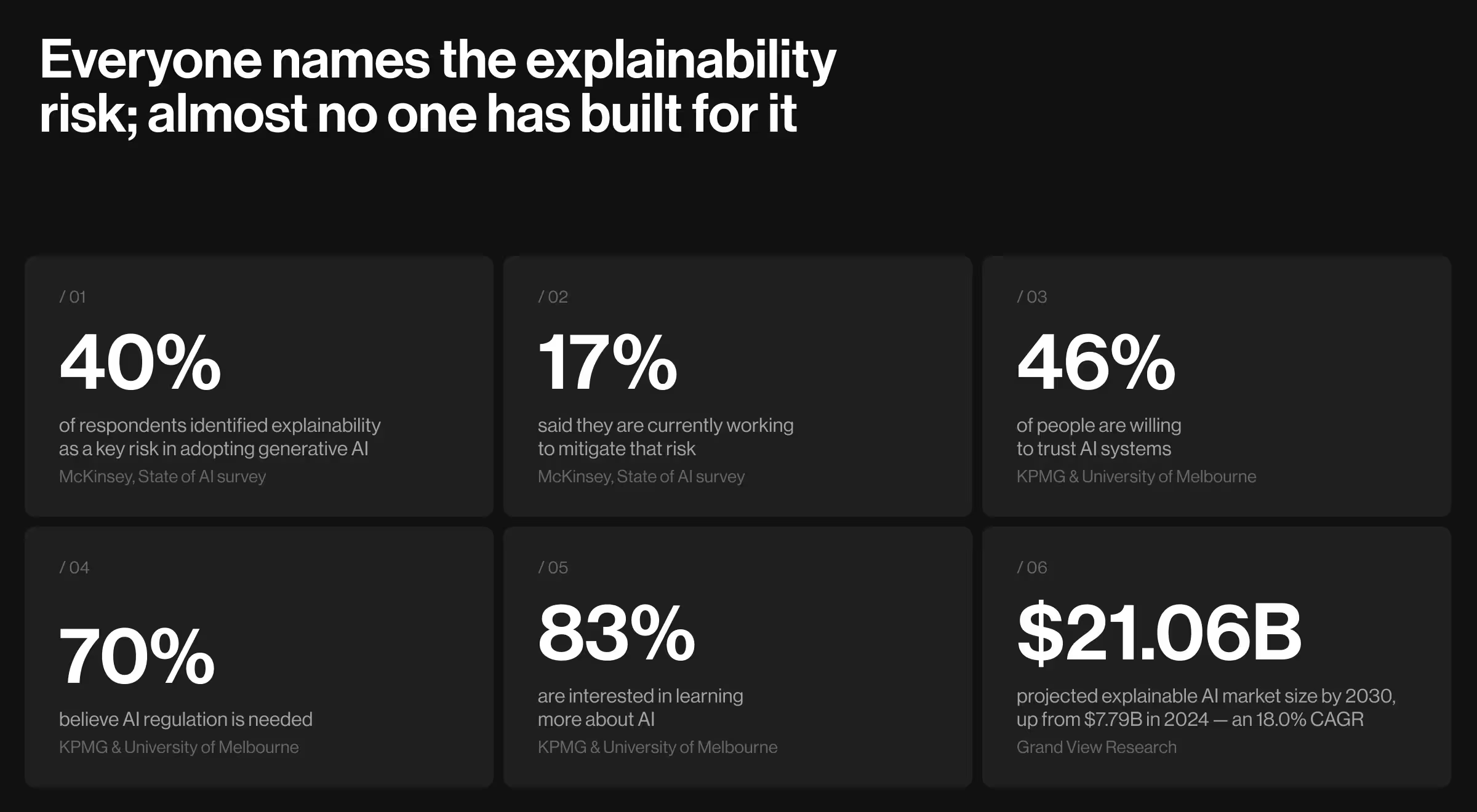
These figures tell one story: teams call explainability a top risk but rarely build it, and fewer than half of people trust AI, which is why most want it regulated. For designers, that means the same demand arriving from two sides at once: users who want to understand a decision, and regulators who will soon require it.
Meeting this demand is design work, and it shows up in what the interface presents and how clearly it reads.
Why is explainability such a challenge in AI?
Explainability is a challenge in AI because the models that score best are the ones humans can read least. A linear model or a shallow decision tree exposes its own logic, but the AI algorithms that win on accuracy spread their reasoning across thousands or millions of parameters, with no legible path from input to output. Thus, three problems follow:
- The accuracy-interpretability trade-off. The most capable model is often the least transparent, so a team either gives up performance or explains after training.
- Post-hoc explanations only approximate. They reconstruct a plausible reason rather than read the real one, and two methods can disagree about the same prediction.
- Faithfulness is hard to prove. Confirming that an explanation matches the model's actual logic takes deliberate testing most teams skip.
No single method in the next section removes this challenge. Each takes on a slice, so the real skill is matching the method to the model and to the person who has to read the result.
Five proven explainability methods
A design team does not build these methods, but it decides how each one reaches a person. The explainability toolkit is a small set of methods, each answering a different question about a model's decisions.
Two distinctions sort them. Some methods explain a single prediction (local), while others describe how the model behaves overall (global). And some models are readable by design (intrinsic), while black-box models need explanations added after training (post-hoc).
Most products run black-box models, so they lean on post-hoc methods that explain one prediction at a time, and reach for global methods when they document the whole system. The table below lists the methods worth knowing, and the sections after it cover when to use each.
1. Feature attribution shows what drove a prediction
Feature attribution is the method that shows how much each input contributed to a single prediction, and it is the go-to tool for explaining models built on tabular data. Two libraries dominate:
- SHAP grounds each input's share in game theory, so the shares sum to the model's output and stay consistent across features. That rigor is why it has become the default for reason codes in finance and insurance.
- LIME takes a lighter approach, fitting a simple local model around the point you want to explain. It is faster to stand up when you need a quick read rather than an audited one.
In practice: a lending product runs SHAP on each declined application, then maps the top contributing features to plain-language reason codes the applicant reads, so one computation serves both the internal model monitor and the user-facing screen.
Reach for it when: a tabular model needs per-prediction reason codes, and the interface can present the top drivers without dumping the full attribution on the reader.
2. Counterfactual explanations show what would change the answer
Counterfactual explanation is the method that finds the smallest change to the inputs that would flip the model's output, and it is the one users find most useful because it is actionable.
Instead of telling an applicant which features mattered, a counterfactual tells them what to do: approve if income were 4,000 higher, or if this account were six months older. The technique was formalized as a way to satisfy the right to explanation without opening the model, since it describes the decision boundary near one person without exposing the model's internals.
In practice: a lending product surfaces "you would qualify with a credit utilization below 40%," turning a rejection into a path the applicant can act on and cutting repeat support tickets.
Reach for it when: the person receiving the decision can act on the result, and a list of feature weights would leave them with nothing to change.
3. Example-based explanations point to the data behind a prediction
Example-based explanation is the method that answers a prediction with the training examples most responsible for it, and it maps to how people reason about precedent. Two techniques carry it:
- Prototype methods return the representative cases a prediction resembles.
- Influence functions trace an output back to the specific training points that shaped it.
Both double as data-debugging tools, because an explanation pointing at a mislabeled or leaked training example says the problem is upstream in the data.
In practice: a medical-imaging product surfaces the labeled prior scans nearest to a flagged image, giving the reviewing clinician precedent to weigh alongside a bare probability.
Reach for it when: users trust comparison over abstraction, or a prediction seems driven by bad training data someone needs to find.
4. Saliency and attention show what the model focused on
Saliency is the method that highlights which parts of an input a deep model weighted most, and it is the primary window into vision and language models. Gradient-based maps such as Integrated Gradients, available in libraries like Captum, show which pixels or tokens moved the output. Treat these as a diagnostic, because a saliency map shows where the model looked and not whether it understood, and the two are easy to confuse.
In practice: a defect-detection team overlays saliency on flagged parts and catches a model keying on a conveyor-belt watermark and missing the crack, a shortcut that offline accuracy hides.
Reach for it when: a vision or language model needs debugging, and someone has to see whether it is attending to signal or to an artifact.
5. Model cards and datasheets document how a model was built
Model cards are the method that documents a model's purpose, training data, evaluation, and known limits in a fixed format, and they carry the transparency load the local methods cannot. A model card records intended use, performance across subgroups, and failure conditions; a datasheet does the same for the dataset behind it. This is the artifact an auditor opens, the record a future maintainer reads, and the first thing a regulator asks for.
Design tip from Lazarev.agency's team: treat the model card's "known limits" section as source material for the product's own disclosures. The conditions where the model is weak are exactly what a user needs to be warned about on the screen, so the honest documentation and the honest interface come from the same place.
Reach for it when: a model moves toward production, a handoff, or an audit, which in practice means every model a team expects to maintain.
Where explanations mislead: failure modes in production
Explainability introduces its own failure modes, and each one surfaces only after real users and auditors start leaning on the explanations a product shipped. An explanation is a second model laid over the first, and when the two disagree, the explanation can do more harm than the missing one it replaced.
Five failures do the most damage:
- Unfaithful explanations. The explanation looks reasonable but does not reflect the model's real logic, so a user or stakeholder trusts a rationale the system never used. Design cannot verify faithfulness alone; confirming it with the data-science team is part of shipping the surface.
- Explanation as theater. A confident reason string reassures the user without being grounded in the computation, which turns explainability into a dark pattern that manufactures trust the model has not earned.
- Confidence with no calibration. The model reports 95% certainty on an answer it gets wrong, because raw scores are not probabilities until they are calibrated. Displaying an uncalibrated number as a confidence level is a misleading design decision.
- Overload. A wall of feature weights or a dense saliency map buries the one thing the reader needed, so a technically complete explanation still fails the person reading it.
- Leakage through the explanation. Detailed explanations can expose training data, proprietary logic, or another person's information, and an explanation surface is an attack path for model inversion.
Every one of these traces back to a decision to ship an explanation without validating it, which is why explanation quality belongs in design review and the evaluation suite, next to model accuracy.
The canon is explicit on the standard: the NIST four principles of explainable AI require not just that a system give an explanation, but that the explanation be meaningful to its audience, accurate to the process, and honest about the model's knowledge limits.
The golden principle of AI explainability: match the explanation to who's asking
The same prediction needs different explanations for different people, and shipping one format to everyone is the most common way explainability underdelivers. A debugging engineer wants raw feature attributions and error slices. A rejected applicant wants a counterfactual and a reason they can act on. An auditor wants the model card and the decision log.
Serving the engineer's SHAP plot to the applicant is as broken as serving the applicant's one-line reason to the auditor. Map the audience to the artifact before designing the surface, so clear communication lets each stakeholder fully understand the part of the decision they own.
UX rule: decide the audience for each explanation surface before picking a method, because the audience sets the format, the depth, and the language.
Practical insight from Lazarev.agency's portfolio: for Elva, an agentic AI video editor, the right explanation for a consumer was never a chart. Lazarev.agency designed the product's AI persona to show what the model is doing behind the scenes through its state and motion, to ask a clarifying question when a request is ambiguous instead of guessing silently, and to present a draft for approval before it acts. That surface makes an opaque generative model legible to a first-time user, the same audience-matching move a SHAP plot makes for an engineer.

Designing explainability for regulation without stalling the model
Regulation now sets a floor for AI transparency and explainability, and in 2026 it turns an applicant's unanswered "why?" from a UX problem into legal exposure. Map each requirement to a concrete part of the experience, and compliance becomes a byproduct of how the product is built.
Three regimes drive most of the work:
- The EU AI Act gives anyone affected by a high-risk AI decision a right to a clear explanation of the significant role the system played. In practice, the interface surfaces a per-decision explanation on request, and the system logs the inputs, output, and model version behind it.
- The EU's transparency requirements also mean telling people when they are interacting with an AI system and marking AI-generated content, pushing disclosure onto the product surface as well as the documentation.
- The GDPR's Article 22 already constrains solely automated decisions with significant effects, and its call for meaningful information about the logic involved sits behind much of Europe's push. The NIST AI Risk Management Framework and sector rules add documented data practices, subgroup testing, and human review, all of which the system should emit as records automatically.
The role of the design is to treat these as disclosure requirements: tell people when AI is involved, label AI-generated content, and give every consequential decision a reason a person can call up, allowing stakeholders to follow how it was made.
Why explanation design is hard to copy
The teams that win with AI build explainability into the product. Most teams do the opposite: they optimize a metric, ship the black box, and discover at the first audit or the first angry user that the interface cannot say why the system did what it did. Retrofitting an explanation onto a model already in production is where the cost and the risk concentrate, and it is the work a competitor with a weekend of prompt engineering cannot copy.
How to improve AI explainability comes down to a few habits Lazarev.agency designs around:
- Design the explanation with the model. Decide what a person sees at the same time the model is built, so the surface is part of the product and not a patch.
- Present, don't dump. Show the one or two drivers a person can act on, and keep the full detail one layer down for anyone who wants it.
- Match the artifact to the reader. Pick the format from the audience, and keep the language theirs.
- Disclose by default. Tell people when AI is involved and let them ask why, before a law requires it.
An unexplainable model that scores well in offline evaluation is a liability waiting for the request no one can answer. A model with explanation, disclosure, and documentation designed in is one a team can deploy in a regulated market, defend to a customer, and hand to the next designer without a rebuild.
Ready to design AI people can trust
AI transparency and explainability are design decisions that compliance later depends on. Get the methods, the failure checks, the audience surfaces, and the disclosures right, and a model earns the AI trust that turns a demo into a deployment.
Lazarev.agency has designed AI-native products since 2017, across 30-plus AI products and 500 million dollars-plus in funding raised by the teams it has worked with. It designs explanation, disclosure, and trust surfaces the same way it designs the rest of an AI product: into the interface from the start, so the model a person sees is one they can understand.
If a model in your product makes decisions someone will question, book a product and AI UX strategy session, and the team will pressure-test your explanation design with you.




.webp)








“Through a detailed understanding of the client’s platform, Lazarev. was able to create a clean and intuitive UI/UX design that ticked all the boxes. The team was receptive to all requirements and requests and adapted well to timeline changes. They produced accurate mockups at every iterative stage.”
Founder at Pika AI