

"The pattern is the same on almost every kickoff: AI works, but adoption stays flat. Teams blame the model. It almost never is the model. The failure point is a user who cannot see why the AI answered, cannot override it when wrong, and hence stops returning. Founders read it as runway pressure. Design leads inherit it as a backlog of states no one had bandwidth to design. Heads of AI walk into board meetings without an ROI story. After a decade of AI-native product design, our insight is: adoption is won at the interface through strategic design choices."
{{Anna Demianenko}}
For most product teams, AI is the easy part of the build. The model fits a benchmark, the API responds, the demo plays. Hard is the rest of the product — the interface that makes the model trustworthy and worth opening again. AI user experience design is what makes that quality of user-product interaction possible.
In this guide, our team of senior AI UX design specialists discusses the key principles of AI user experience design, eight decisions setting well-adopted AI products apart from abandoned ones, and five reusable interface patterns.
Key takeaways
- Design is the bottleneck for AI products. 88% of organizations use AI, but only 6% see significant enterprise-level value from it.
- Trust is the binding constraint on AI adoption. 72% of consumers trusted companies less than a year ago, and 65% feel companies are reckless with their data.
- Hallucination is the baseline. Hallucination rates across leading models run anywhere from 22% to 94%.
- AI-native product design leads the industry’s gold standard. Lazarev.agency's Accern Rhea redesign catalyzed Accern's move from Series B to an eight-figure acquisition, with $40M+ raised across the partnership, whereas the Suits AI MVP secured $1M in seed funding following launch.
The state of AI user experience in 2026
A safe (and proven) way to think of UX is as the bridge between a model that works and a product that gets used. The underlying machine learning may be technically excellent, but adoption depends on whether users can understand and trust what the AI produces.
The macro picture describes a market where AI capability is racing ahead of UX maturity and where trust has never been scarcer:
- Using AI is common — deriving value from it is not. According to McKinsey, 88% of organizations now use AI in at least one business function, but only 6% qualify as "AI high performers" seeing significant enterprise-level value from AI use.
- Personalization is where AI investment compounds. Companies excelling at personalization generate 40% more revenue from those activities than average players, McKinsey reports.
- Consumer trust has eroded, and AI is the test of whether brands earn it back. 72% of consumers trusted companies less than a year ago, and 65% feel companies are reckless with customer data, Salesforce informs.
- AI is the default surface for digital work. Pew Research found that 31% of Americans interact with AI several times a day (up from 22% in early 2024).
- Trust in AI varies by market. Edelman measured trust in AI from 87% in China to 32% in the US, with trust rising 36–45 points across surveyed markets when AI helps users understand complex ideas.
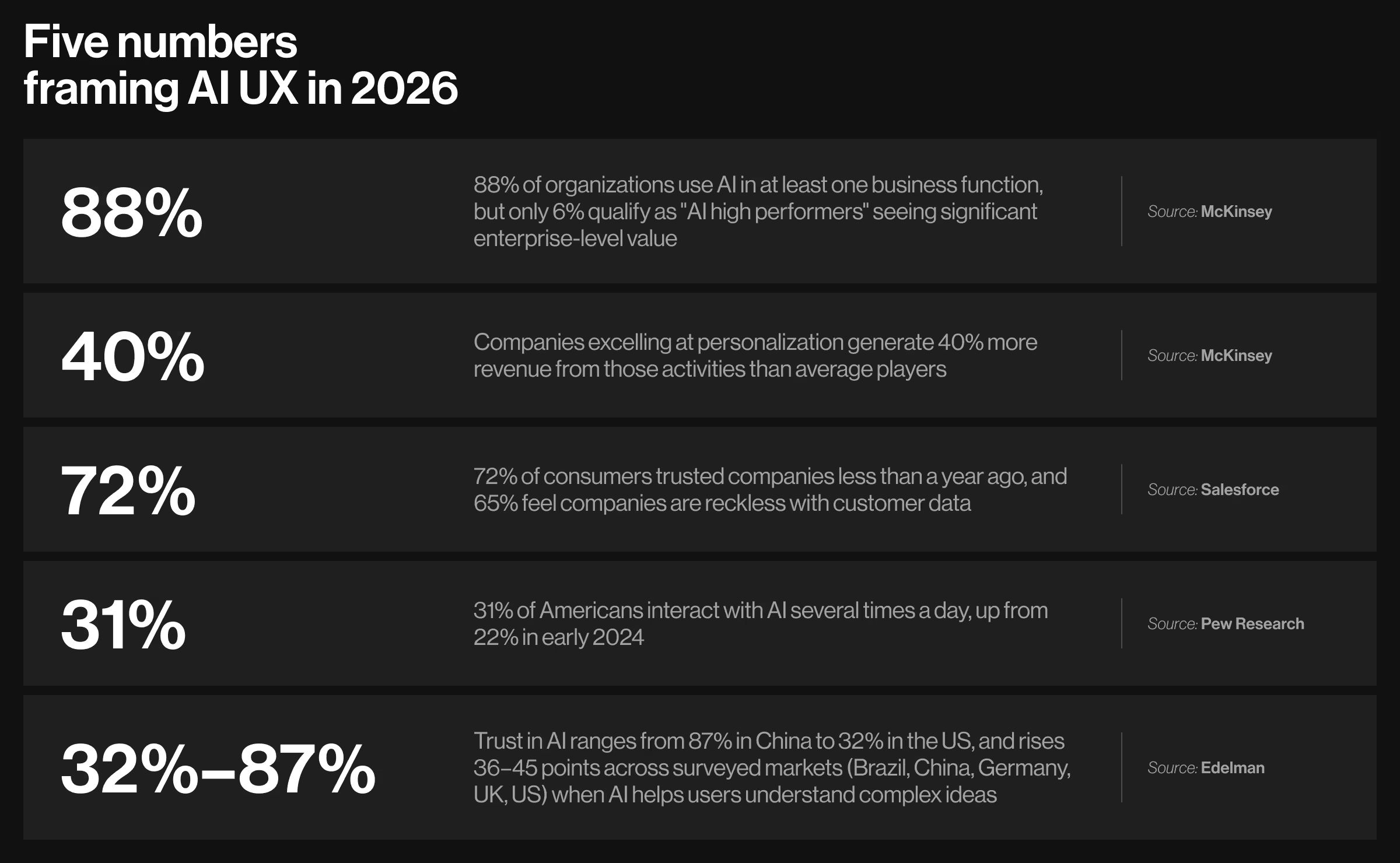
Read together, the numbers point to three levers in AI UX design:
- Comprehension — users can explain what the AI did and why.
- Control — users can override, edit, or undo any AI output in one click.
- Trust — users see source citations, confidence indicators, and a clear scope of action.
Nielsen Norman Group's research on AI for UX frames the same point in stronger language: AI is safest in the hands of practitioners who already understand AI UX design fundamentals, because the failure modes of a generative model look very different from the failure modes of a deterministic feature.
Why most AI startups fail at product-market fit
“The base rate for AI startups is just brutal. Roughly nine in ten do not survive, and almost half of those failures track back to product-market fit (PMF). Conclusion: the team built something the market did not want to use. The unspoken assumption inside most failed teams is that PMF is a model problem: all you need is a set of better benchmarks and more data. The post-mortems tell a different story — fragmented UX design is to blame. Luckily, it is fixable with the right strategies.”
{{Kirill Lazarev}}
Most AI PMF failures fall into one of four UX-driven patterns. Each is fixable inside the interface, without retraining the model.
- Users do not know what to ask. The model can answer the question, but the user cannot phrase it. An empty input field is the culprit. The fix: wayfinders like sample prompts and predictive autocomplete that teach users what the AI can do.
- The AI is correct but untrustworthy. Outputs are accurate, but users will not act on them because there is no verification path. Here, trust builders like replayable decision paths and per-claim provenance do the job.
- The answer is correct but unactionable. The model returns a paragraph when the user needs a one-click action. The fix: widget-based output to map the AI's response to the next move the user wants to make.
- No daily habit forms. Users return weekly. Daily retention stalls because the product is useful enough to remember and skippable enough to delay. The fix: hybrid prompt-plus-GUI flows that compress repeat tasks from ten prompts into two clicks.
Practical insight from Lazarev.agency's portfolio: Suits AI was built to defeat the first failure mode in the list above: users staring at an empty input field, unsure how to phrase a useful prompt.
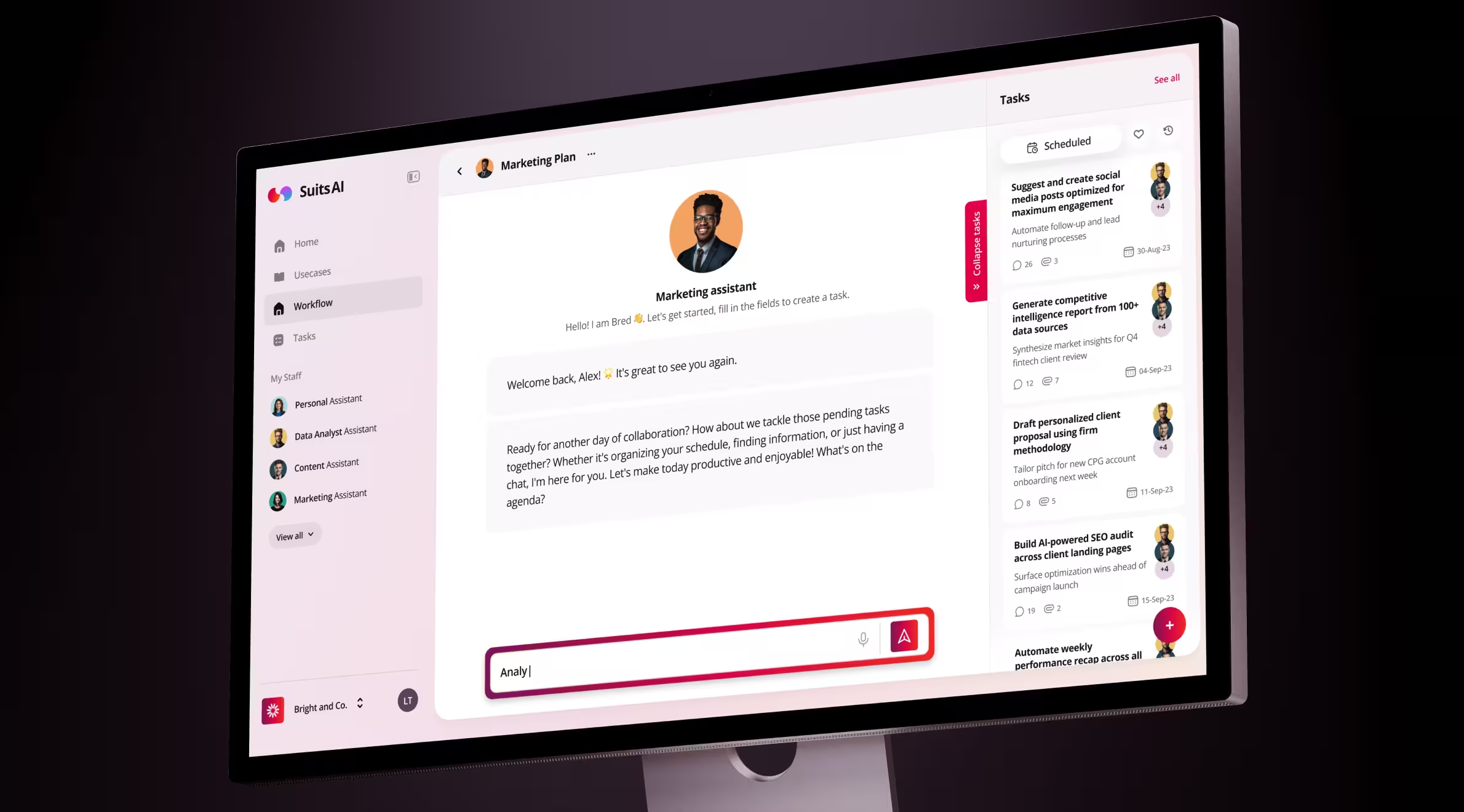
What we built:
- Modular task-specific AI assistants. Users configure named jobs (Write, Summarize, My Team, Coach) by uploading a file or pointing to a website. Prompt-craft is replaced with role assignment.
- Ready-made use case library. Prebuilt workflows users can launch without writing a single prompt.
- Goals-to-workflow onboarding. Translates the user's stated goal into a tailored AI workflow within minutes.
- Mobile-first launch system. Brand, onboarding, and in-app UX shipped as one cohesive package.
Outcome: Suits AI secured $1M in funding following the MVP launch.
Explore more: positioning is the commercial counterpart of these failure modes. The gap surfaces twice: inside the product as failed PMF, and outside as muddled positioning — website, demo, and pitch each telling a slightly different story, while buyers default to doing nothing. For founders heading into a sales push or a fundraise, our guide on AI product positioning for founders and CEOs covers the 7-question audit and the 12-week sprint to close the gap.
Eight principles of AI user experience design
Designing UX for AI products requires extending the standard playbook. The principles below are drawn from our production work across 30+ AI-native platforms and align with Google's People + AI Guidebook.
Each principle in the table corresponds to a documented user response. Demystification is a clear case. According to Salesforce, 44% of consumers are more likely to use an AI agent when its logic is explained clearly, and 45% are more likely to use one with a visible escalation path. And it’s the difference between a feature adopted and a feature refused.
The same dynamic holds across the other seven principles. Skip one, and the response weakens. Honor all of them, and they compound into the kind of AI product enterprise buyers shortlist and end users return to.
Explore more: from principles to a board-ready adoption framework. The principles above describe what an AI interface should do. For Heads of Product and Heads of AI under board pressure to lift adoption this quarter, our companion guide on AI-native product design operationalizes the same ideas through the Visible × Understandable × Controllable × Recoverable = Used equation and a 90-day plan to ship a redesigned AI surface against a live activation metric.
How to build interfaces for AI products: 8 design decisions to get your product ahead
Eight design decisions separate well-adopted AI products from abandoned ones. The list is ordered by impact on first-week retention.
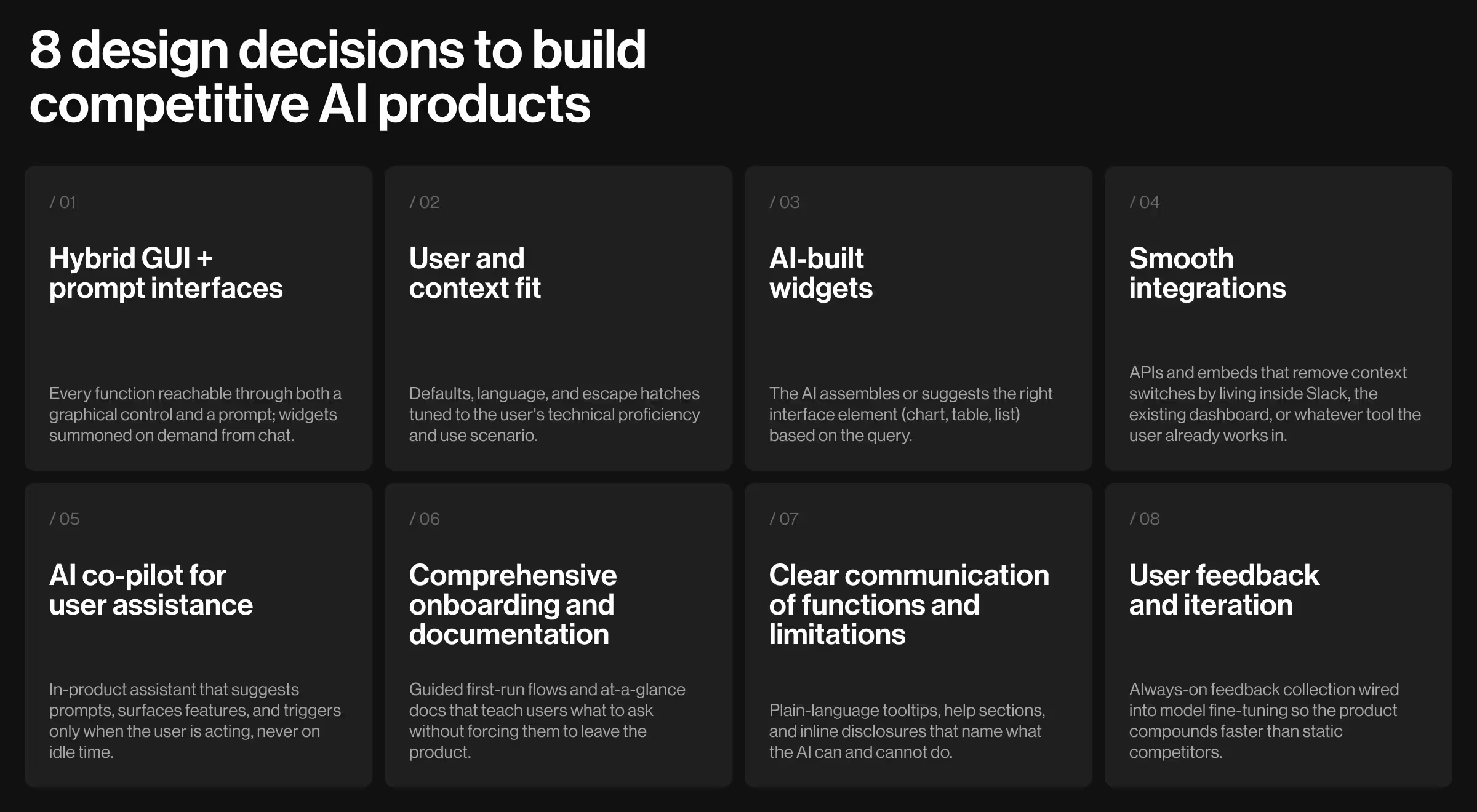
1. Hybrid GUI plus prompt-based interfaces
Combine graphical controls with prompt-based interactions. Every function should be accessible through a button or slider as well as a chat or command line.
"Static interfaces are dead. The future is hybrid — a chat layer that summons widgets on demand, so users finish the job in two clicks instead of ten prompts."
{{Kirill Lazarev}}
Practical insight from Lazarev.agency's portfolio: Accern, the leading NLP company in the U.S., needed a research-to-report tool financial analysts, VC investors, and ESG specialists would trust with regulated decisions.
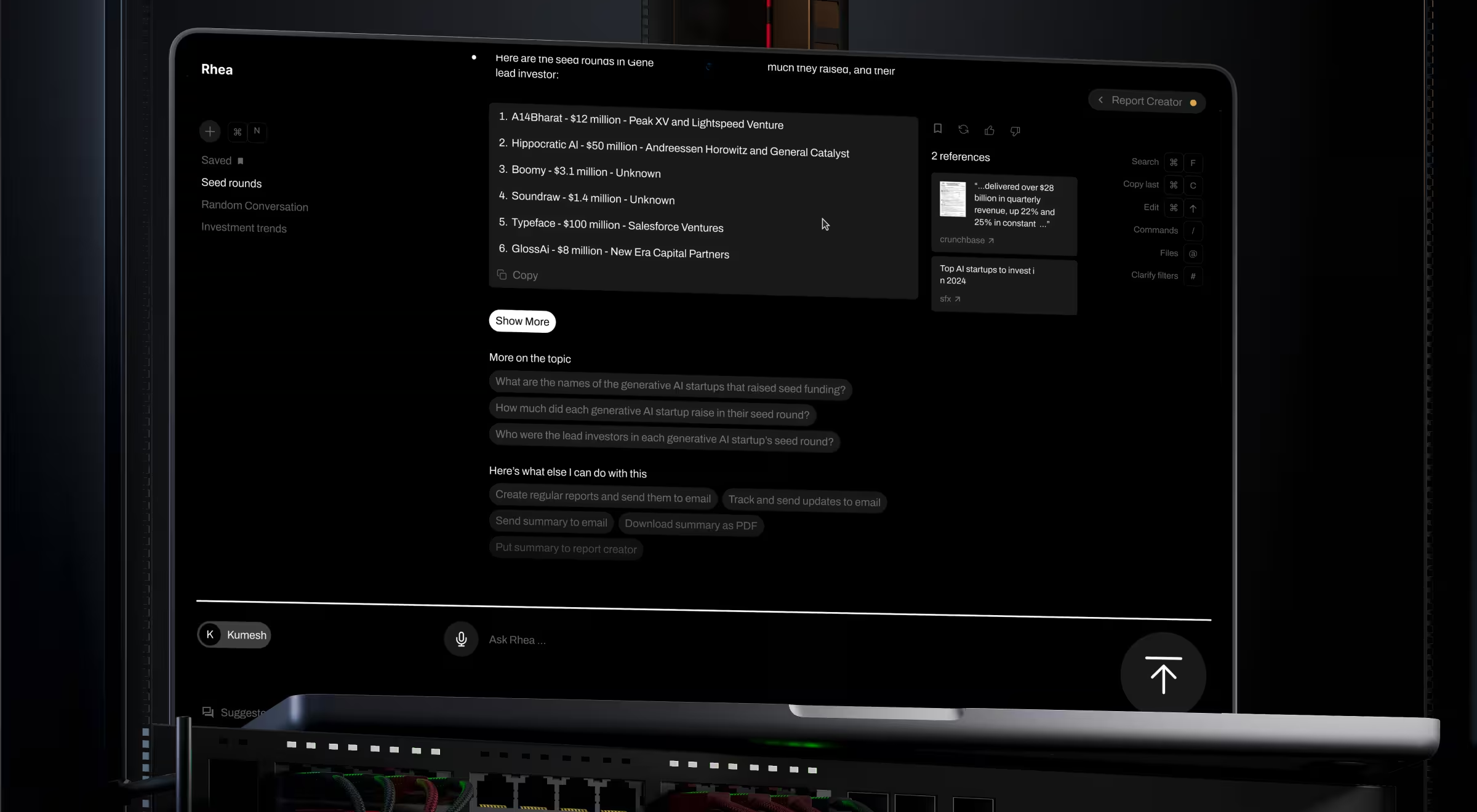
What we built:
- Hybrid GUI/prompt interface. A widget-based system surfacing references, charts, footnotes, and graphical controls in response to voice or text prompts.
- Adaptive natural language communication system. When a query is ambiguous, Rhea steps in with clarifying questions.
- Multi-purpose command line. The standard prompt field became an advanced control surface for searching files, managing automated emails, scheduling calls, and triggering alerts inside the same daily workflow.
Outcome: Rhea catalyzed Accern's move from Series B to an eight-figure acquisition, with $40M+ raised across the partnership.
2. Understand the user and the context
Tailor the interface to the user's technical proficiency and the scenario in which they use the product. A radiologist using AI triage and a marketer using AI copy generation need different defaults and different escape hatches.
Microsoft's Guidelines for Human-AI Interaction opens with two foundational rules: make clear what the system can do and make clear how well it can do it. Designing for a single "user" is the most expensive shortcut in AI UX.
3. Teach AI to build widgets
Move past static layouts. Train the AI to assemble or suggest interface widgets based on user behavior. It could be a chart when the user asks for trends or a comparison table when they ask for differences.
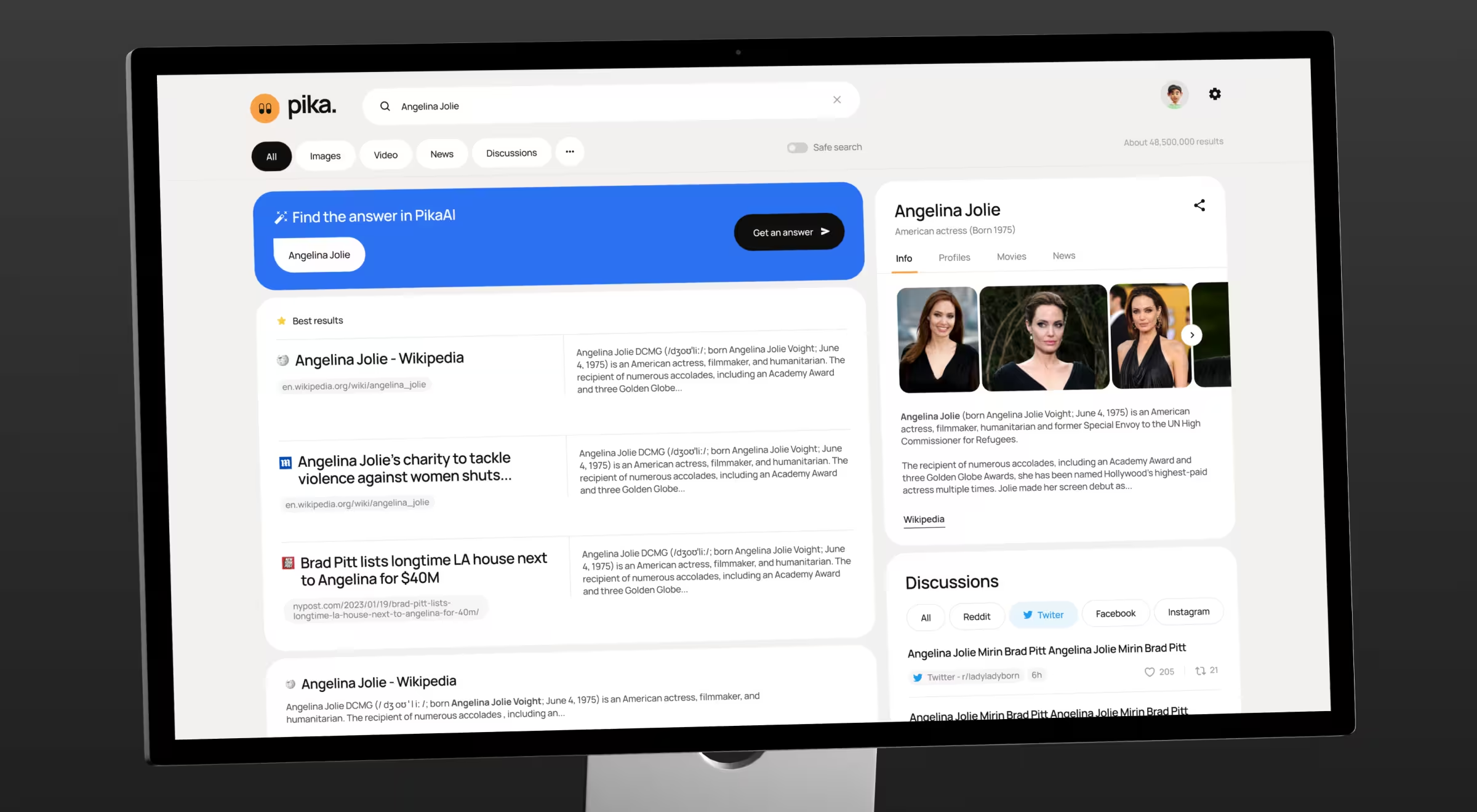
Practical insight from Lazarev.agency's portfolio: Pika AI is a search engine that curates premium sources through AI. The design challenge was earning trust on the very first search — users had to feel comfortable with a familiar search paradigm before adopting an AI-driven one.
What we built:
- Familiar SERP foundation. Preserved the search bar at the top, the F-pattern result layout, and the block-based result design users already recognize.
- AI chat widget below the search bar. Vibrant color accents and deliberate visual prominence pull users into the AI without forcing them to find it.
- AI-composed widgets. As a query lands, the AI selects the most suitable widgets from a library and arranges them by relevance.
- Cross-platform consistency. The mobile design system carries cleanly across platforms without forking the experience.
Outcome: Pika AI is a working example of Lazarev.agency’s extend, don't fork principle — AI capability layered on top of the search paradigm users already trust, with the AI chat widget reading as an extension of search.
4. Smooth integrations
AI products earn their place by removing context switches. Integrate with the tools users already work in, like Slack or the existing dashboard, through APIs or embeds.
5. AI co-pilot for user assistance
Include an in-product assistant to suggest prompts, surface relevant features, and demonstrate capabilities through autocomplete. The co-pilot is the closest thing AI products have to onboarding scaffolding.
Yet, restraint matters as much as presence. GitHub Copilot earns its weekly active users by triggering only when the developer is typing, never during idle time. Co-pilots that interrupt to be helpful make users disable the feature altogether.
6. Comprehensive onboarding and documentation
First-week retention in AI products tracks closely with how well users learn what to ask. Provide guided new customer onboarding and at-a-glance documentation that does not require leaving the product.
7. Clear communication of functions and limitations
State plainly what the AI can do and where it falls down. Tooltips, help sections, and inline disclosures all do this work.
8. User feedback and iteration
Collect user feedback continuously and feed it into model fine-tuning. Closed feedback loops are how AI products improve faster than their static competitors.
Expert tip: Score every prompt path against your GUI path on the same task. If a power user can complete the task faster through prompts than buttons by week two, you have the right hybrid balance. If not, the prompt surface is decoration.
Five reusable AI UX patterns the market has converged on
After a decade of AI product launches, the same five interaction patterns appear in nearly every AI-driven interface. Naming them makes them easier to ship and makes the gaps in your own product much easier to spot.
- Wayfinders. Orient the user to what the AI can and cannot do. Welcome screens, sample prompts, and capability tours are wayfinders.
Notion AI's slash-command tour and ChatGPT's empty-state suggestion grid are the canonical implementations. Both teach the action set in under thirty seconds, before the user can stare at a blank input long enough to leave.
- Prompt actions. Convert the user's prompt into a reversible UI command. Confirmation dialogs, undo stacks, and "preview" modes are prompt actions.
- Tuners. Let users adjust the AI's behavior live. Surface the most-used tuners and hide the rest. The product decision worth making early is which two or three tuners belong on the primary surface and which sit one click away.
Anthropic's extended-thinking toggle and OpenAI's model selector are the most studied reference points.
- Governors. Visible guardrails show what the AI will and will not do. Opt-outs, audit trails, and per-action approval are governors. Critical for enterprise.
- Trust builders. Confidence scores, source citations, "why this answer" links, and replayable decision paths. Trust builders are how the black box becomes translucent.
Perplexity's per-claim citations are the pattern other AI search interfaces have since copied. Glean's enterprise variant pairs each citation with the source document's freshness and access permissions — the detail enterprise buyers ask about first in security review.
Product example: Salesforce Einstein Copilot shipped a "graceful handoff" pattern where the agent routes the user to a human the moment its confidence drops below a threshold. The pattern is a Trust Builder and a Governor at once.
Explore more: the full AI UX pattern library. Five families is the working set, but the full library has more depth. For Design Leads layering AI patterns onto a live product without forking the design system, our guide on AI UX patterns for Design Leads covers 13 reusable AI UX surfaces, the six states each surface has to handle, and the extend, don't fork principle for keeping AI work on-system.
Designing for AI uncertainty: failure recovery and agentic control
AI products underperform in two ways traditional software does not. They produce confident-looking but wrong answers and act on the user's behalf without explicit instruction.
In both cases, the user loses control of what the product does, and the interface must restore the undermined trust. Eight patterns (four per scenario) decide what happens after the first surprise: users return or leave.
1. When the AI is wrong: 4 failure-recovery patterns
“Trust in AI isn't won with disclaimers. It's won by showing users exactly where each answer came from, in the moment they're reading it.”
{{Kirill Lazarev}}
When an AI product produces a wrong answer, the failure point is whether the user can verify, correct, or override the output without leaving the workflow. The four patterns below build the recovery surface.
- Hallucinations. Display source citations next to every factual claim. When the model cannot cite the reference, point to the problem as a fact.
- Confidence intervals. Show low-confidence answers in a different visual language from high-confidence ones. Even a slight shift in color or a brief footnote carries informative weight.
- Reversibility. Every AI action must be undoable in one click. Reversibility is the difference between a feature users explore and a feature they avoid.
- Escalation paths. When the AI is uncertain, route the user to a human or to a deterministic fallback.
2. When the AI acts on its own: 4 agentic-control patterns
Agentic UX, i.e. interfaces for AI that act on the user's behalf, became mainstream in 2025 and is now table stakes. UX is where governance becomes visible to the user: every boundary and rollback is an interface decision.
Data insight: agents are scaling faster than governance. According to McKinsey, 23% of organizations are already scaling agentic AI, and another 39% are experimenting.
- Agent boundaries. Define what the agent can do without asking, and what requires explicit consent. Make this list short, visible, and editable.
- Observability. Show a live activity log of what the agent is doing. Users tolerate slower agents far better than opaque ones.
- Reversibility of agent actions. Agents act faster than users review. Every action must be undoable for at least a session, and high-stakes actions (sending email, spending money, modifying records) should require explicit confirmation.
- Trust calibration. Start with a narrow scope, expand as the user signals confidence. Granting an agent everything on day one is the fastest way to lose the user on day two.
Expert tip: The patterns above belong on a different kind of roadmap. Standard product roadmaps assume features ship complete on a fixed date. AI products ship probabilistic capabilities that drift in production and require eval cycles, data lanes, and observability events. Our guide on the AI product roadmap covers the training-loop method we use to plan agentic products against named eval thresholds.
Ship AI products users will return to
The 2026 winners will be the teams who treat the interface as the product. Model accuracy is table stakes now, and what separates a feature that scales from a feature that stalls is whether users understand it, control it, and recover from it when it fails.
Lazarev.agency has practiced AI product design since well before "AI" was a marketing term. We have shipped hybrid GUI/prompt interfaces, agentic workflows, and AI search experiences for founders and enterprises across fintech, edtech, and other industries. Whether the work is launching a new AI product, scaling an existing one, or adding AI UX patterns to an interface with an existing userbase, we know what ships and what does not.
If the demo plays and the retention chart still flatlines, the gap is in the interface. Start a conversation, and we will tell you exactly where.




.webp)






