

“Treating UX design as a one-time effort is how you make your product irrelevant. What once worked as a stable interface layer is now expected to continuously evolve. Today, UX is synonymous with adaptive systems and anticipatory logic. In other words, we’re entering the era of AI UX design.”
{{Kirill Lazarev}}
Not long ago, UX as a discipline was pushed to a new standard. User expectations sharpened, and understanding the product was no longer sufficient — users started to expect the product to understand them.
That was how AI manifested itself as a defining force in product design. Yet, the technology has been largely misunderstood and poorly implemented. Many products rushed to “add AI” without rethinking the interaction model behind it.
Now, as the initial hype begins to settle, a clear pattern is emerging: static UX is falling behind. Products built on fixed flows and predictable logic struggle to keep up with systems capable of adapting outcomes on the fly.
This article covers the design of UX for AI-powered products. We’ll look at what AI UX design is, how it differs from traditional UX, and what it takes to design intelligent systems users understand and rely on.
Key takeaways
- Efficient AI UX design means making AI outputs trustworthy enough for users to act on.
- AI becomes valuable when embedded into UX workflows. Otherwise, it remains a novelty your users treat with skepticism or abandon altogether.
- The future of AI UX belongs to designers who combine AI-powered design workflows and hands-on usability testing to create more adaptive and efficient digital products.
Traditional UX vs AI UX design: what’s changing and what’s not
The fundamentals of solid UX won’t ever evaporate without a trace. Think of user research, clarity of information architecture, consistency, user feedback, and cognitive load reduction. These form the foundation of any reliable digital experience.
But with anticipatory design and conversational interfaces becoming the cross-industry standard, some approaches are taking the back seat while new ones are solidifying at the forefront of product design.
UX now governs how systems behave, analyze, decide, and adapt. At the same time, artificial intelligence is reshaping how users interact with products:
- AI-mediated interactions reduce reliance on traditional navigation patterns.
- Users delegate actions to systems instead of manually completing flows.
This shift is already reflected in how companies approach AI adoption.
Data insight: McKinsey reports trust to be the foundation of AI adoption. If users don’t understand or believe the system’s outputs, they won’t use it. Yet there’s a clear execution gap: 40% of companies identify explainability as a key risk in AI adoption, while only 17% are actively addressing it.
This disparity explains why the performance of many AI products comes to a standstill shortly after launch. The technology works, but the experience doesn't build enough confidence to support real usage — a pattern we explore further in our AI transformation framework for enterprise.
To understand the scale of this change, it helps to break down where traditional UX assumptions shatter and what works instead:
What does this shift mean? AI is slowly but surely expanding the dimensions of UX design.
In practical terms:
- Users spend less time navigating and more time evaluating AI-generated outcomes.
- Design decisions move from layout and flows to confidence and control.
- The role of UX shifts from crafting interfaces to structuring intelligent systems.
5 AI UX design principles to guide your product process
The five principles of AI UX design are: hybrid interaction models, context-aware personalization, visible invisible AI, embedded workflows, and trust through proof. These come from our hands-on work with AI-first products. Each is backed by real implementations where UX reshaped product value and business outcomes.
1. Hybrid interaction models with AI as a product guide
Most AI products lean too far in one direction. Chat-only interfaces give users flexibility, but little control. Traditional UI design offers structure, but limits how people express intent. Neither is sufficient on its own.
Principle: Let users think in language, operate in structured environments, and guide them toward better outcomes along the way.
✅ Case in point: Accern Rhea — AI financial research platform.

Our team designed the Rhea product as a hybrid decision system where interface and intelligence work together:
- Split-screen layout enables parallel research and output validation
- Generative UI — charts and reference panels — assembles itself contextually based on the user's prompt
- Input field revamped as a command line for multi-step workflows
- AI suggests queries, asks clarifying questions, and refines user intent in real time
This transforms the experience from “input → output” dichotomy into collaborative reasoning backed by generative AI.
Data insight: This approach is backed by broader industry findings. According to McKinsey, when AI systems are designed to ask clarifying follow-up questions, nearly 75% of users express strong enthusiasm, leading to higher adoption and positive business impact, including a 2% uplift in sales.
With Rhea, the result of our AI UX design work was measurable:
- Product became the catalyst for Accern’s 8-figure acquisition
- Contributed to $40M+ raised during the partnership
2. Context-aware personalization
AI without context produces generic answers. Generic answers break user expectations.
Principle: Adapt outputs to user context and underlying intent.
Data insight: AI raises the bar for personalization. What used to be a competitive factor is now a baseline expectation. According to McKinsey, 71% of consumers expect personalized interactions, and 76% get frustrated when it doesn’t happen.
This user dynamic changes the role of UX. Now, it’s all about delivering relevance asap.
✅ Case in point: VTnews.ai — AI-powered news intelligence platform.

With the VTnews platform design, our primary objective was to create an experience users would associate with what we call intelligence-driven cognitive augmentation.
To achieve this, we introduced UI components that helped restructure news into a contextual, multi-layered experience:
- AI works by scanning and analyzing 130k+ sources in real time
- Each story presents AI-generated summaries alongside left, center, and right-leaning perspectives
- A visual bias scale shows which narratives dominate or are underrepresented
- A prediction feature allows users to explore possible future outcomes and validate them over time
- Reader analytics reveal personal consumption patterns
The result:
- 85k users onboarded in the first month
- 90% of users reported reduced exposure to biased “information bubbles”
3. Invisible AI made tangible
Some of the most powerful AI systems have no visible interface. It’s a UX problem.
Principle: Present backend intelligence in a visible format that speaks of its decision-ready value.
✅ Case in point: Bacca AI — SRE automation platform.

Bacca AI’s product value was buried in technical language and invisible processes that real users couldn’t see and thus trust.
Our team of AI UX designers had a clear 3-faceted design vision:
- Reframe technical processes as business narratives (uptime → revenue protection)
- Design a vertically guided experience to walk users step-by-step from problem to resolution
- Introduce conceptual UI and motion to visualize invisible workflows
The result:
- Measurable increase in customer acquisition post-launch
- Stronger engagement from both technical and executive audiences
- Clear differentiation in a crowded SRE market
4. AI powered user workflows
AI features layered on top of products create barriers. AI embedded into workflows removes them.
Principle: Integrate AI where decisions happen.
✅ Case in point: Pika AI — AI-powered search engine.

With Pika AI, our team reimagined search as a guided experience:
- A conversational AI layer placed directly under the search bar captures user intent at the moment it forms
- Dynamic SERP combines traditional results with AI-curated content
- Block-based layout follows scanning behavior (F-pattern)
- Results personalized and ranked by relevance
The key move was placing AI at the moment of intent.
The result:
- Significant reduction in search time through AI-assisted discovery
- Increased engagement with AI interaction due to prominent placement
- Consistent cross-platform experience reinforcing usage patterns
5. Trust through transparency and proof
AI products win on confidence.
Principle: Let users verify value before they commit.
✅ Case in point: DragonGC — Legaltech AI platform.
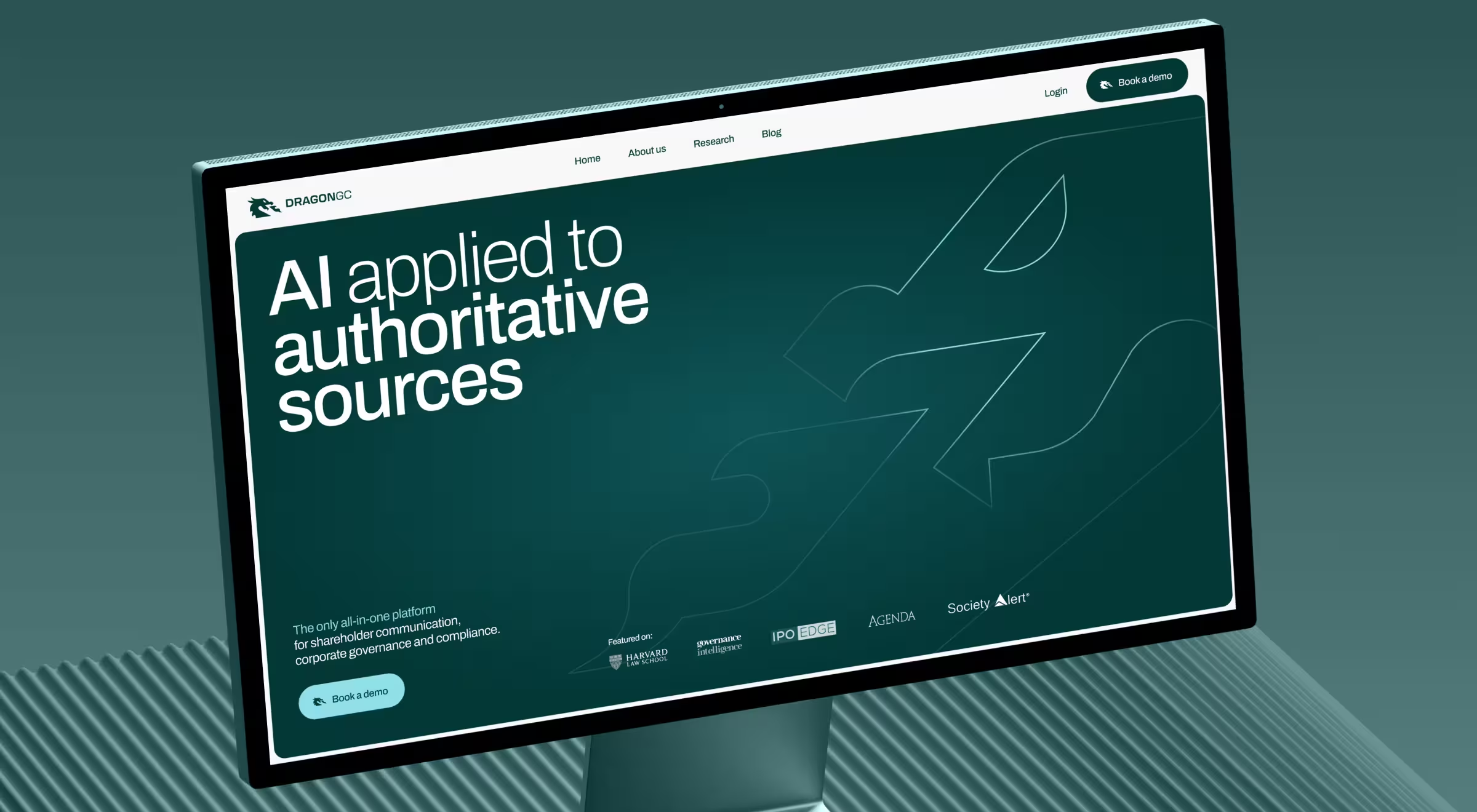
DragonGC had strong AI capabilities. It analyzed over 500+ disclosure topics and helped legal teams move faster with compliance and reporting.
But the product faced a critical barrier. It didn’t communicate its value clearly enough to earn trust from high-stakes enterprise buyers.
The UX solution focused on proof:
- Introduced report preview functionality (“try before you buy”) — the key trust-building principle to drive free trial to paid conversion success
- Structured product around real-world legal use cases
- Reinforced credibility with testimonials and visible expertise
- Unified messaging across all touchpoints
The result:
- Increased conversion by directly linking AI outputs to business value
- Reduced hesitation among enterprise buyers
- Strengthened positioning as a trusted, market-ready platform
AI UX design mistakes and how to fix them
Effective AI UX depends on how product teams frame and design the experience around intelligence.
A recurring pattern across products is the mismatch between how AI behaves and the way it’s presented to users. When this gap goes unaddressed, even capable systems get perceived as unreliable.
Below are six common missteps teams make when designing AI UX, along with practical ways to resolve them.
1. Treating AI as an extra feature
“We need a chatbot” or “Let’s introduce AI recommendations” — that’s how many AI UX conversations start. The problem with such narrative framing is that AI is superficially integrated into an existing product.
🟥 Why it fails:
- No clear role in decision-making
- Low usage after initial curiosity
- AI feels optional
🟩 How to fix it:
- Anchor AI to a core user decision
- Ask: What breaks if we remove AI?
- Map where AI reduces effort or time in the main flow
Practical tip: If AI lives in a floating widget or secondary tab, it’s likely misplaced. Make it a part of the primary interaction path.
2. Black-box AI
AI systems are probabilistic. When such behavior is not explained, users perceive outputs as inconsistent. More so, the lack of a clear insight into how the model works erodes trust. And in a world flooding with alternatives, lost trust equals lost customers.
🟥 Why it fails:
- Users cannot form a mental model of the system
- Incorrect outputs feel unpredictable
- Confidence in the system declines
🟩 How to fix it:
- Ensure users understand:
- how outputs were generated
- what inputs influenced the result
- Use layered explanations:
- high-level summaries by default
- deeper details on demand
Practical tip: Users don’t want to understand the model. They need to understand whether the output is reliable enough to act on.
3. Removing too much control through automation
Automation can reduce effort, but it can also remove necessary control. The fix is a human-in-the-loop model: when users cannot verify or override AI outputs, they disengage, and the system loses the signal it needs to improve.
🟥 Why it fails:
- Users feel locked into system decisions
- Errors become more costly
- Trust is difficult to rebuild after failure
🟩 How to fix it:
- Introduce control points within the flow:
- editing outputs
- refining inputs
- confirming critical actions
- Design AI as a human-in-the-loop collaborator
Practical tip: Systems designed to support user intervention tend to be trusted more, even if they require slightly more interaction.
4. Ignoring failure states
AI systems will inevitably produce AI hallucinations — confident, plausible-sounding outputs that are factually wrong. Ambiguous or low-confidence responses are the less dramatic version of the same failure mode.
When failure scenarios aren’t designed deliberately, they lead to confusion and erode user trust.
🟥 Why it fails:
- Users cannot distinguish between low-confidence and high-confidence outputs
- The system appears inconsistent
- Recovery paths are unclear
🟩 How to fix it:
- Define and design for:
- low-confidence outputs
- missing or conflicting data
- ambiguous queries
- Provide clear alternatives:
- suggest refinements
- offer multiple interpretations
Practical tip: Acknowledging AI hallucinations increases trust more than presenting a confident but incorrect answer.
5. One interface for all users
AI products often serve users with very different levels of expertise. A single interaction model doesn’t fit all.
🟥 Why it fails:
- Less experienced users struggle to get meaningful results
- Advanced users are slowed down by unnecessary guidance
- Overall efficiency decreases
🟩 How to fix it:
- Introduce layered interaction models:
- guided interactions for new users
- faster, more flexible controls for experienced users
- Allow the system to adapt based on usage patterns over time
Practical tip: This is where UX personas and user research become essential. A beginner and a power user will approach the same AI UI with entirely different expectations. Without a clearly defined user persona framework, teams tend to design for an “average user” who doesn’t exist.
6. Assuming users know how to interact with AI
Prompt-based systems depend on the quality of user input, but most users haven't learned prompt engineering. It’s a skill of framing queries in ways AI can act on reliably. Designing for this gap is a UX responsibility.
🟥 Why it fails:
- Poor inputs lead to poor outputs
- Users attribute issues to the system, not their input
- Early interactions fail to demonstrate value
🟩 How to fix it:
- Provide structured support:
- example prompts
- contextual suggestions
- inline guidance
- Reduce reliance on free-form input where possible
- Reduce the prompt engineering burden by surfacing editable example prompts the user can adapt
Practical tip: Empty input fields increase cognitive load. Guided entry points reduce it.
AI UX design is where intelligence becomes usable
All by itself, AI is not your product differentiator. It becomes one when you craft a strategic UX design around how users interact with AI.
If your product feels powerful but unpredictable, the most likely culprit is the experience around it.
Reach out to AI UX professionals at Lazarev.agency for an expert consultation on responsible AI design. We’ll help you identify where your design workflow breaks and how to revamp the system so users trust it.




.webp)






