

“If your AI product feels like Slack with a chatbot bolted on, you don’t have an AI-first system — you have a messaging layer with a model behind it. We see this constantly in enterprise B2B. AI speeds things up, but it also creates parallel bodies of work that never reshape the core product.
The question isn’t ‘Did we add AI?’ It’s ‘Did intelligence fundamentally change how our product creates value?’ If the answer is no, you’re still operating in a pre-AI architecture.”
{{Kirill Lazarev}}
Many AI-first teams still approach UX as if they were building traditional software. Intelligence gets slotted in as a feature — a powerful one, perhaps — but still just a component in an otherwise familiar system.
Designing AI-first products demands a different lens. Teams must decide how deeply intelligence should shape the core workflow, how mature the interface needs to be to support probabilistic outputs, how trust will be established, and where human oversight is essential.
In this article, we explain what AI-first means, introduce our AI interface maturity model, expose common design missteps, and outline the UX patterns required to design intelligent systems responsibly and at scale.
Key takeaways
- AI maturity is a structural decision. The depth of AI integration determines whether your product evolves into a category leader or remains a traditional system with automation layered on top.
- UX is the integration layer between model capability and business value. Many AI initiatives stall because intelligence is poorly embedded into workflows.
- Trust architecture defines long-term adoption. Transparency, feedback loops, scoped autonomy, and graceful failure are the infrastructure that make probabilistic systems viable in real-world environments.
What “AI-first” means
Before discussing UX, we must define the premise. AI-first does not mean “a product with AI features”. It means intelligence is embedded into the core workflows of the system.
This aspect matters because AI is no longer peripheral to business strategy. McKinsey reports that generative AI alone could contribute $2.6–4.4 trillion annually to the global economy. PwC estimates that AI could add up to $15.7 trillion to global GDP by 2030.
And while executive urgency is clear, structural execution is less so.
Research from Boston Consulting Group shows that while the majority of enterprises experiment with AI, only 5% of companies are “AI future-built”. Around 35% are scaling AI and beginning to generate value. The remaining 60% report minimal revenue or cost reduction despite significant investment.
In most cases, the bottleneck is the integration layer — how intelligence is embedded into product architecture and surfaced through UX.
There is a spectrum:
- AI-native: the interface exists because of AI. In ChatGPT, conversation is the interface.
- AI-augmented: AI enhances existing workflows. Microsoft Copilot integrates into productivity environments without replacing them.
- AI-powered but UI-static: AI improves backend intelligence while the interface remains largely unchanged. In Spotify, ranking and personalization continuously adapt while UI patterns remain consistent.
When companies decide to “become AI-first”, they face a strategic question: At what level should AI reshape the interface architecture?
The answer depends on multiple factors, including your product complexity, its risk tolerance, regulatory environment, and user expectations.
Lazarev.agency’s AI interface maturity model
AI transformation should be intentional. Over-integration creates instability. Under-integration hides value.
Through work on more than 30 AI-oriented platforms, we developed a five-level maturity model to guide architectural decisions around intelligence. Each level reflects increasing structural commitment to AI.
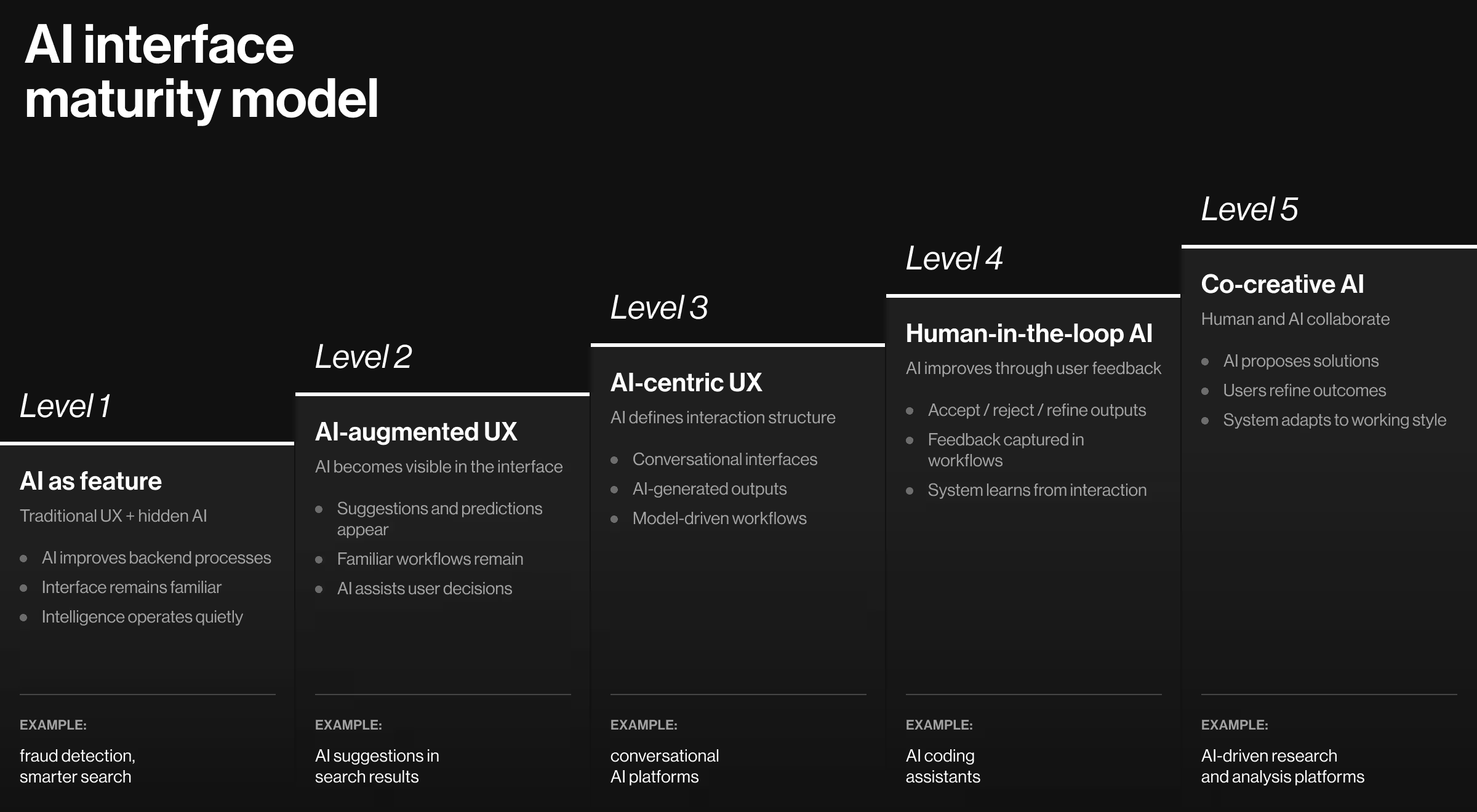
Level 1. AI as feature (traditional UX + AI engine)
At this stage, AI operates behind the scenes. The interface remains largely traditional.
Some facets of the system do change. Search becomes smarter. Recommendations improve. Processing accelerates. Yet the user experience feels familiar and stable.
- Risk: users do not perceive a considerable AI-driven improvement in their experience. The system feels the same.
- Opportunity: surface AI-driven benefits explicitly without disrupting established workflows. Communicate improvement without forcing behavioral change.
💻 Practical example: Stripe is a strong example of Level 1 AI integration in a high-stakes environment. The core UX is unchanged, and the interface follows standard SaaS conventions.
AI operates behind the scenes through:
- Real-time fraud detection
- Behavioral anomaly modeling
- Adaptive risk scoring
- Dynamic transaction evaluation
Level 2. AI-augmented UX (traditional UX adapted for AI)
At Level 2, AI becomes visible. The interface evolves to expose intelligence.
Users see suggestions, predictive text, auto-generated options, or dynamic insights. Workflows remain familiar, but AI is now part of the surface layer.
- Risk: if AI lacks transparency or control, suggestions are ignored. Surface-level intelligence without trust design reduces user engagement.
- Opportunity: design for user agency. Augment without overwhelming and build trust through controlled exposure.
This level works well in enterprise environments transitioning toward AI-enabled workflows.
💻 Practical example: A strong example is our work on Pika AI, a next-generation search engine built around curated, high-quality sources. The foundation remained a recognizable search experience — search bar, results page, familiar layout patterns.

We also introduced a strategic AI-powered chat system positioned directly beneath the search bar to facilitate intuitive navigation and reduce search time. Search results were assembled using AI-selected widgets arranged by relevance. The experience felt familiar, but intelligence was clearly present and actionable.
Level 3. AI-centric UX (interface architecture reflects AI)
At this level, AI shapes the structure of interaction. Information flows reorganize around model outputs.
Examples include conversational interfaces, AI-generated drafts, adaptive dashboards, and personalized experiences.
The architecture now assumes intelligence at the center.
- Risk: users assume deterministic accuracy from probabilistic systems. When AI fails, credibility suffers.
- Opportunity: design expectation boundaries and clear failure states.
💻 Practical example: ChatGPT illustrates an AI-centric architecture:
- Conversational interface is the product architecture.
- Workflow built around AI generation and refinement.
- Output is dynamic and model-driven.
- The interface exists because AI exists.
Level 4. Human-in-the-loop AI (user feedback improves AI)
At Level 4, AI systems are designed to learn through interaction.
The interface captures structured feedback. Correction mechanisms are embedded into workflows. User behavior refines the quality of model outputs.
- Risk: if users do not see improvement, feedback mechanisms feel performative. Trust weakens.
- Opportunity: close the feedback loop visibly. Demonstrate system adaptation over time and reinforce collaborative improvement.
💻 Practical example: GitHub Copilot operates at this maturity level:
- Developers accept, edit, or reject suggestions.
- Corrections are training signals.
- Feedback loops are embedded in everyday workflows.
- The interface captures behavioral signals.
Level 5. Co-creative AI (humans and AI as partners)
At the highest maturity level, the relationship between user and AI becomes collaborative.
AI proposes solutions, and humans refine the output. The system adapts to preferences and patterns over time. The interface supports iterative co-creation.
- Risk: blurred decision ownership. Who made the final decision?
- Opportunity: differentiation through partnership positioning.
💻 Practical example: Our work on Accern’s Rhea research platform exemplifies Level 5 maturity. Our team designed a hybrid GUI/prompt interface that combined conversational AI with dynamic widgets, charts, references, and structured research elements.

We introduced a split-screen research-to-report workflow to preserve analytical clarity. The input field evolved into a multi-purpose command line.
Rhea also incorporated adaptive clarification logic — when prompts were vague, the system responded with guidance and refinement suggestions.
Level 5 is relevant when:
- AI is central to value creation.
- Workflows are complex and high-stakes.
- The system must evolve through interaction.
This level defines category leaders in AI product design. It requires deep integration between UX, product strategy, and model capability.
Common mistakes in AI product UX
“AI integration differs across industries. A fintech compliance system cannot adopt the same UX structure as a creative AI tool. A healthcare product cannot tolerate the same uncertainty level as a marketing assistant.”
{{Anna Demianenko}}
Still, recurring design errors appear across AI-first products. Recognizing them early prevents architectural instability later.
AI-first UX cannot be retrofitted. It must be architected intentionally from the beginning and supported by deliberate AI change management so teams adopt the new workflows.
High-performing AI UX patterns
Across enterprise and consumer AI platforms, several structural patterns consistently correlate with higher trust, sustained engagement, and responsible deployment. Below, we expand each pattern with industry-backed insights.
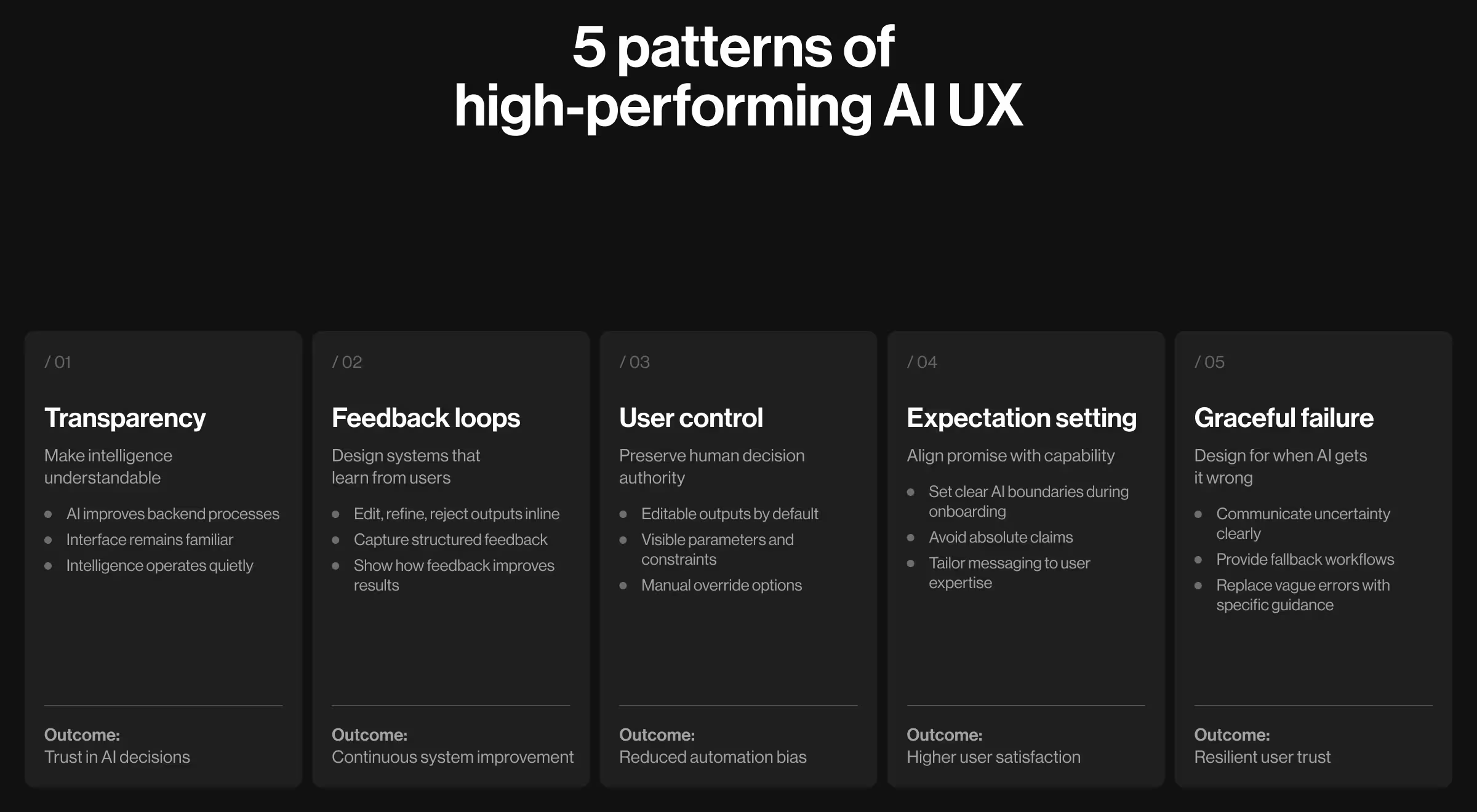
1. Transparency first
AI systems produce probabilistic outputs. Users interpret them as definitive answers unless told otherwise. That gap drives misplaced trust or premature rejection. Closing it is the foundation of how to design AI products that users understand.
Data insight: In McKinsey’s research on the state of AI, 40% of organizations identified explainability as a major risk factor when adopting generative AI. Yet only 17% reported addressing that risk. The implication is clear: companies recognize the danger of opaque systems but underinvest in solving it at the interface level.
What this means for UX:
- Expose confidence strategically. In high-stakes domains, displaying confidence ranges or qualitative indicators reduces over-reliance.
- Provide trust-inducing explanations. Research in human–AI interaction (Stanford HAI) shows that layered explanations outperform dense, always-visible technical detail.
2. Feedback loops
AI systems improve upon receiving structured feedback. Many products capture usage data but ignore qualitative correction.
Effective feedback loops are intentional and embedded into workflows.
🔍 Explore different approaches to collecting user feedback — from in-product micro-prompts to public signals — in our Lead Designer’s guide.
Key design principles:
- Design correction as part of the task flow. Users should be able to edit, refine, or reject outputs inline. Avoid separating feedback into distant forms.
- Capture structured signals. Thumbs up/down is insufficient for complex systems. Enable category-based corrections or annotated edits.
- Show how feedback influences outcomes. Show that input influences outcomes. When users see improvement, they engage more deeply.
- Differentiate between training feedback and workflow adjustment. Not all edits should retrain models. UX must distinguish refinement for the current task vs. long-term adaptation.
3. Control mechanisms
Loss of perceived control is one of the most consistent barriers to AI adoption.
Data insight: Recent workplace research underscores the risk. According to KPMG, 66% of employees rely on AI output without evaluating its accuracy, and 56% admit they have made mistakes in their work due to AI.
This is a UX architecture problem. When interfaces present AI output as authoritative rather than suggestive, users default to automation bias.
Effective control mechanisms ensure users retain decision authority:
- Editable outputs as default behavior. In most use cases, generated content should be open to editing and refinement.
- Parameter visibility. When AI relies on adjustable constraints (tone, risk tolerance, thresholds), expose them clearly to avoid confusion about system-level operational logic.
- Manual override paths. Provide deterministic alternatives when AI confidence is low.
- Scoped autonomy. In agent-based systems, define what AI can act on independently and what requires additional user approval.
4. Expectation setting
One of the strongest predictors of AI dissatisfaction is when users’ expectations don’t match the experience. Inflated expectations around AI autonomy might lead to disappointment even when systems perform well.
Key design principles for optimal expectation setting:
- Calibrate language. Avoid absolute phrasing. Replace “This analysis is accurate” with “Based on available data”.
- Introduce capability boundaries early. During onboarding, clarify what AI does well and where it requires human oversight.
- Align marketing and product experience. If promotional messaging promises autonomy, the interface must reflect it realistically.
- Segment expectations by user expertise. Expert users tolerate nuance. Novices require simpler framing.
5. Graceful failure
AI systems fail. The differentiator is how failure is communicated.
Research insight: Studies in human–computer interaction demonstrate that acknowledged errors combined with clear remediation mechanisms preserve trust more effectively than silent failures or vague messaging, which amplify frustration and resistance over time.
Design implications:
- Make uncertainty explicit. Clear uncertainty states reduce over-reliance on AI recommendations.
- Provide fallback workflows. Systems that include manual alternatives retain higher adoption continuity during outages or edge-case failures.
- Avoid vague error language. Specificity increases user confidence, even in failure scenarios.
Architect intelligence at the right depth: start with UX strategy
AI-first companies should approach UX design as a strategic move grounded in a rigorous product discovery process.
At Lazarev.agency, an AI product design agency, we specialize in designing AI-native products across industries where intelligence is core to value creation.
If you are rethinking your product through an AI-first lens, the conversation should begin at the level of UX strategy and interface architecture. We welcome discussions with teams operating at that frontier.
Reach out to evaluate your AI UX maturity and define the right integration strategy for your product.





.webp)